13 TWS connection parameters
When using IB-Matlab, there is no need to worry about connecting or disconnecting from the IB client (TWS/Gateway) – IB-Matlab handles these activities automatically, without requiring user intervention. The user only needs to ensure that TWS/Gateway is active and logged-in when the IBMatlab command is invoked in Matlab.
IBMatlab connects to whichever TWS is currently active. If you login to TWS with a paper-trade login, IBMatlab will work on the simulated account, and similarly for a live account. TWS’s account type is transparent to IBMatlab: the only way to control whether IBMatlab will use simulated/live trading is to use the appropriate TWS login.
IB-Matlab automatically connects to IB when any request that requires IB is made and the connection is not live. This happens upon the first IBMatlab request (when the initial connection needs to be established); after TWS/Gateway closed; after calling IBMatlab('disconnect') or ibConnector.disconnectFromTWS (see §15.1); after Matlab restarts; when specifying a new ClientID; and in a few other special cases.146
data = IBMatlab('action',...); % do whatever
IBMatlab('disconnect'); % disconnect from IB
data = IBMatlab('action','portfolio'); % will automatically reconnect
To programmatically check whether IB-Matlab is currently connected to IB, do this:
[~,ibConnector] = IBMatlab;
flag = ibConnector.isConnected; % true/false
IB-Matlab does not require any special configuration when connecting to IB. It uses a random client ID when first connecting to TWS or the IB Gateway, and this is perfectly ok for the majority of use-cases.
However, in some specific cases, users may wish to control the connection properties. This is supported in IB-Matlab using the following input parameters:
Parameter | Data type | Default | Description |
ClientId | integer | (random) | A number that identifies IB-Matlab to TWS/Gateway. 0 acts as another TWS. |
Host | string | 'localhost' = '127.0.0.1' | IP address of the computer that runs TWS/Gateway. |
Port | integer | 7496 | Port number used by TWS/Gateway for API communication. |
AccountName | string | '' | The specific IB account used for queries or trades. Useful when you handle multiple IB accounts (§8.5), otherwise leave empty. |
The ClientID, Host and Port properties should match the API configuration of the TWS/Gateway applications, as described in §2 above (installation steps #5,6).
In reconnections of any kind, IB-Matlab automatically tries to reuse the same ClientID as in the previous connection, even if you do not explicitly specify the ClientID. If the initial connection fails, IB-Matlab automatically tries a different (random) ClientID.
If IB-Matlab cannot connect to IB using either the specified or a random ClientID, IB-Matlab will try to connect using other common Port values (4001, 4002 that are commonly used by IB Gateway; and 7496, 7497 that are commonly used by TWS). This mechanism enables IB-Matlab to seamlessly connect to TWS or IB Gateway, whichever of them happens to be active, without requiring users to specify the Port. To prevent IB-Matlab from trying to connect using these standard Port values, specify the required Port parameter as a string with a trailing '!', for example:
IBMatlab(...,'port',1234); %will also try ports 4001,4002,… as needed
IBMatlab(...,'port','1234!'); %will only try port #1234, not others
Setting a static ClientID can be used to modify open orders (and track executions) placed in a different IB-Matlab session (after the original IB-Matlab client has disconnected from IB and a new IB-Matlab has connected). IB prevents clients from accessing orders placed by other clients, unless all IB-Matlab sessions use the same ClientID.
ClientID=0 is special: it simulates TWS and enables IB-Matlab to receive/modify/ cancel open orders that were interactively entered directly in TWS (not via IB-Matlab). Instead of ClientID 0, you can use any value that you pre-configured as Master API Client ID in TWS’s API configuration (see §2 installation steps #5,6). Using a Master API Client ID enables IB-Matlab to track/modify orders placed in IB using any ClientID. If you only connect IB-Matlab and no other API client to TWS, and if you only use the static ClientID 0, then you do not need to worry about Master API Client ID setup.
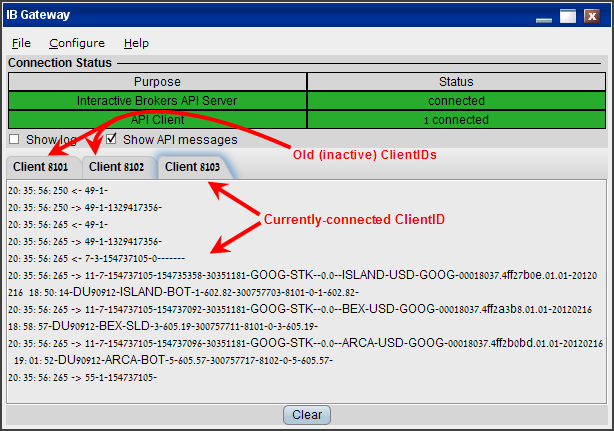
When a new ClientID is specified for any IBMatlab command, IBMatlab automatically disconnects the previous client ID and reconnects as the new ClientID. In the IB Gateway, this will be seen as a dark-gray tab contents for the old ClientID and a light-gray tab contents for the connected ClientID:
data = IBMatlab('action','executions', 'ClientID',8103)
Note that TWS and the IB Gateway have a limitation that they can only be connected to a single IB-Matlab client at any time. Also, TWS and the IB Gateway cannot be logged-in at the same time to the same IB account. These IB limitations mean that you cannot simultaneously connect multiple IB-Matlab instances to the same IB account.
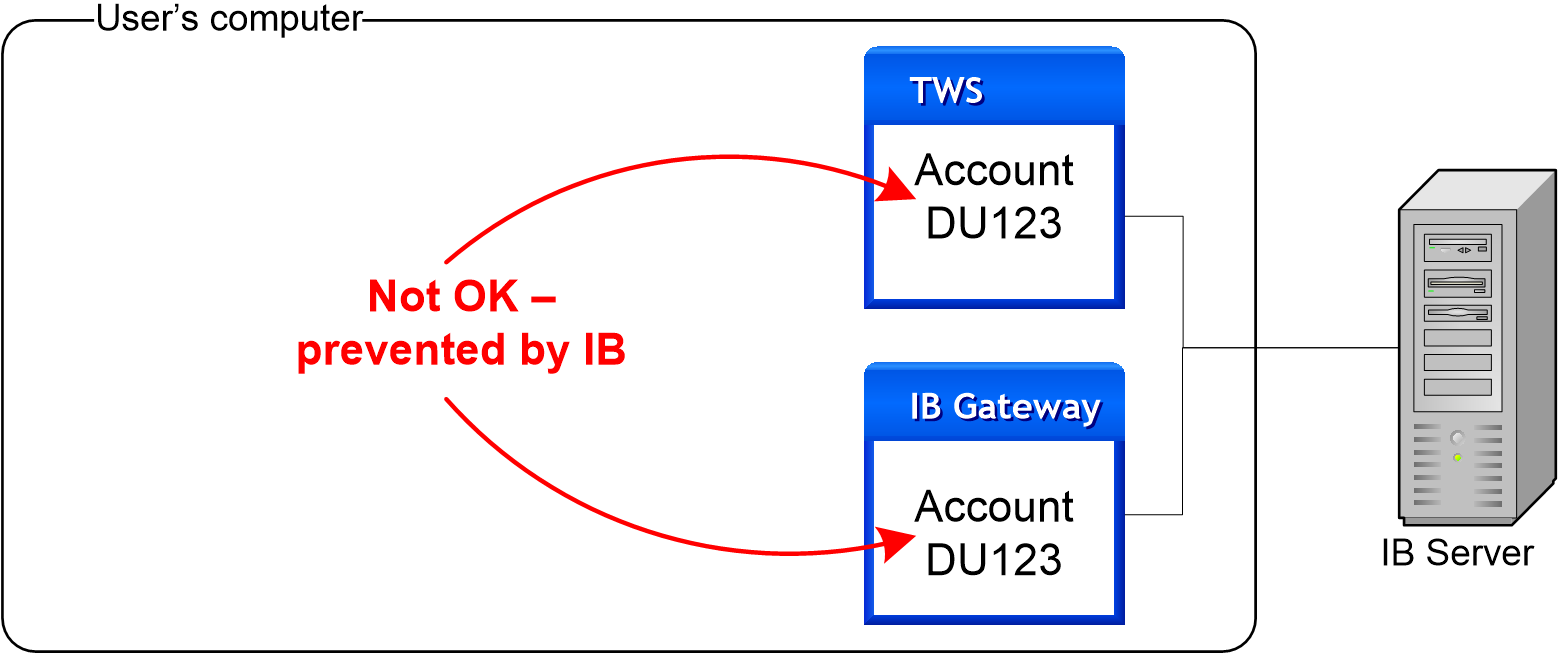

On the other hand, it is possible to control multiple IB accounts from the same TWS application, and in such a case IB-Matlab can access all of these accounts when it connects to TWS, using the AccountName parameter. Please refer to your TWS documentation (or IB’s customer service) to set up your TWS accordingly.

For additional information regarding the usage of IB-Matlab with multiple accounts, typically used by Financial Advisors, refer to §8.5 above.
It is also possible to run TWS with one IB account, and IB Gateway with another account, either on the same computer as IB-Matlab, or on another machine. You can then connect one or more IB-Matlab instances to these IB applications at the same time. Simply ensure that your Host, Port and AccountName parameters are OK for any IBMatlab command. IB-Matlab can maintain simultaneous connections to both TWS and IB Gateway, on different Ports, as long as they are both on the same Host.

TWS & IB Gateway on the same host (computer) can be controlled by a single IB-Matlab
Another use is to connect IB-Matlab on one computer (which has Matlab installed) to TWS/Gateway on another computer, which may not necessarily have Matlab. In this case, simply set the Host and possibly also the Port parameters.147 However, you cannot connect to separate TWS/Gateways on separate computers: all TWS/Gateways must reside on the same Host (which is not necessarily IB-Matlab’s computer):

Separate TWS/Gateways on separate hosts (computers) cannot be controlled by a single IB-Matlab
To control two or more TWS/Gateways, it is better to use distinct IB-Matlab instances, i.e., distinct Matlab sessions, each running its own IB-Matlab instance and connecting to a single IB client (TWS or Gateway). This helps prevent mix-ups in the AccountName or Port that may occur when IB-Matlab controls separate IB clients:
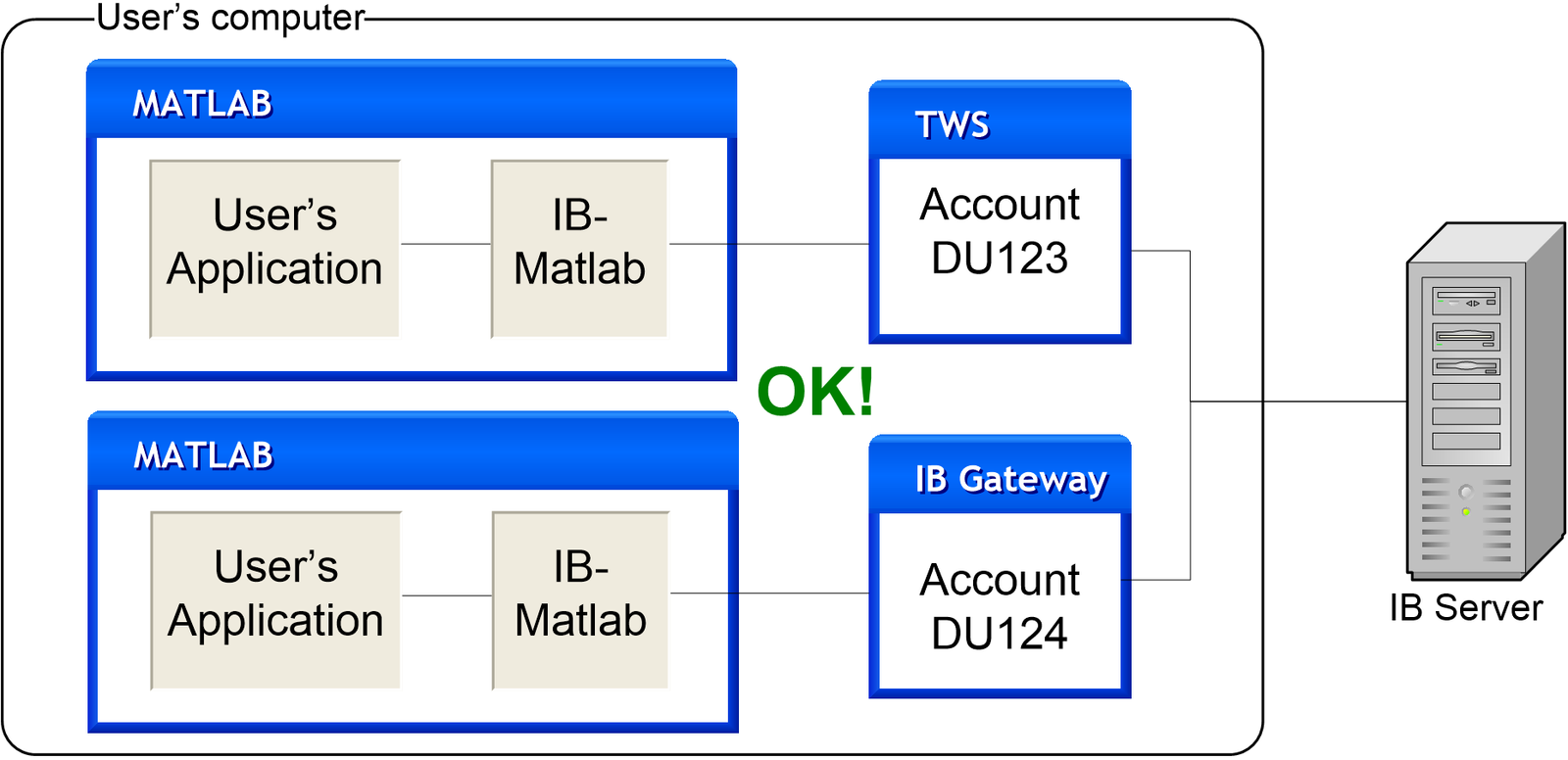
Or alternatively (this requires two separate IB-Matlab licenses):148

Note: For IB-Matlab to work, the IB client (TWS or IB Gateway) must be running and connected to IB’s servers. Depending on your setup, the client may periodically log out (once a day, or once a week on Sunday149). You will need to login again for IB-Matlab to be able to communicate with IB. To keep the connection active continuously, you can either use an IB Gateway version earlier than 974, or use a 3rd-party program such as IBC to automatically keep TWS connected.150
IB servers occasionally disconnect API clients (for example, during routine server maintenance), causing stale API connections.151 IB-Matlab may still be connected to TWS/Gateway, but cannot receive data or send trade orders. In such cases, IB-Matlab needs to disconnect and reconnect to IB, as shown at the end of §4.1 above.
146 See discussion of the ReconnectEvery parameter (§7.1 above).
147 IB only sends live/historic data to a single computer, so retrieving such data requires IB-Matlab to be connected to the TWS that gets the live data, not to another TWS on a different computer. So if you connect TWS to your live account on computer #1, and another TWS to your paper-trading account on computer #2, then IB-Matlab can retrieve data only via computer #1.
148 A separate IB-Matlab license is required for each computer running IB-Matlab, except if you have a site license.