
Access market/portfolio data and submit trade orders in Matlab via Interactive-Brokers (IB), using the IB-Matlab application. 
IB-Matlab is a Matlab connector to InteractiveBrokers, enabling users to leverage Matlab’s superior analysis and visualization capabilities, with IB’s low-cost data-feed and brokerage trading platform. IB-Matlab can be used for both automated algo-trading and selective manual trading, as well as continuous market data feed.
IB-Matlab provides a reliable, easy-to-use Matlab interface to Interactive Brokers that works right out-of-the-box on all Matlab platforms (Win32, Win64, Mac, Linux) using simple Matlab commands:
- query current market data (quotes and market depth) in snapshot or streaming modes.
- fetch historical, intraday and live market data, using IB as a data-feed provider.
- lookup fundamental data, contract trading info and option chains on assets.
- place scanners that filter the market for securities that match certain criteria.
- retrieve the current portfolio contents, balance, P&L, margin, and other IB account values.
- place trade orders for multiple security types and trading parameters on dozens of exchanges worldwide.
- monitor open trade orders and track executions (partial/full).
- attach user-defined Matlab callback functions to ~40 data events sent by IB (trade executions, real-time tick data etc.)
- combine all of the above for a full-fledged end-to-end automated trading system using plain Matlab.
IB-Matlab was developed by a renowned Matlab expert, Yair Altman, and is continuously maintained and improved since 2010. The product is actively used by hundreds of financial institutions and individual traders/quants worldwide.
IB-Matlab was optimized for excellent performance, reliability, stability, compatibility, feature set and overall value. A very detailed User Guide is available, complete with multiple working usage examples and implementation tips.
Don’t take our word for it – get your fully-functional free trial today, and check for yourself!
Main features
- Full solution – IB-Matlab is an inexpensive application that enables simple Matlab access to IB’s API functionality.
- Tried and tested – IB-Matlab has been installed, tested and in active use by thousands of traders and quants since 2010. IB-Matlab is reportedly used to actively trade $100 million daily. It is rock solid.
- Inexpensive – IB-Matlab provides excellent value compared to other connectors of its kind or to the amount of time that would be needed to develop a similar robust connector from scratch. A fully-functional free trial version is available (see below).
- Easy to use – Users can activate IB’s API by simple Matlab commands, without any need to know Java (on which the API is based) nor Matlab programming. IB-Matlab simplifies the IB API in a very easy-to-use yet powerful interface that can be used by any Matlab user, novice or advanced.
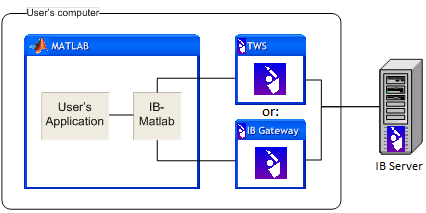
- Connectivity – IB-Matlab enables users to connect Matlab to TWS or the IB Gateway, on the Matlab’s computer or on a different computer.
- API functionality –
- Active trading actions: buy, sell, short, close, modify, cancel, exercise, lapse
- Numerous settable contract and order attributes
- Market query actions: current market data, scanner filter, streaming quotes, real-time bars, snapshot and streaming market depth, historic and intraday data, contract details, options-chains
- Account query actions: account info, portfolio list, open orders, executions data
- IB events: all ~40 asynchronous events that are sent by the IB server are accessible in Matlab (see below)
- Novice and advanced users – Users can use either simple one-line Matlab commands, or internal objects exposed by IB-Matlab, to access the full range of IB’s API.
- Multiple (FA) accounts – Financial advisors can easily manage multiple IB accounts from a single Matlab session/script, including portfolio queries (parent and sub-accounts), routing trade orders to FA profiles/groups and allocation methods/percentages.
- Remote access – IB-Matlab can be installed on the same platform as TWS, or on a separate machine that connects to the IB client remotely.
- Event callbacks – Users can easily attach Matlab code (callbacks) to IB events. For example, this enables adding an entry in an Excel file, or sending an email/SMS (text message), whenever a trade order executes, or a specified price is reached.

- Additional functionality – IB-Matlab also provides functionality that is not readily available in the basic IB API: the ability to specify automated trading; specifying custom trades such as brackets or combo spreads; automatically changing unfulfilled limits based on the momentary bid/ask prices; and changing order types at a certain time.
- Compatibility –
- Platforms: IB-Matlab works on all platforms on which Matlab runs: Windows (both 32 and 64 bits), Mac, Linux/Unix.
- Matlab: IB-Matlab works on all Matlab releases since 2006, including the latest release (R2025b).
- IB clients: IB-Matlab works with both Trading WorkStation (TWS) and IB Gateway since 2009, including version 983.
- Security – IB-Matlab does not transmit any information externally except to IB, so your portfolio and trading information are as safe as your own computer.
- Performance – IB-Matlab is optimized for performance, providing fast and responsive connectivity. While Matlab as a platform is not well-suited for HFT, IB-Matlab still enables placing multiple requests per second, and receiving dozens of streaming quotes or other IB messages per second.
- Development – IB-Matlab was developed by an acknowledged Matlab expert, who wrote the reference textbooks on Matlab-Java interfacing and Matlab performance.
- Support – Custom development and ongoing support is available directly from the developer, with extremely fast response times.
- Documentation – Extensive and comprehensive documentation, with numerous code examples and usage tips (see below).
- Client base – IB-Matlab is actively used by many hundreds of traders worldwide, ranging from individual traders, to hedge funds and banks.
- Backtesting – IB-Matlab does not include backtesting functionality. IB-Matlab’s author (Yair Altman) has extensive experience in developing complete backtesting and real-time trading applications. Yair will be happy to either develop a new application based on your specifications, or to integrate IB-Matlab into an existing application, under a consulting contract.
No other solution provides this rich set of features – not even close (see comparison).
While IB’s Java connector, which is provided by IB, can be used directly in Matlab, setting up the event callbacks and data conversions between Matlab and the connector is definitely not easy. You need to be familiar with both Matlab AND Java, at least to some degree.
Other applications that solve these problems are either expensive, not supported, or limited in functionality or deployment. For example, ActiveX solutions only work properly on 32-bit Windows and even then lose some events and are relatively slow. matlab2ib quant2ib
Don’t take our word for it – get your free trial and check for yourself. You will not be disappointed.
Documentation
- Quick-reference help
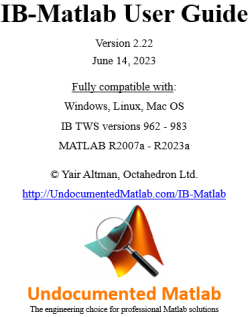
- Full User Guide (PDF, ~170 pages)
- Full User Guide (HTML, web-based)
- Usage syntax details
- Usage examples
- Questions & Answers
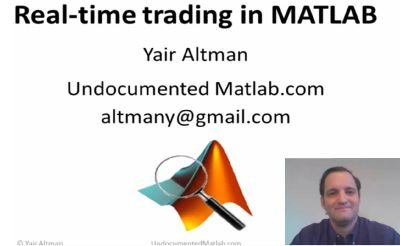
- Real-time trading system demo that uses IB-Matlab, presented at the MATLAB Computational Finance Conference in New York in May 2013, and at the MATLAB Computational Finance Virtual Conference in Sep 2013 (presentation slides, demo source-code, webinar video).
- Two reviews of IB-Matlab were published in the Automated Trader magazine (2011, 2012). The full reviews (PDF) are available for download here (2011, 2012) – see excerpts below.
- User testimonials – see below
- IB’s online API Guide
Professional reviews

So, do we like it? Well, IB-MATLAB is robust, very easy to learn how to use and does exactly what it claims to do – namely provide a simple and efficient order interface between MATLAB and Interactive Brokers’ API. It also costs peanuts…
So yes, we like it – a lot.
– Andy Webb, Automated Trader magazine, Q3 2011 (“The Virtue of Simplicity” article online; or downloadable PDF)
…At that point I turned to Yair Altman’s IB-Matlab product. Happily, this uses IB’s Java api, which is a great deal more robust than the ActiveX platform. It’s been some time since I last used IB-Matlab and was pleased to see that Yair has been very busy over the intervening period, building the capabilities of the system and providing very comprehensive documentation for it. With Yair’s help, it took me no time at all to get up and running and within a day or two the system was executing orders flawlessly in IB’s TWS. …
Yair is very generous with his time in providing support to his users and his responses to my questions were fast and detailed.
– Jonathan Kinlay, Quantitative Research and Trading, March 5, 2015 (“Algorithmic trading” article)
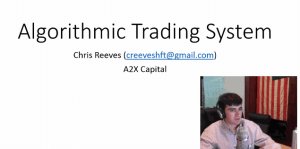
IB-Matlab is our wrapper for the IB API, so that we don’t have to write our own Java connector. IB-Matlab is a robust Java connector, complete wrapper for the IB API. A cheap investment, it’s definitely worth it. I can’t even stress enough how much time it will save you. Don’t build from scratch, it is cheaper and faster to buy from 3rd-party vendors. If I was to build IB-Matlab it would take me several weeks and for only $400 I could have a turnkey solution, I mean it’s a no-brainer there… It’s better than those retail trading platforms. This is the cheapest professional-grade system that you can get. IB connected to IB-Matlab connected to Matlab connected to the Data-Feed Toolbox connected to IQFeed is the cheapest technology stack that will give you trading robustness.
Yair is extremely helpful, provides great customer support.
– Chris Reeves, A2X Capital, Feb 27, 2015 (“Algorithmic Trading System” video)
Also quoted: IB-Matlab is the most robust wrapper for the IB API I have come across. Amazing value for the price!
– creeves, Feb 23, 2015 (comment posted about IB-Matlab on IB’s Marketplace)
User testimonials
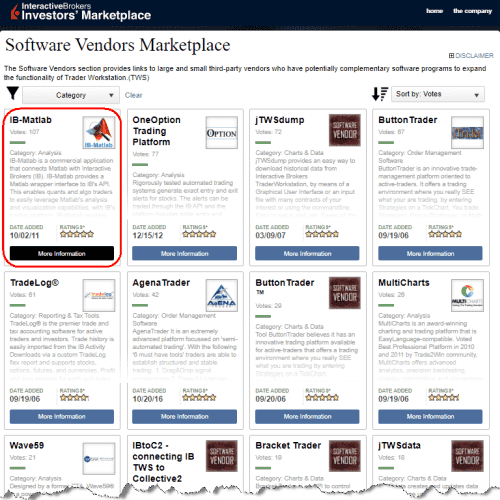
The following testimonials appear on IB’s Marketplace, where IB-Matlab is the top-rated product, with a perfect rating of 5.000 stars from over 100 independent traders:
- “Fantastic product that works flawlessly and has saved me a lot of work, time and money on developing my trading systems! well done Yair!” – mdyson
- “I have been using IBMatlab for some years now and it works flawlessly. Very well documented and excellent technical support. Highly recommended.” – 6315
- “IB-Matlab provides absolutely impressive functionality, seamlessly connecting the IB’s trading platform with Matlab and letting you focus on trading.” – Aztec
- “Works flawlessly, well documented. The IB integration from Matlab’s built in Trading Toolbox is terrible, this plugin will have you up and running within minutes” – KagenA
- “The trading toolbox from Mathworks is a waste of $. Get IB-Matlab instead. Robust, easy to use, that will pay for itself in rapid development.” – MXR64
- “Exceptional! Product: robust/stable. Provider: responsive with a less than 24 hr turnaround. This system allows any group to leverage algo trading.” – RSRSE
- “Yair Altman is the author of two treatise-length books on Matlab. This is evident as IB-Matlab corrects many shortcomings of Matlab’s own interface.” – PhiStrat
- “IBMatlab really simplified the creation of a functional trading system in Matlab, and Yair has been helpful and very responsive on all my questions.” – brianr
- “Great product that is very stable. The docs are excellent with many examples. Support is top notch as Yair responds quickly to questions.” – cbmitch
- “Truly solid product. Easy to work with and has all the functionality to smoothly execute our trading, we have not had a single issue with it.” – STCMF
- “An excellent product with a detailed user guide. Quick and detailed support by its developer, Yair, an expert Matlab practitioner. Highly recommended.” – T_R
- “Rarely are the claims of a developer so understated. The software is simply a “must have” for IB development within Matlab. Thanks to Yair.” – kvargas
- “You should charge more for it. Best value for your money. No bugs. Detailed user-guide contains concise explanations. Easy to use and amazing support.” – Constant
- “This software is a MUST. 15 days trial, EXCELLENT documentation, top notch support, the API is world class design, CHEAP! easy and yet powerful.” – bayes
- “Very quick response. Support is unparalleled professional quality. Software works great, definitely an easy-to-use tool for making money.” – CLVoting
- “Highly competent, professional, quick turnaround, in-depth understanding of electronic market micro-structure” – sgoyvote
- “The software works flawlessly and the support from Yair is unparalleled. Without a doubt worth purchasing.” – asselall
- “Super. Wasted too much time trying other solutions eg. trading toolbox. IB-Matlab is the way to go. Robust, logical and very well documented.” – jt1010
- “Excellent connector for MatLab. We evaluated it against the Mathworks product and found Yair’s version far better. We use it on a daily basis.” – AP1234
- “Great software – very helpful to implement own strategies. Comprehensive and easy to use interface to the API. Yair is very responsive and helpful!” – quantD
- “Highly recommended product. Easy to use, robust, inexpensive, quick and quality support from the developer. High value product for the money.” – scap
- “We hired Yair to write some functions for our prop-shop. Got excellent help within 10 hours and he is eager to solve all the things you need.” – johlof
- “Everyone should buy it. Price is reasonable. I have been using it for three years.” – flash201
- “IBMatlab has been invaluable to test trading strategies; it is reliable and includes lots of useful functions. Yair is very responsive and helpful.” – algo1410
- “IB-Matlab provides an excellent range of tools for automated trading systems. Support excellent and prompt. 100% stable in live operation.” – sunbear6
- “I’ve been using it for over a year and I have no complaints. It is robust and does what it is supposed to do. Very quick customer service.” – hank99
- “I find it quite reliable and easy to use. I was able to code a real time automatic trading system relatively easily. The service behind is excellent.” – khalfina
- “I have been using IB-Matlab for almost 3 years and have found it to work perfectly. Yair responds promptly to questions with detailed answers.” – kChuck
- “Excellent software product, customer support and seamless integration. Totally reliable and a superb addition for automated trading.” – gazza75
- “Excellent. Saves $1600 from Mathworks’ built-in solution.” – muller
- “A quality product at a good price. I find it to work better and in a more flexible way than Matlab’s own IB toolbox.” – Vasastan
- “IB-Matlab allows me to perform fully automated trading, using my own developed code. Yair’s support is very professional. I highly recommend it.” – wimvwijn
- “IB-Matlab is a tremendous product. The documentation is outstanding and Yair is INCREDIBLY responsive to any questions or issues which arise.” – wgpCap
- “IB-Matlab lets you harness the depth and efficiency of MATLAB! It’s intuitive, robust, full-featured, and affordable. Great documentation and support.” – JTrade
- “IBMatlab is a professional Matlab TWS API interface. It works very reliable and is easy to use. The support is very client focused and supportive.” – drepl
- “Excellent product, responsive support and very useful examples/documentation to get you up and running without much work. Highly recommend!” – CharlesM
- “Great product! Stable platform, very flexible, great support, and easily scaled to implement any automated trading strategy. Well worth the money!” – BenM
- “Worth every dime and excellent support. The possibilities with the combination Matlab/IB seem limitless. The resulting mac system is extremely stable.” – onmac
- Professional reviews and additional user testimonials
These quotes are from real IB traders, who took the time to comment anonymously about IB-Matlab on IB’s website using IB’s system. Over 100 traders have anonymously rated IB-Matlab on IB’s website – all of them, without exception, rated IB-Matlab with a perfect 5-star rating. Such perfect rating and superlatives from so many independent traders is unparalleled by any other program on the IB Marketplace. Numerous other traders have provided similar statements about IB-Matlab by private email.
We take great pride in providing a great product, fantastic value, and excellent customer service.
Don’t take our word for it – try it out for yourself!
Pricing and support
| License type | License duration 6 | License cost 7 | Remarks |
|---|---|---|---|
| Free trial (see below) | 1-2 weeks | Free | No extension or renewal |
| Commercial 1 | 2 months |
$99 buy
|
|
| 6 months |
$199 buy
|
||
| 1 year |
$299 buy
|
Most popular | |
| 2 years |
$499 buy
|
||
| 3 years |
$699 buy
|
Best value ($19/month) | |
| Academic 1,2 | 6 months |
$149 buy
|
Contact us for special course-wide pricing |
| 1 year |
$199 buy
|
||
| 2 years |
$349 buy
|
||
| Bundle: IB-Matlab + IQML Professional 1 | 6 months |
$349 buy
|
IQML = IQFeed-Matlab connector (description) 3
A similar bundle is also available for EODML = EOD-Matlab connector (description) |
| 1 year |
$499 buy
|
||
| 2 years |
$799 buy
|
||
| 3 years |
$1099 buy
|
||
| Volume (multiple computers) | flexible | Contact us | Multiple computers |
| Site license | flexible | ||
| Deployment (compiled or OEM) 4 | flexible | ||
| Development (source-code) | unlimited | ||
| Custom feature development | unlimited | ||
| Custom trading-program development (examples) 5 |
unlimited |
Notes:
- Each individual license (Commercial, Academic, or Bundle) is limited to a single user on a single physical computer. Running on multiple computers requires multiple individual licenses, or one of the other license types (Site, Deployment or Development).
- The Academic license is available to currently-active members of a graduate degree-granting academic institution (students or faculty) who use an academic email account.
- The IB-Matlab+IQML Bundle is available with both IQML Standard and IQML Professional. See IQML’s webpage for details and pricing.
- IB-Matlab can be compiled and deployed using the Matlab Compiler. Each computer running a compiled IB-Matlab requires an IB-Matlab license (just like a non-compiled IB-Matlab that runs in Matlab), unless you get a group license (Site, Deployment, or Development). In other words, for your deployed computers you have a choice of either buying individual licenses (separately for each deployed computer), or a group license which does not require dedicated license activations.
- Consulting/support package is available, please contact for details.
- With each license purchase, you will receive the latest version of the product available at that time.
License renewal can be to any license type and any duration, not necessarily the same as the original license purchase, as per the pricing table at the time of renewal. - License cost includes free email assistance with installation issues. Non-refundable. Prices subject to change from time to time. Please allow up to one full business day for payment processing and handling. Payment is processed by PayPal. A PayPal account is not required; all major credit cards are accepted. Contact us if you wish to pay via wire (bank) transfer.

Free trial version
Request a trial and get a no-obligations copy of IB-Matlab with detailed installation and usage instructions. There are absolutely no strings attached: the trial is completely free and fully functional, just limited in duration (1-2 weeks, depending on request date). The trial starts the moment that you request it; you will receive download and installation instructions to your specified email.
You only need the basic Matlab, no toolbox is required. You can be up and running within minutes. We are confident that you will love the product, so we encourage you to test it:
If you have any question or concern, please don’t hesitate to email us directly.
Legal disclaimer
THIS SOFTWARE IS PROVIDED “AS IS”, WITHOUT WARRANTY OF ANY KIND, EXPRESSED OR IMPLIED, INCLUDING BUT NOT LIMITED TO THE WARRANTIES OF MERCHANTABILITY, FITNESS FOR A PARTICULAR PURPOSE AND NON-INFRINGEMENT. IN NO EVENT SHALL THE AUTHORS OR COPYRIGHT HOLDERS BE LIABLE FOR ANY CLAIM, DAMAGES, LOSS OR OTHER LIABILITY, WHETHER IN AN ACTION OF CONTRACT OR OTHERWISE, ARISING FROM, OUT OF OR IN CONNECTION WITH THE SOFTWARE OR THE — USE OR OTHER DEALINGS IN THE SOFTWARE.
(detailed disclaimer is available in IB-Matlab’s User Guide)
