
In earlier posts I showed how to modify the Command Window (CW) text and background color, and a very limited method of displaying red (error) and blue (hyperlinked) CW messages. Since then, I was obsessed with finding a better way to CW display text in any color. After lots of trial-and-errors, frustrations and blind alleys – many more than I imagined when I started out – I am now very proud to say that I have solved the problem. My cprintf utility is now available in the File Exchange.
Before I describe the internal implementation, let me show the end result:
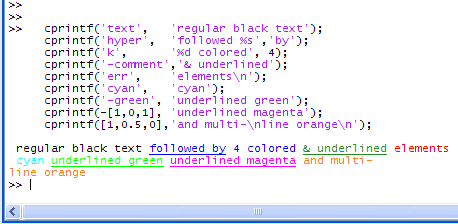
cprintf relies on ideas presented in the previous two posts mentioned above. Since the CW is a JTextArea which does not enable style segments, I was curious to understand how Matlab is able to display syntax highlighting in it. This is probably done using a dedicated UI class (com.mathworks.mde.cmdwin.CmdWinSyntaxUI), as suggested in the second post. This is an internal Matlab Java class, so we cannot modify it. It seemed like a dead end for a while.
But what if we could fool the UI class to think that our text should be syntax highlighted? at least then we’d have a few more colors to play with (comments=green, strings=purple etc.). So I took a look at the CW’s Document component (that holds all text and style info) and there I saw that Matlab uses several custom attributes with the style and hyperlink information:
- the SyntaxTokens attribute holds style color strings like ‘Colors_M_Strings’ for strings or ‘CWLink’ for hyperlinks
- the LinkStartTokens attribute holds the segment start offsets for hyperlinks (-1 for non-hyperlinked, 0+ for hyperlink)
- the HtmlLink attribute holds the URL target (java.lang.String object) for hyperlinks, or null ([]) for non-hyperlink.
I played a hunch and modified the style of a specific text segment and lo-and-behold, its CW color changed! Unfortunately, I found out that I can’t just fprintf(text) and then modify its style – for some unknown reason Matlab first needs to place the relevant segment in a “styled” mode (or something like this). I tried to fprintf(2,text) to set the red (error) style, but this did not help. But when I prepended a simple hyperlink space character I got what I wanted – I could now modify the subsequent text to any of the predefined syntax highlighting colors/styles.
But is it possible to use any user-defined colors, not just the predefined syntax highlighting colors? I then remembered my reported finding from the first post about CW colors that ‘Colors_M_Strings’ and friends are simply preference color objects that can be set using code like:
>> import com.mathworks.services.*; >> Prefs.setColorPref('Colors_M_Strings',java.awt.Color(...)); |
So I played another hunch and tried to set a new custom preference:
>> Prefs.setColorPref('yair',java.awt.Color.green); >> Prefs.getColorPref('yair') ans = java.awt.Color[r=0,g=255,b=0] |
So far so good. I now played the hunch and changed the CW text element’s style name from ‘Colors_M_Strings’ to ‘yair’ and luckily the new green color took effect!
So we can now set any style color (and underline it by enclosing the text in a non-target-url hyperlink), as long as we define a style name for it using Prefs.setColorPref. How can we ensure the color uniqueness for multiple colors? The answer was to simply use the integer RGB values of the requested color, something like ‘[47,0,255]’.
But we still have the hyperlinked (underlined) space before our text – how do we get rid of it? I tried to set the relevant LinkStartTokens entry to -1 but could not: unlike SyntaxTokens which are modifiable Java objects, LinkStartTokens is an immutable numeric vector. I could however set its URL target to null ([]) to prevent the mouse cursor to change when hovering over the space character, but cannot remove the underline. I then had an idea to simply hide the underline by setting the character style to the CW’s background color. The hard part was to come up with this idea – implementation was then relatively easy:
% Get a handle to the Command Window component mde = com.mathworks.mde.desk.MLDesktop.getInstance; cw = mde.getClient('Command Window'); xCmdWndView = cw.getComponent(0).getViewport.getComponent(0); % Store the CW background color as a special color pref % This way, if the CW bg color changes (via File/Preferences), % it will also affect existing rendered strs cwBgColor = xCmdWndView.getBackground; com.mathworks.services.Prefs.setColorPref('CW_BG_Color',cwBgColor); % Now update the space character's style to 'CW_BG_Color' % See within the code: setElementStyle(docElement,'CW_BG_Color',...) |
Having thus completed the bulk of the hard detective/inductive work, I now had to contend with several other obstacles before the code could be released to the public:
- Older Matlab versions (e.g., 7.1 R14) uses the Document style elements slightly differently and I needed to find a solution that will work well on all Matlab 7 versions (this took quite some time…)
- If the text is not newline (‘\n’)-terminated, sometimes it is not rendered properly. Adding a forced CW repaint() invocation helped solve much of this problem, but some quirks still remain (see cprintf‘s help section)
- Multi-line text (‘abra \n kadbra’) creates several style elements which needed to be processed separately
- Debugging the code was very difficult because whenever the debugger stopped at a breakpoint, ‘k>>’ is written to the CW thereby ruining the displayed element! I had to devise non-trivial instrumentation and post-processing (see within the code).
- Taking care of exception handling, argument processing etc. to ensure foolproof behavior. For example, accepting case-insensitive and partial (unique) style names.
Bottom line: we now have a very simple and intuitive utility that is deceivingly simple, but took a few dozen hours of investigation to develop. I never imagined it would be so difficult when I started, but this just makes the engineering satisfaction greater 🙂
Any sufficiently advanced technology is indistinguishable from magic
– Arthur C. Clarke
As usual, your comments and feedback are most welcome
Addendum (May 15, 2009): CPRINTF was today chosen as the Matlab Central File Exchange Pick of the Week. That was fast! – thanks Brett 🙂
Addendum (May 18, 2009): CPRINTF was today removed from the Pick of the Week list, after internal MathWorks discussions that came to a conclusion that by posting CPRINTF on an official Matlab blog it might appear as an official endorsement of undocumented features. I can certainly understand this, so no hard feelings…

Yair, If I was wearing a hat, I would have taken it off in your honour! This is an impressive demonstration of obsession, detective work and development.
WOW!! I am sure that a lot of people will download your utility, it is such a common request from worldwide MATLAB users!
You are a guru !!
Great!
Is there anyway to control the text displayed in the Editor? For example to display Greak symbols in the comments using LATEX?
@Junziang – as far as I know you can only use LATEX in plot texts, not the editor/CW
Thanks Yair!
I think with the same method used in your cprintf, not only the color but the font(font name/font style….) can also be readily changed. So I hope with the next version of cprintf we can also change the font of the text in the CW.
I like cprintf! Thanks a lot!
@junziyang – that’s an interesting suggestion – I may indeed try this 🙂
From the cprintf syntax example I might guess that each call adds text to the current buffer using one unique 2-parameter style (color and underlined/link). Besides the question whether it is technically possible to switch also the FontName, FontSize, FontWeight etc for each new token before the buffer is terminated and we see the >> prompt again, I am curious if we will ever see some hprintf for HTML-formatted text, to specify text with changing properties using one single command? Yair, would that be an option for cprintf version 2.0?
However, don’t feel stressed!-) What you gave us is already cool enough and deeply impressive. After all, my very personal approach is to use the command window only to display plain text, because everything else is (was?) so much easier to display with GUI elements (which already *can* interpret basic HTML in their String property). But from a sportsman’s viewpoint… wow, you are miles ahead!
[…] to enable display of text in any color, as well as underline, in the Command Window. See my post on cprintf for details. […]
Hello,
Thanks a lot for providing this beautiful program. But I am facing some problem with it. On my matlab (Version 7.4.0.287 (R2007a)), I am observing a strange thing. For instance, when I execute following command
>> cprintf([1,0.5,0],’and multi-\nline orange\n’);
and multi-
line orange
It works … But when I execute the next command, it gives error:
>> cprintf([0,1.0,0],’This is in green’);
Element #1:
??? Attempt to reference field of non-structure array.
Error in ==> cprintf>dumpElement at 335
if ~isjava(docElement), docElement = docElement.java; end
Error in ==> cprintf at 96
if ishandle(style), dumpElement(style); return; end
Again I get error :
>> cprintf([0.5,1.0,0],’This is in green’);
This is in green>> cprintf([0,0,1],’This is in green’);
Element #1:
??? Attempt to reference field of non-structure array.
Error in ==> cprintf>dumpElement at 335
if ~isjava(docElement), docElement = docElement.java; end
Error in ==> cprintf at 96
if ishandle(style), dumpElement(style); return; end
BUt this one works !!
>> cprintf(-[0,0,1],’This is in green’);
This is in green>> help printf
Can you please look into this anomaly and tell me if I am making any mistake.
Regards,
Swagat
Swagat – you are correct, this is indeed a bug: an edge-case caused by the fact that all the values you’ve entered for the style color (0.0 and 1.0) were also valid handles… I have fixed this and a few other issues – the updated CPRINTF is now online in the File Exchange (use the link contained in the article above).
how do u used the cprintf command?? each time i type it it says that undefined command cprintf….. i have downloaded the m file but how do i used it…im a bit of a newbies so please help…:)
@Taufiq – MathWorks stores CPRINTF in a zip file. After downloading this file, unzip it to any folder on your Matlab path (type “path” at the Matlab Command Prompt to see the path). The zip file contains cprintf.m which should now be available for use. Type “help cprintf” to see usage explanations and examples.
thanks a lot! its extrememly useful!
Thanks a lot! This tool is what I was looking for. Did you already figure out how to delete the extra space at the beginnen of each string?
@Matthias – I’m afraid not… Care to try?
I would like to make my comments in italics. How to do it using your discovery which is a little above my heads.
Thanks
@Kathy – as far as I know italics are not supported
I am waiting with baited breath for an update that allows one to change the FontName within the CW. There is nothing on the net on how to do it without using plots…
Good work!
@Giovanni – unfortunately, at the moment I do not know of any way to modify the CW fonts…
Really helpful for the community why MathWoks didn’t think about that before???!
Many thanks!
This function is really amazing! I cannot understand how MathWorks did not do this already. Thanks for making it.
However, it seems that R2011b (just released) has broken cprintf. I hope it can be fixed soon.
For all the people who have noted about cprintf’s issues with R2011b, the new version that was just uploaded fixes those problems, as well as the issue of the space (on R2011b only)
To whom it may concern: here is another useful hack (not really undocumented but one of the most underrated/unknown), that I have been using to replace the last few characters at the end of progressbar-like message strings inside loops.
step 1:
step 2:
similarly, step 3 (blinking text):
step 4 (in a loop):
The pause command in the example represents a sequence of time-consuming operations. Note that we don’t need any timer objects, GUI callbacks, class events, Java, com.mathworks.etc here. Just raw C format specifications, doing their dirty deeds since Matlab 5 (or earlier). The general strategy should also work with cprintf, so thanks Yair we can finally see those progressbars grow in any color.
@Helge – you could try to use ‘\r’ instead of multiple ‘\b’
@Yair, \r is nice to clear an entire line back to its beginning, but the content is nevertheless displayed on a new line, as with \n. I tried the following to check this (with as well as without extra \b on either side of \r):
The multiple \b solution (+repmat, if this makes things simpler), in contrast, overwrites the last line with either on or off, so that the progress message is updated in-place, rather than adding a new line of output to the CW. In other words: the \b hack avoids that previous messages scroll out on top of the CW. Nevertheless, thx for \r, I was not yet aware of that.
I downloaded the latest cprintf() from file exchange for my R2011b, but it seems like the colors glitches (changes to unwanted color in between) when it’s displayed too fast. Here’s an example where I used cprintf(‘blue’, …)
http://www.stanford.edu/~wonghoi/DC/MATLAB%20%20R2011b_2012-04-17_15-51-51.png
All the text in tht screencap is supposed to be in blue but some characters turned red and black in between.
Thanks for writing such a great program and I’d really appreciate any time looking into the issue.
@Hoi – it’s probably an EDT timing issue. Try adding a small pause(0.1) after each line is displayed, and/or use less colors i.e. regular black for all the regular text, using fprintf rather than cprintf.
Hi Yair,
Congratulations for your code!
I need a suggestion.. I want to print some strings (with variables) in a file, how I can colorize it with your code?
Now, my black and sad words are printed in the follows:
fprintf(id_handler, ‘Tipus de sensor: %s \n’, sensor); % geofon, electret i piezo
fprintf(id_handler, ‘Pes de la pedra: %s \n’, weigth); % 3.5kg, 9.5kg, 12kg…
fprintf(id_handler, ‘Distància de la caiguda: %s \n’, dist); %1m, 3m, 6m…
fprintf(id_handler, ‘Lloc: %s \n’, place); % cova, balma,
fprintf(id_handler, ‘Tipus de terra: %s \n’, soil); %argila, roca
fprintf(id_handler, ‘Guany: %s \n’, gain); % màxim, mínim, mig
How I write this words with colors and different styles?
Thank you very much!
@Roser – File text is colored by the editor application, different editors display colors differently. Text files do not typically have colors in editors
Dear Yair,
First of all, congratulations for you excellent site. I’d like to show some words in bold in the command window. For example, in Matlab 2012a, when you type >>help mean, the word “mean” in the displayed help is in bold. So it must be possible to print words in bold in the command window, but I cannot figure how. For example, disp(”<b> hello </b>”) does not work. Thank you very much for your time.
@Peter – Matlab indeed added a fourth custom attribute (to the list of three attributes listed in the article above): BoldStartTokens. Unfortunately, this appears to be an immutable array of numeric position indices, that I have so far not found a way to modify. Removing/adding the attribute also fails (a
javax.swing.text.StateInvariantError: Illegal cast to MutableAttributeSetJava exception is thrown). I’ll update cprintf if and when I ever find a workaround…@Peter – it turns out the answer is much simpler than messing around with the internal attributes – simply use <strong> rather than <b>:
that’s awesome !
Thank you very much Yair!!! For everyone’s info, fprintf(‘not bold, <strong> bold </strong>\n’) works on R2012a, R2011b, (cannot test in R2011a,sorry), but not in R2010b … or previous.
@Peter – FYI, this feature was added in R2011b. My article next week will expand on this issue.
Hi Yair.
I have been using cprintf with Matlab R2011b (win7, x64) for a little while now and have noticed a few glitches:
– Printing one character with cprintf messes up the previous print. Basically cprintf recolors the previous print + the new one (1character) with the new color. (and sometime it’s even more random, but this one is consistent).
-printing some strings make some color appear when it shouldn’t. I have a script where it is very reproduce-able (>90% of the time), but still there is a randomness part that I cannot manage to eliminate.
Did you notice these problems too ?
PS: I would like to work on these problems myself but Matlab’s debugger is always spitting text in the Command Window, making it really hard to troubleshoot the cprintf/fprintf functions. How do you work around that ?
@Raphael – indeed so. This happens because Matlab has internal logic to “optimize” the formatting by merging adjacent elements. This is the reason that I’ve used the extra space separator between cprintf elements in R2011a and earlier releases (see lines #153-161).
Debugging is indeed very difficult. For this reason I’ve used the dumpElement function (lines #381-427). I also used the trick of looking at a previously-displayed
docElement– this way whatever extra text is displayed in the Command Window will not affect thedocElementso we can safely “play around” with it. I’m not saying it’s easy. It’s pretty difficult even for me…oh yeah, huh that’s a rather useful trick.
Do you know if it would be possible to tunnel the output in a separate window / file ?
That way we could separate the matlab outputs and the ones from our code.
PS: I’ve finally narrowed down the erratic red displays. It comes up when I use cprintf with % signs to display. One seem ok, but when playing around with several ones, the output color changes between black and red.
@Raphael – I see no reason why you couldn’t funnel the output into a separate window / file. At some point during the creation/debugging of cprintf I even contemplated this myself, but in the end it was not necessary. But you might find it useful in your case.
[…] A reader comment last week sent me on a short wild goose chase, that had an interesting and useful conclusion. […]
[…] my cprintf utility, which was selected as POTW, was quickly deselected as POTW because of this very issue […]
Hello Yair,
Thanks very much for your very interesting and extremely useful posts. I have a question regarding one of your suggestions to output the MATLAB command window on a GUI text box (see below; I found this on MATLAB Answers at http://www.mathworks.com/matlabcentral/answers/71078-command-window-output-to-gui ). This is really nice and to some extent solved my problem. However, this does not work when I run my application in the deployed mode (i.e. when the executable version of my app runs using the MCR). Is there any solution to make this work in the deployed mode? Thanks very much for your help.
Regards,
Amir
– – – – – – – – – – – – – – –
You can access the CW text programmatically as follows:
You can place a callback that will update your GUI whenever new text is added to the CW:
@Amir – I do not know of a way to automatically trap console output in deployed mode. The best solution is to use a custom output function that does what you need, rather than using standard disp or fprintf.
Wow !Wow!
thank you very Much, this is exactly what I’m trying to make in MATLAB this morning, a great help from you
thank you very much !
Hi Yair,
I have read your posting and answer for the command window output catching.
I tried to use your method to send the command window outputs to the my own GUI.
However, it doesn’t show the CW outputs in the status box of my GUI. Could you check the part of script?
Thanks in advance,
CH.
@CH – What exactly are you trying to set
hhto?! what’s wrong with setting your status box directly tocwText?If I use the following line
in the status box of my GUI, it does not show the updated outputs dynamically.
I could see only first several lines which depends on the status box size.
You need to set the callbacks to update the text dynamically, of course.
If you’d like me to help you debug your specific issue, contact me by email for a short consulting.
Dear Yair,
Great effort, From some of the previous discussion can I conclude that I can’t use cprintf to print text to a file in color?
Is there an alternative way to print colorful text to files?. I don’t need text to be displayed in command window I need it in a file.
@Ahmed – you can use COM to place the text/data in an Excel/Word/PowerPoint file and then color the relevant parts just as you would do manually. Basically you need to invoke a series of COM (=VBA) commands from Matlab, but for the specific details you will need to search elsewhere. This is way beyond the scope of a post comment.
Thanks very much, you guided me to the way and I will check it.
Would italicized text be possible?
no Alex
Hello Yair,
is it possible to set the text background color as well (not for the whole command window)?
Not as far as I know…