
A few days ago, a CSSM forum reader asked how to modify Matlab’s listbox scrollbars. Another user asked how to configure line-wrapping. I thought this is a good opportunity to describe how listbox and editbox scrollbars can be customized. The timing is particularly opportune, after I have recently described how the Matlab Editbox can be customized by accessing its underlying Java object using the FindJObj utility.
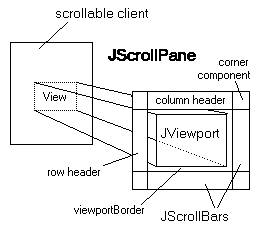
Both the listbox and the multi-line editbox uicontrols share a similar design: a multi-line Java control embedded within a JViewport within a JScrollPane (note that for historical reasons, the Java view-port class is called JViewport rather than the more standard camel-cased JViewPort). In addition to the view-port, the containing scroll-pane also contains two scrollbars (horizontal and vertical), as expected from standard Java scroll-panes.
Scrollbar policies
Control of the scroll-pane’s scrollbar behavior is done via the JScrollPane’s VerticalScrollBarPolicy and HorizontalScrollBarPolicy properties.
VerticalScrollBarPolicy accepts the self-explanatory values of:
- VERTICAL_SCROLLBAR_ALWAYS (=22)
- VERTICAL_SCROLLBAR_NEVER (=21)
- and VERTICAL_SCROLLBAR_AS_NEEDED (=20)
HorizontalScrollBarPolicy accepts:
- HORIZONTAL_SCROLLBAR_ALWAYS (=32)
- HORIZONTAL_SCROLLBAR_NEVER (=31)
- and HORIZONTAL_SCROLLBAR_AS_NEEDED (=30)
All these properties are static enumerated constants that can be referred using either their Java notation (e.g., JScrollPane.VERTICAL_SCROLLBAR_ALWAYS) or their equivalent numeric values. Using the non-numeric format is better, since it is more readable and the numeric values may change, but the choice is yours.
By default, Matlab implements a VerticalScrollBarPolicy of VERTICAL_SCROLLBAR_ALWAYS for sufficiently tall uicontrols (>20-25 pixels, which practically means always) and VERTICAL_SCROLLBAR_NEVER for shorter uicontrols.
For the horizontal scrollbar, Matlab implements a HorizontalScrollBarPolicy of HORIZONTAL_SCROLLBAR_NEVER for all editboxes and for narrow listboxes (<35 pixels), and HORIZONTAL_SCROLLBAR_AS_NEEDED for wide listboxes.
These settings are generally satisfactory. However, in some cases users may wish to modify the settings. For example, the default VerticalScrollBarPolicy setting of VERTICAL_SCROLLBAR_ALWAYS causes the vertical scrollbar to appear even when unneeded (the entire editbox content is visible). Also, we may wish to have a horizontal scrollbar on narrow listboxes and editboxes, something that the standard HORIZONTAL_SCROLLBAR_NEVER prevents. In both cases, a *_SCROLLBAR_AS_NEEDED policy might be more appropriate.
To modify these settings, we simply need to get the uicontrol’s underlying Java reference handle (using the FindJObj utility), and modify the appropriate property. For example:
% Create a multi-line (Max>1) editbox uicontrol hEditbox = uicontrol('style','edit', 'max',5, ...); % Get the Java scroll-pane container reference jScrollPane = findjobj(hEditbox); % Modify the scroll-pane's scrollbar policies % (note the equivalent alternative methods used below) set(jScrollPane,'VerticalScrollBarPolicy',20); % or: jScrollPane.VERTICAL_SCROLLBAR_AS_NEEDED jScrollPane.setHorizontalScrollBarPolicy(30); % or: jScrollPane.HORIZONTAL_SCROLLBAR_AS_NEEDED |


Note that updating the uicontrol handle (hEditbox)’s Position property has the side-effect of automatically reverting the scrollbar policies to their default values (HORIZONTAL_SCROLLBAR_NEVER and VERTICAL_SCROLLBAR_ALWAYS/NEVER). This also happens whenever the uicontrol is resized interactively (by resizing its container figure window, for example). It is therefore advisable to set jScrollPane’s ComponentResizedCallback property to “unrevert” the policies:
cbStr = sprintf('set(gcbo,''VerticalScrollBarPolicy'',%d)', ... jScrollPane.VERTICAL_SCROLLBAR_AS_NEEDED); hjScrollPane = handle(jScrollPane,'CallbackProperties'); set(hjScrollPane,'ComponentResizedCallback',cbStr); |
Line-wrapping
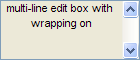
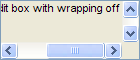
By default, line-wrapping is turned on, effectively disabling horizontal scrolling (which is why Matlab set the HorizontalScrollBarPolicy to HORIZONTAL_SCROLLBAR_NEVER. However, in some cases it may be more useful to turn line-wrapping off and horizontal scrolling on using the TextArea’s setWrapping() method. Here’s a usage example:
jViewPort = jScrollPane.getViewport; jEditbox = jViewPort.getComponent(0); jEditbox.setWrapping(false); % do *NOT* use set(...)!!! newPolicy = jScrollPane.HORIZONTAL_SCROLLBAR_AS_NEEDED; set(jScrollPane,'HorizontalScrollBarPolicy',newPolicy); |
Notes:
- setWrapping() only works for the default EditorKit, and fails for HTMLEditorKit – This is due to HTML’s inherent wrapping behavior, as can easily be seen in any browser webpage.
- while setWrapping() may seem like a regular setter method for a Wrapping property, in reality it is not. Actually, set(jEditbox,’wrapping’,flag) may crash Matlab. So, always use the setWrapping(flag) method variant, which is entirely safe.

I’m trying to turn off the ‘always on’ behavior of the vertical scrollbar in an edit control when I’ve made it multiline.
I also tried jScrollPane.VERTICAL_SCROLLBAR_NEVER in place of the 21, but am getting this error:
??? There is no ‘VerticalScrollBarPolicy’ property in the
‘com.mathworks.hg.peer.EditTextPeer$hgTextField’ class.
Any suggestions? I downloaded and added findjobj to my path. Is there some other m-file I’m missing?
EditTextPeer$hgTextField is the single-line edit-box component, which does not have scrollbars. This is expected, since you ran findjobj immediately after creating your editbox as a single-line control. To turn the control to multi-line, you need to set the control’s Max property to a value greater than 1. If you now run findjobj you’ll see EditTextPeer$hgTextEditMultiline, which does indeed contain scrollbars.
Found the answer. Well, first I was trying to do this on the wrong edit control in my code – needed to do it on a multiline edit control.
Second, when using the findjobj, it returned a 1×2 matrix of objects. Turned out the UIScrollPane was the second object in the matrix, so to set the scrollbar, I did:
Of note, Matlab said “No appropriate method, property, or field … when I tried to use jScrollPane(2).VERTICAL_SCROLLBAR_AS_NEVER instead of 21.
Thanks Yair. Sorry I didn’t see your post before I posted my final solution. I didn’t mean to seem ungrateful for your response.
@Carrie – it’s VERTICAL_SCROLLBAR_NEVER (without the “_AS_”). Only VERTICAL_SCROLLBAR_AS_NEEDED has an “_AS_”.
Sorry. Just a typo in my post. I tried …AS_NEEDED and …_NEVER in my code – no luck, but the numbers work great. Thanks.
i tryed this code, for horizontal scrollbar,
but am getting this error:
?? No appropriate method, property, or field HORIZONTAL_SCROLLBAR_AS_NEEDED for class javahandle_withcallbacks.com.mathworks.hg.peer.utils.UIScrollPane.
Error in ==> blblblb at 8
newPolicy = jScrollPane.HORIZONTAL_SCROLLBAR_AS_NEEDED;
@Camilo – it would help to know which Matlab version, Java version and OS you have – in short, the output of the ver function in your Matlab command prompt.
In the meantime, you can try Carrie’s solution above – simply use the number 30 instead of jScrollPane.HORIZONTAL_SCROLLBAR_AS_NEEDED
Hi Yair,
It works only half for me, hopefully you can point me in the correct direction. Currently working with :
———————————————————————————–
MATLAB Version 7.4.0.287 (R2007a)
Operating System: Microsoft Windows XP Version 5.1 (Build 2600: Service Pack 3)
Java VM Version: Java 1.5.0_07 with Sun Microsystems Inc. Java HotSpot(TM) Client VM mixed mode
———————————————————————————–
For testing I put a button and edit on a figure in GUIDE, I have a function to change the properties of the edit:
I used the integer-values for the scrollbars because the named constants are not part of the Java object.
Problem: when I call the above function from the button-callback, then it works. But this is not what I want, I want that when the figure is made visible, the scrollbars are automatically OK. So what I tried:
1) call ‘set_edit_props’ from edit create-callback:
jScrollPane =
handle: 0-by-0
No appropriate method or public field getViewport for class handle.handle.
2) call ‘set_edit_props’ after a 2 secs delay (timer-object) started within edit create-callback (try to let everything become visible before access is requested):
jScrollPane =
handle: 1-by-0
No appropriate method or public field getViewport for class handle.handle.
3) call ‘set_edit_props’ from OpeningFcn: result as with 2)
4) call ‘set_edit_props’ via timer from OpeningFcn: result as with 1) (!)
Nothing works. Maybe you have some ideas….
Regards,
Jeroen
@Jeroen – It doesn’t work in your creation callbacks because the figure is not yet visible at that point and findjobj requires a visible figure to find the underlying Java handles. This is why you see an empty handle list. This is also the reason it doesn’t work in your _OpeningFcn() function. Instead, place your code in the _OutputFcn() function, which is called immediately after the figure becomes visible.
@Carrie, @Camilo and others: If you get an error when you try to use the enumerated (non-numeric) policy values, then you can simply cast the Matlab handle() of the Java reference back into a Java reference. For example:
Alternately, as mentioned above, you can always use the numeric values of these enumerated policies. They are less readable/maintainable, but they always work 🙂
Hello Yair,
I show three edit text boxes. I want that when you move the first one`s slider( so you get the text from the line 12, for example) the other two show the text from the same line as the first one.
Do you know any way to do so?
Thanks,
Gonzalo
@Gonzalo – you can do this in the callback function for the slider. If you need help in this development (for a fee), then contact me offline using the email link at the top-left of this page.
I want maintain the scroll bar with respect to my matching text .For example in my page if there is Adeel in first existance than the scroll bar set on this Index. Please help me out
Hi Sir,
I am using Matlab 7.6.0(R2008a). When i used the same code for multiline edit, i am getting the following error:
??? Undefined function or method ‘findjobj’ for input arguments of type ‘double’.
I sincerely request your help to get rid of this problem.
And also how to make the display window to span across the entire screen?
Thank you.
@Charan – you need to download the findjobj utility from the Matlab File exchange (link). See a detailed explanation here.
Regarding window maximization, read here.
Hi Sir,
Thanks a lot for your “jet” reply.
I downloaded findjobj and now working fine. I am able to maximize the figure window also.
But still there persists a small problem.
The horizontal scroll bar is getting visible only after i press “Maximize” button in the control box (located on the top right hand corner); otherwise it is not visible, eventhough the text is crossing.
Thank you
Charan
Hi Yair,
I would like to stop a uitable from automatically scrolling back to the top after a cell has been edited in the table – instead staying at the same viewing position.
How would I go about doing this?
Many thanks,
Ben
By updating the cell at the Java level rather than updating the uitable’s Data property
“By updating the cell at the Java level rather than updating the uitable’s Data property”
How do you do that?
By using findjobj and the table’s setValueAt() method. The specifics depend on your Matlab release. Read my uitable customization report or section 4.1 in my Matlab-Java programming book for details.
Hi Yair,
Can you give me some help? I’m not understanding how can I implement this in a GUI using GUIDE.
I have this Callback, there are no errors but it’s not working because the Horizontal Scrollbar is still appearing.
Thanks
your message_list variable is not defined in your function, so obviously the function errors out
Do you mean this?
I don’t get it because in GUIDE the editbox is self-created
You need to use the control’s handle, which is probably handles.message_list in your case. I’m afraid this is very basic HG programming, and this blog is for programmers who already have experience with Matlab programming. This is not a general-purpose Matlab blog. You may find the Matlab newsgroup or forum more suitable for your skill level.
Thanks Yair, I will take a look.
Hi Yair,
Actually I already had searched in some foruns including Matlab, what bring me here.
It looks like this doens’t work with GUIDEs or maybe I’m confused with a simple thing.
I get this error:
« The name ‘VerticalScrollBarPolicy’ is not an accessible property for an instance of class
‘com.mathworks.hg.peer.ListboxPeer$UicontrolList’. »
Findjobj works perfectly with GUIDE-generated GUI. I’m sorry but this starts to get beyond my ability to support in a public blog. Please contact me offline (via the email link at the top of this page) for a private 1-on-1 consulting session.
What is the best way to retrieve and set the position of the viewport? I would like to record the current view of an uitable, and then reset it after Data is updated.
@Dan –
Yair, thank you so much for your prolific and open sharing – this is valuable stuff. Your code snippet to set the scroll position helped me significantly today!
Just a quick comment on the following line:
What I found in my case is that 2 handles were returned from findjobj(hTable). Here is what MATLAB’s “class” function returned for the 2 handles:
javahandle_withcallbacks.com.mathworks.hg.peer.HeavyweightLightweightContainerFactory$UIComponentLightweightContainerjavahandle_withcallbacks.com.mathworks.hg.peer.utils.UIScrollPaneSo what I did is just filter through these as follows:
Thanks again for your help!
John
[…] desired position using the scrollCellToVisible() method.Note that the Matlab object builds on the javax.swing.JViewport and provides a convenient interface as in the case of the scrolling function, since its java […]
Yair,
These functions are extremely valuable. I have an issue in uitable when updating single cells at the java level instead of reloading the entire Data.
I have a long uitable-list with e.g. 100 rows and 5 columns. When updating a single cell (or multiple cells) that is not in the current view, the jtable.setValueAt-function hangs the entire program, and have to be force-quit. Example: Viewport is at (0,0) top left, and I ask that cells with checkboxes in row 90 to 100 is set false by a for-loop, without scrolling down.
It works like a charm if the edited cells are in the current view. Is this a limitation in java-tables?
Knut
Matlab 2013a.
@Knut – more likely it is a bug in Matlab’s implementation of uitable (which is a wrapper around Java’s JTable), and not a limitation of the underlying JTable. Try setting the table visibility off just for the duration of the update, maybe this will work. Otherwise, you can temporarily scroll to make the selected cell visible, and/or use a real JTable or JIDE table rather than uitable.
Thanks for your tips.
Just turning off visibility did not do the trick. My solution was to get the viewport position (using some of your other code snippets), setting the entire Data to the table, and then jumping to the original scroll position. Thank you for the inspiration.
This works:
Knut
Hey,
how can i get access to the row header? If it works, i would like to use it to display the line numbers of the editbox. There are lots of useful links on google for java purpose but i can’t figure out how to implement them on matlab.
I tried this:
if I put a break point after the last line, i can see the scrollbar goes down to the bottom.
if I dont use break point, the scrollbar stays at the original position.
If I use jVScroll.setValue(max); it displays error message.
how to solve this problem?
Thanks
@Lumina – this appears like yet another instance of EDT effects. Try using javaMethodEDT and/or drawnow; pause(0.05);
I am developing a GUI that creates multiple detached figures. I have been using the MATLAB ‘Figures’ container to manage all these figures because it provides so much useful functionality, rather than spend a lot of time creating a less slick and time-costing multi-figure container on my own. I am trying to set the horizontalscrollbarpolicy and have run into a couple problems for which someone might have some insight.
One thing I have noticed is that findjobj cannot find any figure objects when the figure is docked to the MATLAB ‘Figures’ container. Perhaps there is a code workaround for that? As a simpler workaround, I undock the figure and then set the horizontalscrollbarpolicy to allow horizontal scrolling (which works). If I dock the figure back to the MATLAB ‘Figures’ container, the scrollbar is reset and no longer allows horizontal scrolling. Is there any way to make persistent the java settings on the GUI objects as they are docked to the ‘Figures’ container?
Thanks
Horizontal bar disappeared after upgrading to R2014b. The same code works fine in R2013a.
Thanks!
This is an issue of the new graphics system in R2014b so far as I can see (I also have a similar problem). An editbox is now a matlab.ui.control.UIControl object rather than just a numeric handle and findjobj doesn’t know about these of course since they are totally new. I am having a look at findjobj with respect to this for my own similar problem but it is an area I am totally unfamiliar with so I’m not sure I’ll find a solution other than no longer using it. If I do I’ll add a further comment if Yair has not already responded.
@Adam – I’ve updated findjobj over a year ago to process handle (in addition to numeric) objects. It behaves well in both HG1 (up to R2014a) and HG2 (R2014b). If it cannot find your specific handle then you might be using it incorrectly.
@Xialong – in 14b, you simply need to have Matlab repaint the component in order for the scroll changes to be visible. This can easily be done programmatically:
jEditbox.revalidateAh yes, sorry! I jumped the gun on that one, it must be a different aspect of the R2014b upgrade that has broken my functionality and caused findjobj to return no component (uitable in my case).
Dear Mr. Altman,
i got a problem with the setWrapping Function. It does not work.
My Versions are:
MATLAB Version: 8.2.0.701 (R2013b)
Java Version: Java 1.7.0_11-b21
When i check the component then there is “Wrapping off” but when i resize my figure the text breaks into multiple lines. I have of course used the componentresizecallback too. Everything should be okay, but my text breaks into multiple lines after resizing my figure.
Am i doing something wrong?
Here a sample code. The only code that worked for me.
Thanks Mr. Altman
Here a screenshot to show my problem a little better. I am attaching a small textarea to the jHandle of the editfield to see the number of lines. but when i resize the window, the text breaks into more lines…
http://fs1.directupload.net/images/141126/56nang4l.jpg
Greetings
@Christian – when you resize a component, Matlab resets its internal Java properties, so your Java customizations are forgotten and need to be re-applied. Specifically, you need to call setWrapping(false) once again, it’s not enough to just re-update the scrollbar policies.
Hello,
unfortunately it’s not true. I just tried by opening my programm directly with smaller figure width. I did not resize it after. The text is immediately wrapped :-/ I think that setWrapping doesn’t work as it should.
I guess that my manipulation of the rowHeader by attaching a textarea, destroys everything. 🙁 Before manipulation my object has Wrapping off. After manipulation there is no Wrapping anymore, neither on or off.. it’s like it’s an another object
Hi,
I’m trying scroll to a specific position in a GUI table. But when I load the value an exception appears.
I do this, it’s okay?
The error is this,
I am using Matlab 2009a
This seems related to the post at http://undocumentedmatlab.com/blog/handling-red-java-console-errors
Hello Mr. Atlmann,
is it possible to change the width of the scrollbar? I use my app on a touch display and its hard to impossible to hit the scrollbar with the finger, so i would like to change the width of the scrollbar. If thats not possible, what other solutions would there be?
Thanks, Peter.
@Peter – you can modify the scrollbars by accessing them directly. For example:
A more advanced solution could be to modify Matlab’s default Look-&-Feel (
javax.swing.UIManager.put('ScrollBar.width',40);) so that all scrollbars created from now on (in the current Matlab session) will have a width of 40 pixels.hi!! how i can set the horizontal scrollbar to the leftside when appearing! now it set to right side of text
Dani – You can use
jViewport.setViewPosition(java.awt.Point(0,0))as I showed in earlier comments here