
A few days ago, a CSSM user asked whether it is possible to modify the appearance of the Bytes column in the Workspace pane, so that it will present data in KBytes rather than in Bytes. Although I promised that my next post will explain FindJObj and its uses, I couldn’t resist the challenge. Here’s the solution to the request:
In this post I will assume Matlab release R2008a (7.6) – the adaptations for other releases should be minor at worst. First, we need to retrieve the Workspace table’s Java reference handle. In the past I’ve already shown several uses for the Matlab Desktop’s Java handle. Today we’ll use this handle to get the Workspace pane’s handle:
>> jDesktop = com.mathworks.mde.desk.MLDesktop.getInstance jDesktop = com.mathworks.mde.desk.MLDesktop@42d390 >> jWSBrowser = jDesktop.getClient('Workspace') jWSBrowser = com.mathworks.mde.workspace.WorkspaceBrowser[Workspace,0,24,355x707,...] >> jWSTable = jWSBrowser.getComponent(0).getComponent(0).getComponent(0) jWSTable = com.mathworks.mlwidgets.workspace.WorkspaceTable[WorkspaceTable,0,0,352x102,...] |
Next, we note that jWSTable is a simple java Swing JTable, and as such we can easily modify its column header:
jWSTable.getColumn('Bytes').setHeaderValue('KBytes'); jWSBrowser.repaint; |
Modifying the column’s behavior to display 1/1024 of the initial values is more tricky. We can use a simple TableCellRenderer, replacing WorkspaceTable’s DefaultTableCellRenderer. We first create the following KBytesCellRenderer.java file:
import java.awt.*; import javax.swing.*; import javax.swing.SwingConstants.*; import javax.swing.table.*; public class KBytesCellRenderer extends DefaultTableCellRenderer implements TableCellRenderer { public Component getTableCellRendererComponent(JTable table, Object value, boolean isSelected, boolean hasFocus, int row, int column) { Component cell = super.getTableCellRendererComponent(table, value, isSelected, hasFocus, row, column); //System.out.println(row + "," + column + " => " + value); ((KBytesCellRenderer)cell).setHorizontalAlignment(TRAILING); // TRAILING = right int bytes = Integer.parseInt(value.toString()); ((KBytesCellRenderer)cell).setText(bytes/1024 + ""); // Bytes => KBytes return cell; } public KBytesCellRenderer() { super(); } } |
Next, we find out our Matlab’s Java version:
>> version -java ans = Java 1.6.0 with Sun Microsystems Inc. Java HotSpot(TM) Client VM mixed mode |
Next, we download and install a JDK version compatible with our Matlab’s Java version. You can download the latest JDK from here or here. Previous JDK versions can be downloaded from here or here (which even lets you select your requested update number). Development versions, usually fixing reported bugs, are described and can be downloaded from here. Note that you need the full JDK, not just the JVM/JRE runtime versions.
Next, we compile this file using the JDK’s Java compiler (javac) utility: In your system’s command-line (outside Matlab), type the following in the folder containing your KBytesCellRenderer.java file:
javac KBytesCellRenderer.java |
If all goes well, javac will report no error and will create a KBytesCellRenderer.class file in the current folder (or you can download it directly from here).
Now copy this KBytesCellRenderer.class file to one of the folders in your Matlab’s javaclasspath (for example, C:\Program Files\Matlab\R2008a\java\patch\) and restart Matlab. Don’t worry – all this is only a one-time operation.
After restarting Matlab, we have all the chips in place, so we can place the following code in our startup.m script:
jDesktop = com.mathworks.mde.desk.MLDesktop.getInstance; jWSBrowser = jDesktop.getClient('Workspace'); jWSTable = jWSBrowser.getComponent(0).getComponent(0).getComponent(0); jWSTable.getColumn('Bytes').setHeaderValue('KBytes'); jWSTable.getColumn('Bytes').setCellRenderer(KBytesCellRenderer); jWSBrowser.repaint; |
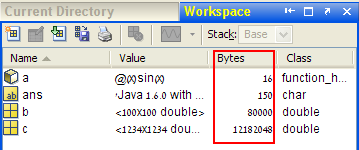
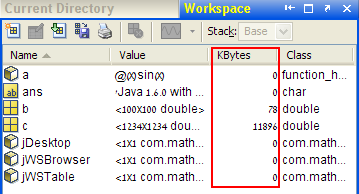
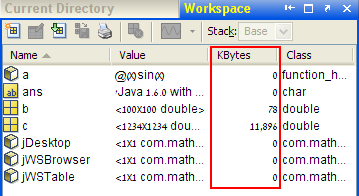
We can use a slightly more complex CellRenderer to highlight cells with too high a value or to present thousands (comma) separator by simply modifying and recompiling KBytesCellRenderer.java, updating the class file in our javaclasspath folder and restarting Matlab. Here’s the version for the thousands separator (American locale):
import java.awt.*; import javax.swing.*; import javax.swing.SwingConstants.*; import javax.swing.table.*; import java.text.NumberFormat; public class KBytesCellRenderer extends DefaultTableCellRenderer implements TableCellRenderer { public Component getTableCellRendererComponent(JTable table, Object value, boolean isSelected, boolean hasFocus, int row, int column) { Component cell = super.getTableCellRendererComponent(table, value, isSelected, hasFocus, row, column); //System.out.println(row + "," + column + " => " + value); ((KBytesCellRenderer)cell).setHorizontalAlignment(TRAILING); // TRAILING = Right int bytes = Integer.parseInt(value.toString()); NumberFormat nf = NumberFormat.getInstance(); ((KBytesCellRenderer)cell).setText(nf.format(bytes/1024)); // Bytes => KBytes return cell; } public KBytesCellRenderer() { super(); } } |
If you have created an interesting CellRenderer, I will be happy to hear about it in the comments section below.

I surely noted your answer the day you posted it in my NG help request. I also implemented your solution but i wanted to display MB with two decimal places and comma separated values…
Since i never programmed in JAVA i spent all day trying on the links that you added here…and this is as far as i went:
first of all i don’t know how to elevate to a power :).
second i can’t get it rigtht with the decimal format….
I’ll keep trying…
Oleg
Oleg – There are two separate problems with your code:
1) you need a DecimalFormat object (instance) before you can use applyPattern().
2) bytes/(1024*1024) is an integer division so the result is rounded to an integer. Instead, use bytes/(1024.0*1024.0) to ensure a floating-point result.
Here’s the resulting code fragment:
You might also be interested to add a “MB” suffix:
I plan to submit a utility to the File Exchange within a few days, that will enable users to choose their display format. I will post a followup when it is available.
By the way, DecimalFormat (and most Java) experiments can easily be done directly in the Matlab Command Window, without the annoying need to recompile Java and restart Matlab. For example:
Thank you very much for the tips. I’m eager to try your next submission!
Oleg
Nice trick!
Is it possible to make the Size column display the size for 4-D matrices this way?
Right now, the Size column just displays “4-D” in case of a 4-D matrix, instead of “m x n x p x q”, which is very annoying…
Cheers,
Ben
@Ben – I think what you ask is possible if you add a JMI call in your CellRenderer. In a nutshell, the Renderer code will get the variable name from the table’s other column, and query its size by invoking JMI with the size function. However, this is non-trivial and also goes against known programming practices (that Renderers should be kept as light and fast as possible). On the other hand, I cannot think of any other way to do it.
Fantastic work! This is a really good idea. Not sure if anyone still reads this but:
I was trying to see if I could take this one step further — I have a function that allows me to preview a certain type of structure I use a lot so I thought I would try to add a new contextual menu item for this.
There appears to be two popup handlers for the Workspace browser/table, that I’m able to access using:
I’m able to change the first one easily enough; if I just call:
This adds a new separator just fine. However, I can’t do the same with the more useful popup used when I have a workspace variable selected. For some reason whenever I add a new menu item to it, it gets reset after I do anything.
Would something like this require me to write a custom cell renderer as well? Or is there an easy way to do this?
@Mike – there a simple way to do this that does not directly modify the Workspace table but rather the class-registry which drives the context menu. Here is an article about this.
-Yair
[…] Last week, a reader of that article posted a comment asking how to customize the context (right-click) menu with some user-defined actions […]
Hi,
Works like a charm,really awesome.
My question is slightly off the track to this article.Since,it is related to workspace i will go ahead and ask. I will be glad to have input on this.
Can i monitor deletion of any variable from the workspace table(event which gets fired on deletion of variable).I tried listening events related to jworkspace table but it seems they are of no use to detect the deletion of variable.Mouseclicked,property change,key pressed etc all these event i was able to listen to.Am i missing something or i need to change my approach.
Please Help.
@Tarun – you can try listening to the TableChanged event on the workspace table’s model:
Just note that this keeps firing all the time so you need to check for actual changes in the rowcount at the very top of your callback and bail-out if no change. Otherwise your Matlab will get stuck in 100% CPU load just processing the callback events…
Thanks Yair.
I was able to detect the variable deletion. As you have mentioned about CPU load, is there a way where deletion of particular variable can be detected (depending on memory location or something). I want to know more about variable storage in matlab environment so that I can monitor clearing of particular memory location (if it is possible).
The whole point being more efficient technique to monitor variable deletion.
There’s probably a way somehow to monitor variable allocation and deallocation, but I do not know how to do it. If there is any person in the world (outside MathWorks) who knows, it would probably be Andrew Janke. I plan to post an article of his about Matlab’s memory usage sometime in the hazy future, and you could re-post your question there.
Looking forward for the article. Will definitely re-post.
Thanks Yair.
In Matlab 2011b the startup script fails since
returns an empty array. The crude workaround that I use to get it to work again is
@Lukasz – maybe your Workspace client is called something else. run
jDesktop.getClientTitlesto get the full list of clients in your Matlab – the Workspace should be near the top of this list:Putting this in startup.m:
results in this showing up in the command window:
@Lukasz – try
Hi,
I’m having a weird bug in R2010b running on linux. The right-click is disabled in the table column header of the workspace, so I can only see the columns enabled by default (Name, Value, Min, Max). I really need to see “Bytes” at least! Would you have any idea how to sort this out with your Java magic?
I was thinking: either we need to enable the mouse listener if it’s been disabled for some reason, or access the table model somehow and manually add the column?
It’d be really great if you can help!
@Fred – no need for any Java magic. Simply go to the main Desktop menu-bar, then choose
View => Choose Columns