
One of my many File Exchange submissions, UISplitPane, was chosen yesterday as Matlab Central’s Pick of the Week (thanks Jiro!). UISplitPane was probably my most challenging submission to date. I thought it would be a good point in time to share some of the undocumented features that I used in UISplitPane. Readers are encouraged to download UISplitPane.m and look at its code.
The basic problem which UISplitPane solves is the inability in Matlab to construct a dual pane separated by an interactive divider. Such split-panes are very common in modern GUIs, including Matlab tools, but were never available for Matlab GUIs. Java Swing has the JSplitPane control, but Matlab axes cannot (as yet) be added to Java containers. A similar problem exists for tabbed-panes, and Matlab provided a very innovative solution for this (the semi-documented uitabgroup function), which is described in a separate post. Unfortunately, uitabgroup‘s solution cannot be applied to the split-pane problem since in JSplitPane’s case, the container overlaps the axes-containing panes.
To make a long story short, the solution was to create an off-screen (invisible) JSplitPane, extract only its narrow central divider sub-component, and place that onscreen using javacomponent. I encourage readers to look at the addDivider() function which does this, setting mouse cursor and other interesting properties.
The Java divider’s reference is then converted into a Matlab handle, so that some extra properties can be added using schema.prop (which [you guessed it] will be described in a later post) and will become visible when using regular get.
Pure-Matlab code then attaches standard Matlab uipanels as sub-panes on either side of the divider. Property linkages (this will be detailed in later posts about schema.prop’s getter/setter functions and handle.listener) ensure that whenever the divider is dragged or programmatically modified, the two sub-panes on its sides will be resized accordingly, together with all their content (axes and controls). Since the two split panes are simple uipanels, they can contain not only axes and controls but also other uisplitpanes, creating a hierarchy of split-panes:
[hDown,hUp,hDiv1] = uisplitpane(gcf, 'Orientation','ver', 'dividercolor',[0,1,0]); [hLeft,hRight,hDiv2] = uisplitpane(hDown, 'dividercolor','r', 'dividerwidth',3); t=0:.1:10; hax1=axes('Parent',hUp); plot(t,sin(t)); hax2=axes('parent',hLeft); plot(t,cos(t)); hax3=axes('parent',hRight); plot(t,tan(t)); hDiv1.DividerLocation = 0.75; % one way to modify divider properties... set(hDiv2,'DividerColor','red'); % ...and this is another way... |
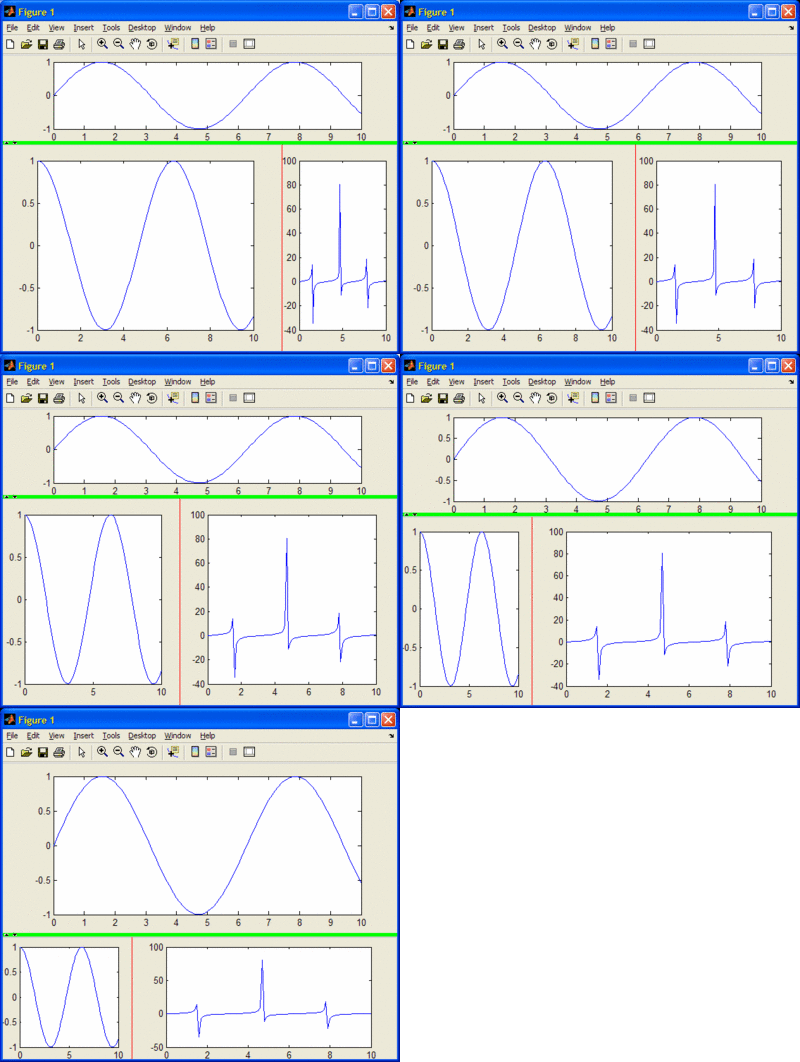
UISplitPane makes use of some semi-documented internal helper functions: hgfeval is used in the mouse callbacks, in order to chain the original WindowButton callback (if available); setptr is used to set the mouse pointer (cursor).
UISplitPane behaves nicely in the presence of Mode Managers (zoom, pan, …) by using the figure’s undocumented ‘ModeManager’ property and setting its ‘ButtonDownFilter’ to bypass mode.
Finally, the figure’s undocumented ‘JavaFrame’ property is used to get a reference to the figure’s AxisComponent container, which is needed for setting mouse callbacks that behave better than similar callbacks at the figure level.
All-in-all, UISplitPane is perhaps a good example of combining a variety of unrelated undocumented Matlab features in order to achieve a coherent application.
An interesting side-note: Matlab 7.6 (R2008a) and onward contain a reference to uisplittool and uitogglesplittool in the javacomponent.m and %matlabroot%/bin/registry/hg.xml files. These are not valid functions (built-in or otherwise) and I could not figure out how this functionality can actually be used. At the very least it is certain that it is deeply undocumented and (of course) unsupported, leaving an open mystery for future investigation…
Addendum Jan 14, 2015: For an alternative implementation of split-panes, see here.

Dear Yair,
Thank you very much for starting blogging and investing so much effort in gaining and sharing you knowledge!
About split pane: I think that this component is great for axes and possibly few uicontrols, but would be much more powerfull when embedded into a consistent Layout Manager. What do you think about it?
It is really valuable to see all undocumented features, but apart from this point why have you opted for such complex implementation? I naively think it could be possible in pure matlab…
@Mikhail – uisplitpane (or the split-panes concept, same as the tab-panes concept) is a component that can be embedded into any Matlab container or Layout Manager (Matlab itself has several layout managers – see the File Exchange), just like any other Matlab component/container. That was an important design point of uisplitpane. I agree that my sample screenshot would be more powerful if I showed the split-panes embedded in some Matlab uipanel – If I have some spare time I’ll do this.
Using the Java divider (as opposed to pure-Matlab button) enabled me to use its internal one-click flush hotspots (the arrows near the top/left end of the dividers that enable to flush the divider all the way to the side in one click) with a special mouse hover cursor. The property listeners were required to ensure that whenever the divider was modified, the split-panes did as well – this cannot be done in pure Matlab. The other undocumented functions had their own special reasons too.
Yair, This is nice. How easy to implement a round slider, like a meter?
Wei – the standard javax.swing.JSlider doesn’t have this out-of-the-box, but you can easily integrate 3rd-party components that do this. Google is your best friend, or search one of numerous Swing component repositories, like http://swing-components.safe-install.com/
This will solve the problems people have with R2008b and latter (exceptions…)
This also solve the exceptions with your brilliant Systray software.
Regards
Thanks J 🙂
Dear Yair, dear Anonymus,
while trying to implement my own code to use a systray icon (Yair, your systray function is great but throws many warnings about “depreciated use of set/get” in more recent Matlab versions), I stumbled over another error message using the java code.
Though above code resolves the issue in Matlab 2010b, in 2011b, the issued event is
com.mathworks.widgets.desk.DTDocumentBar.wantsToHandleSo you should add this to your list.
By the way: Which events are triggered by these four (to be removed) event_listeners and why could they easily be removed without changing other stuff?
The code I used is basically:
Thanks for your great work,
Alexander
Addendum:
After turning off
com.mathworks.widgets.desk.DTDocumentBar.wantsToHandle, alsocom.mathworks.widgets.tooltip.ToolTipAndComponentAWTListener.mouseInTipComponentthrows an error. But this is not part of the event_listener list.
Please replace with this condition:
With these 3 event listeners removed, it seems no more exeptions occurs (hopefully).
This works great – one question I have though, I’m not able to get a uitree to resize when placed in one of the panes this creates:
When the sliders are moved, the uitree doesn’t change size with the pane.
Update, here’s an ugly hack I’ve inserted into uisplitpane so that a uitree correctly resizes if it’s in one of the panes.
In the updateSubPaneSizes, line 800, I’ve inserted:
Seems to work well enough.
Thanks,
Zach
Yair/Anonymous,
Where do I insert the following lines to remove the bug with R2008+?
@Yogesh – You can do this anywhere in your Matlab session, or at the beginning of the function. Note that the relevant condition was modified by Anonymous (see the comments above) to:
[…] In a general case where we might wish to embed Matlab graphs in one of the side panels, we would need to employ a more sophisticated solution (see my UISplitPane utility). […]
[…] Draggable (resizable) panel borders (note that this feature does not work in the new HG2 – I hope it will be fixed by the time that HG2 is released) […]
I know this is an old topic but I had a question/problem I hope someone can help me with.
Using the example from the file exchange I noticed that the mouse pointer no longer updates. Example, select the “zoom in” button, mouse over an axes and the pointer does not change. However, it still functions correctly. Is there a way to fix this so the Pan/Zoom/Etc. positioning controls retain the correct mouse pointer.
Ciao Yair!
It seems that the suggestions to remove all those Java exception (even with the conditions update) do not work with Matlab 2013b onward. It is a shame as the power of what you are sharing is amazing! Is there any chance to provide us some working code so we can take advantage of your very great job? 😉
Many thanks!
Seb
Hi Yair,
I recently updated to Matlab 2015a and thus updated my UISplitPane method in my program. I was using your previous UISplitPane method on Matlab 2012a and referenced a property called ‘offsetPosition,’ it was stored within plotDivider; is there a reason why this is not written into the Matlab 2015a version?
Also, in the old UISplitPane method, there was a line “G.Z.updateSubPaneSIzes = @updateSubPaneSizes” so that I could call updateSubPaneSizes elsewhere in the program, do you have a suggestion for how I could call updateSubPaneSizes outside of UISplitPane?