
One of the few standard Java Swing controls that does not have any Matlab uicontrol counterpart is JSpinner. JSpinner is basically an editbox with two tiny adjacent up/down buttons. Spinners are similar in functionality to a combo-box (a.k.a. drop-down or pop-up menu), where a user can switch between several pre-selected values. They are often used when the list of possible values is too large to display in a combo-box menu. Like combo-boxes, spinners too can be editable (meaning that the user can type a value in the editbox) or not (the user can only “spin” the value using the up/down buttons).
JSpinner uses an internal data model, similarly to JTree, JTable and other complex controls. The default model is SpinnerNumberModel, which defines a min/max value (unlimited=[] by default) and step-size (1 by default). Additional predefined models are SpinnerListModel (which accepts a cell array of possible string values) and SpinnerDateModel (which defines a date range and step unit).
Here’s a basic code snippet showing how to display a simple numeric spinner for numbers between 20 and 35, with an initial value of 24 and increments of 1:
jModel = javax.swing.SpinnerNumberModel(24,20,35,1); jSpinner = javax.swing.JSpinner(jModel); jhSpinner = javacomponent(jSpinner, [10,10,60,20], gcf); |
The spinner value can be set using the edit-box or by clicking on one of the tiny arrow buttons, or programmatically by setting the Value property. The spinner object also has related read-only properties NextValue and PreviousValue. The spinner’s model object has the corresponding Value (settable), NextValue (read-only) and PreviousValue (read-only) properties. In addition, the model also has the settable Maximum, Minimum and StepSize properties.
To attach a data-change callback, set the spinner’s StateChangedCallback property.
I have created a small Matlab demo, SpinnerDemo, which demonstrates usage of JSpinner in Matlab figures. Each of the three predefined models (number, list, and date) is presented, and the spinner values are inter-connected via their callbacks. The Matlab code is modeled after the Java code that is used to document JSpinner in the official documentation. Readers are welcome to download this demo from the Matlab File Exchange and reuse its source code.
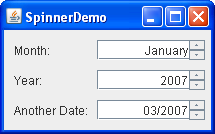
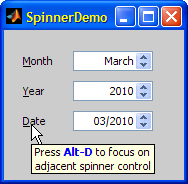
As can be seen from the screenshot, SpinnerDemo also demonstrates how to attach a label to a GUI control with an associated accelerator key (Alt-D in the screenshot example, which sets the focus to the Date control).
An internal component in Matlab, namely
com.mathworks.mwswing.MJSpinner, extends javax.swing.JSpinner, but in this particular case I cannot see any big advantage of using the internal MJSpinner rather than the standard JSpinner. On the contrary, using JSpinner will likely improve forward compatibility – MathWorks may well change MJSpinner in the future, but it cannot do anything to the standard Swing JSpinner. In other cases, internal Matlab controls do offer significant advantages over the standard Swing controls, but not here it would seem. In any case, the SpinnerDemo utility uses MJSpinner, but you can safely use JSpinner instead (line #86).The internal Matlab controls are discussed in detail in Chapter 5 of my Matlab-Java book, and
MJSpinner is specifically discussed in section 5.2.1.Another
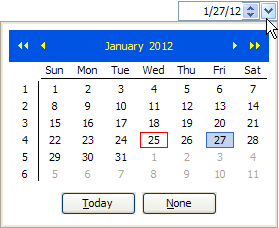
JSpinner derivative is JIDE’s com.jidesoft.grid.SpinnerCellEditor, which can be used as the cell-editor component in tables. An example of this was shown in the article about Advanced JIDE Property Grids (and section 5.7.5 in the book). You may also be interested in the com.jidesoft.combobox.DateSpinnerComboBox, which presents a control that includes both a date-selection combo-box and a spinner (section 5.7.2):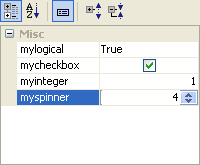

Great post, very useful. I did not know this function.
hi Yair
great jcontrol. Do you happen to know how to force the jspinner to accept only numeric data and at the same time allow to clear the text-box-like field?
best
@Ramiro – good to see you here 🙂
You can force the spinner to accept only numeric data by simply using the
SpinnerNumberModel, as I have shown in the article and in my demo application, but then you cannot clear the value because it’s an invalid numeric value. If you think about it, there’s really no reason for a spinner to have no value, because this control is supposed to represent a set of pre-defined values.Hi, great post!
I’ve found it very useful and far better (more functional and, of course, better looking) than Spinner (from 2004, I think) I’ve found in official file exchange.
Thank you for the GREAT post. One question, is there a way to place this spinner within a “Parent” box. I am working on a GUI that has 5 different boxes on a single tab and would like to place this spinner in the fourth box.
THANK YOU
@Brittney – the 3rd (optional) input parameter of the javacomponent function is the parent container handle. It can be the figure handle (default value: current figure or gcf), or a uipanel handle. When you say “box” I assume you mean a uipanel, so simply specify its handle as the 3rd input arg of javacomponent.
Additional information: http://undocumentedmatlab.com/blog/javacomponent
This is very useful, Yair!
I am trying to find a way to store hFig into a spinner handle, so I can tell which figure in case of multiple figures. Here is code for the test:
I also tried to set datatype as handle, and it seems h.Parent accepts only java handle, not figure/uicontrol handle:
My current solution is like this in a callback function for both spinner and other uicontrol:
Is there a way to let gcbo return figure handle from java spinner? Octave gcbo uses ‘Parent’, and no idea about Matlab gcbo. Maybe I am too greedy 🙂
Thanks.
Xiangrui
Oh, yes. Thank you for the simple solution, Yair!
hello yair,
consider the following spinner
At this step all is right!
Now if I want to come back to non bold non italic
is without any effect!!?? Any idea?
Another curious point values appear as 140 140,5 141 … and not 140.5 ??
Thanks
Alain
@Alain – apparently the
JSpinnercomponent creates its internal text-field using the parent control’s Font property value when it is first rendered, and then ignores changes to that parent property value. Instead, you can modify the text-field’s Font property (and its other property values) directly:@yair
Thanks a lot. It works fine. I had a similar problem with Spinner BackgroundColor and ForegroudColor. Now using for exemple
gives the expected result.
Why a non standard “Text: ‘125,5’” property although the Value property is
“Value: 1.2550e+02” ?
Is there a way to modify something here?
Cheers
Alain
@Alain – see my SpinnerDemo (or read
JSpinner‘s documentation) to see how to modify the text formatting.@yair
I have found the reason. By default the decimal format is local dependent!!
In France it is , and not .
Ok I’ll look at your demo.
However a last point as in your demo, if the user enters a value outside min or max (for example 2030 as year) the spinner is out of use.
Is there a special callback property to use in order to check this case.
Alain
Hi, Yair!
I tried to add a StateChangedCallback to the JSpinner, and if the value is modified, it will display the current value on the command line.
However, I find a strange phenomenon, the callback is sometimes invoked twice.
The codes above will output someting like this:
Notice that although I only click once, the disp sometimes output two same results.
So I try to check whether the value is changed at the first time. However, something stranger happens.
I replace the StateChangedCallback by the line below.
Which outputs:
Notice that even the value is changed at line 3, it still disp twice.
And the jspinner.getPreviousValue seems to not remember the result of the first time.
So I use a temperate value to check whether the value is the same with the previous. (Why I use a tmp value? Because the jspinner.getPreviousValue failed in the case above.)
This time, the output works fine, and it never outputs two same lines.
I guess the problem may be something related to the thread of java/matlab events, but I do not hava enough knowledge about it. The problem could be solved by adding a temp value and add an if-end sentence, but it would be better to know the reason.
Could you please help me find the reason of this problem?
By the way, your MATLAB-Java book and many blogs has helped me a lot!
Thank you so much!
@Asimov – Java events often fire twice: first when the event processing starts, and then when the even processing ends. You can process only one of them by adding code in your callback function to prevent re-entrancy. For example:
Additional information: http://undocumentedmatlab.com/blog/controlling-callback-re-entrancy
If you found my book useful, then please post a favorable review of it on Amazon – thanks in advance!
Hi Yair.
Is it possible to modify the spinner’s position (x, y, w, h) after it has been created? I’m trying to do it during a SizeChangedFcn callback.
Thanks.
yes – assuming you created the spinner using the
javacomponentfunction, you can modify the Position and Units properties of the component’s container handle, which is the second output argument returned byjavacomponent. See http://undocumentedmatlab.com/articles/javacomponent for details.