
A few days ago, I was asked by a reader how to programmatically display the popup help window and customize it with arbitrary contents. This help window displays the doc-page associated with the current Command Window or Editor text.
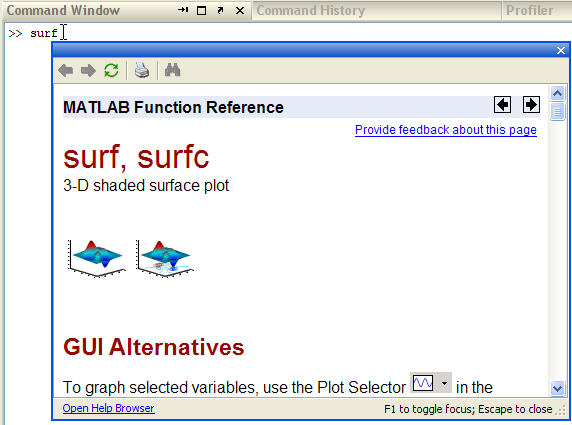
To programmatically display this help popup, a modeless MJDialog Java window, we need to run the following on Matlab releases that support these windows (R2007b onward):
jDesktop = com.mathworks.mde.desk.MLDesktop.getInstance; jTextArea = jDesktop.getMainFrame.getFocusOwner; jClassName = 'com.mathworks.mlwidgets.help.HelpPopup'; jPosition = java.awt.Rectangle(0,0,400,300); helpTopic = 'surf'; javaMethodEDT('showHelp',jClassName,jTextArea,[],jPosition,helpTopic); |
Where:
1) jPosition sets popup’s pixel size and position (X,Y,Width,Height). Remember that Java counts from the top down (contrary to Matlab) and is 0-based. Therefore, Rectangle(0,0,400,300) is a 400×300 window at the screen’s top-left corner.
2) helpTopic is the help topic of your choice (the output of the doc function). To display arbitrary text, you can create a simple .m file that only has a main help comment with your arbitrary text, which will be presented in the popup.
3) on R2011b, we could simplify the above code snippet with the following replacement:
helpUtils.errorDocCallback('surf') |
4) on R2007b, we need to use the equivalent but more cumbersome awtinvoke function instead of javaMethodEDT:
jniSig = 'showHelp(Ljavax.swing.JComponent;Lcom.mathworks.mwswing.binding.KeyStrokeList;Ljava.awt.Rectangle;Ljava.lang.String;)'; awtinvoke(jClassName,jniSig,jTextArea,[],jPosition,helpTopic); |
For example, if we had a sample.m file with the following contents:
function sample % The text in this function's main comment will be presented in the % help popup. <a href="http://undocumentedmatlab.com">Hyperlinks</a> % are supported, but unfortunately not full-fledged HTML. |
Then we would get this result:
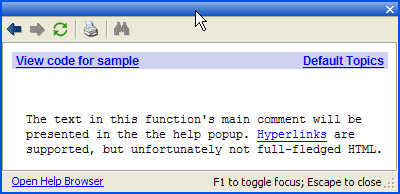
Well, it does get the message across, but looks rather dull. It would be nice if this could be improved to provide full-scale HTML support. Unfortunately, Matlab documentation says this cannot be done:
The doc function is intended only for reference pages supplied by The MathWorks. The exception is the doc UserCreatedClassName syntax. doc does not display HTML files you create yourself. To display HTML files for functions you create, use the web function.
Luckily for us, there is an undocumented back-door to do this: The idea is to search all visible Java windows for the HelpPopup, then move down its component hierarchy to the internal web browser (a com.mathworks.mlwidgets.html.HTMLBrowserPanel object), then update the content with our arbitrary HTML or a webpage URL:
% Find the Help popup window jWindows = com.mathworks.mwswing.MJDialog.getWindows; jPopup = []; for idx=1 : length(jWindows) if strcmp(get(jWindows(idx),'Name'),'HelpPopup') if jWindows(idx).isVisible jPopup = jWindows(idx); break; end end end % Update the popup with selected HTML html=['Full HTML support: <b><font color=red>bold</font></b>, '... '<i>italic</i>, <a href="matlab:dir">hyperlink</a>, ' ... 'symbols (∀β) etc.']; if ~isempty(jPopup) browser = jPopup.getContentPane.getComponent(1).getComponent(0); browser.setHtmlText(html); end |
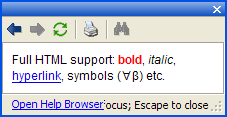
We can display HTML content and highlight certain keywords using the setHtmlTextAndHighlightKeywords method:
browser.setHtmlTextAndHighlightKeywords(html,{'support','symbols'}); |
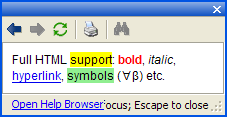
Instead of specifying the HTML content, we can point this browser to a web-page URL (no need for the “http://” prefix):
browser.setCurrentLocation('UndocumentedMatlab.com'); |
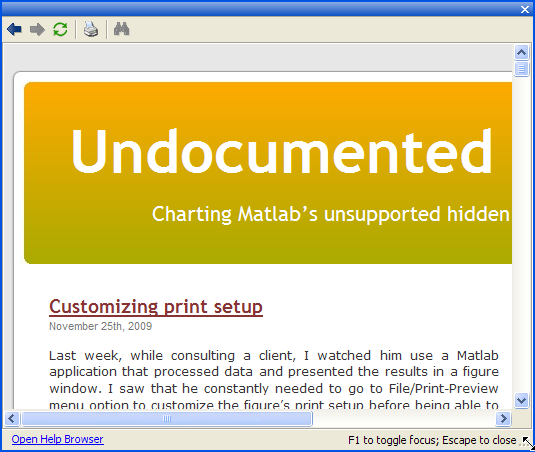
The HTMLBrowserPanel includes a full-fledged browser (which may be different across Matlab releases/platforms). This browser supports HTML, CSS, JavaScript and other web-rendering aspect that we would expect from a modern browser. Being a full-fledged browser, we have some control over its appearance e.g., addAddressBox(1,1) and other internal methods. Interested readers may use my UiInspect utility to explore these options.
As a technical note, HTMLBrowserPanel is actually only a JPanel that contains the actual Mozilla browser. Luckily for us, MathWorks extended this panel class with the useful methods presented above, that forward the user requests to the actual internal browser. This way, we don’t need to get the actual browser reference (although you can, of course).
I have created a utility function that encapsulates all the above, and enables display of Matlab doc pages, as well as arbitrary text, HTML or webpages. This popupPanel utility can now be downloaded from the Matlab File Exchange.
An interesting exercise left for the readers, is adapting the main heavy-weight documentation window to display user-created HTML help pages. This can be achieved by means very similar to those shown in this article.
Of course, as the official documentation states, we could always use the fully-supported web function to display our HTML or URLs. Under the hood, web uses exactly the same HTMLBrowserPanel as out HelpPopup. The benefit of using the methods shown here is the use of a lightweight undecorated popup window which looks well-integrated with the existing Matlab help.
Please note that the HelpPopup implementation might change without warning between Matlab releases. An entirely separate, although related, implementation is Matlab’s built-in context-sensitive help system, which I described some months ago. That implementation did not rely on Java and worked on much earlier Matlab releases.

I’m having troubles using this in a GUI that I’m coding by hand.
As a “help” pushbutton callback, I have the following code:
However, I am receiving an error stating that
“??? Error using ==> javaMethodEDT
Java exception occurred:
java.lang.IllegalArgumentException: ‘parent’ cannot be null”
When stepping through the debugger, I find that jTextArea is empty. However, if I re-type that line while in debug mode, it works just fine. Do you know any way that I can fix this problem?
-Nathan
@Nathan – I assume you haven’t placed this in your GUIDE-generated _OpeningFcn(), as explained elsewhere. Another cause of this might be that when you run the code, jTextArea is still unavailable by the time the javaMethodEDT is called. In step-by-step debugging this is not an issue, since there is plenty of time for jTextArea to be set. It is also possible that there is no FocusOwner in the Desktop (unlike the case of step-by-step debugging) – this can be forced using the commandwindow function. As a final alternative, try using the getClient() approach to getting the Command-window TextArea, as I explained in my recent setPrompt article:
I am not using GUIDE (as implied by “coding by hand”), but your getClient() method worked for me. Thanks for the quick response and your help. This website is very insightful.
-Nathan
Hi Yair,
When I try to use html in help popup, I was told there is no setHtmlText of browser. So I ask myself is there any update in matlab 2017b. But I tried getComponent with other indices which doesn’t work. Maybe you would have a clue. Thanks a lot.
@Peng – the code above was relevant as of the time I wrote the article, 10 years ago (2009). In recent Matlab releases the code needs to be modified a bit:
I have a problem with putting this into the startup.m to be executed at the beginning of the MATLAB session.
My startup script uses similar code that opens and closes a dummy popup with custom window size that would be applied for subsequent F1-popups.
In R2018a and R2020b Prerelease the above example works well as standalone code. Nevertheless, when used in startup.m it does not create a popup during the startup (and for variant 1 it also results in “java.lang.IllegalArgumentException: ‘parent’ cannot be null” exception). I remember that in some earlier releases a similar solution used to work (pause(1) or drawnow were helpful in case of errors), but now I cannot find any fix. Maybe you would know if it is still possible to open a popup with the desired size during MATLAB startup.
@Peter – the graphics system might not be fully initialized by the time that the startup script is being executed by the Matlab engine. I suggest placing the relevant code in a small function and in startup.m simply start a single-shot timer with a StartDelay of several seconds, that will run the new function in its TimerFcn callback.