
In my previous posts, I introduced the semi-documented uitree function that enables displaying data in a hierarchical (tree) control in Matlab GUI, and showed how it can be customized. Today, I will continue by describing how specific uitree nodes can be customized.
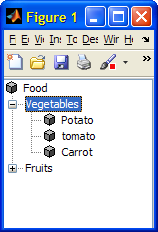
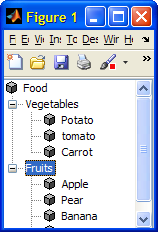
To start the discussion, let’s re-create last week’s simple uitree:
% Fruits fruits = uitreenode('v0', 'Fruits', 'Fruits', [], false); fruits.add(uitreenode('v0', 'Apple', 'Apple', [], true)); fruits.add(uitreenode('v0', 'Pear', 'Pear', [], true)); fruits.add(uitreenode('v0', 'Banana', 'Banana', [], true)); fruits.add(uitreenode('v0', 'Orange', 'Orange', [], true)); % Vegetables veggies = uitreenode('v0', 'Veggies', 'Vegetables', [], false); veggies.add(uitreenode('v0', 'Potato', 'Potato', [], true)); veggies.add(uitreenode('v0', 'Tomato', 'Tomato', [], true)); veggies.add(uitreenode('v0', 'Carrot', 'Carrot', [], true)); % Root node root = uitreenode('v0', 'Food', 'Food', [], false); root.add(veggies); root.add(fruits); % Tree figure('pos',[300,300,150,150]); mtree = uitree('v0', 'Root', root); |
Labels
Node labels (descriptions) can be set using their Name property (the second uitreenode data argument). Note that the horizontal space allotted for displaying the node name will not change until the node is collapsed or expanded. So, if the new name requires more than the existing space, it will be displayed as something like “abc…”, until the node is expanded or collapsed.
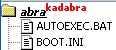
Node names share the same HTML support feature as all Java Swing labels. Therefore, we can specify font size/face/color, bold, italic, underline, super-/sub-script etc.:
txt1 = '<html><b><u><i>abra</i></u>'; txt2 = '<font color="red"><sup>kadabra</html>'; node.setName([txt1,txt2]); |
Icons
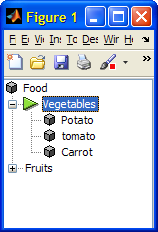
Tree-node icons can be specified during node creation, as the third data argument to uitreenode, which accepts an icon-path (a string):
iconPath = fullfile(matlabroot,'/toolbox/matlab/icons/greenarrowicon.gif'); node = uitreenode('v0',value,name,iconPath,isLeaf); |
Tree node icons can also be created or modified programmatically in run-time, using Matlab’s im2java function. Icons can also be loaded from existing files as follows (real-life programs should check and possibly update jImage’s size to 16 pixels, before setting the node icon, otherwise the icon might get badly cropped; also note the tree-refreshing action):
jImage = java.awt.Toolkit.getDefaultToolkit.createImage(iconPath); veggies.setIcon(jImage); veggies.setIcon(im2java(imread(iconPath))); % an alternative % refresh the veggies node (and all its children) mtree.reloadNode(veggies); |
Behavior
Nodes can be modified from leaf (non-expandable) to parent behavior (=expandable) by setting their LeafNode property (a related property is AllowsChildren):
set(node,'LeafNode',false); % =expandable node.setLeafNode(0); % an alternative |
One of the questions I was asked was how to “disable” a specific tree node. One way would be to modify the tree’s ExpandFcn callback. Another way is to use a combination of HTML rendering and the node’s AllowsChildren property:
label = char(veggies.getName); veggies.setName(['<html><font color="gray">' label]); veggies.setAllowsChildren(false); t.reloadNode(veggies); |
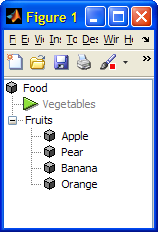
Another possible behavioral customization is adding a context-menu to a uitree. We can set node-specific tooltips using similar means.
Answering a reader’s request from last week, tree nodes icons can be used to present checkboxes, radio buttons and other similar node-specific controls. This can actually be done in several ways, that will be explored in next week’s article.
There are numerous other possible customizations – if readers are interested, perhaps I will describe some of them in future articles. If you have any special request, please post a comment below.

How can you get the path from the node if you are using uitree for a file system? Also very interested in using check boxes on the nodes.
@Amy – here’s how to get the file-system path from your tree:
Re checkbox nodes – look at tomorrow’s article…
Hello Yair
I’d like to get back the whole path of a tree’s node in a structure following the classic way to display it:
S.S1.S1(2).signal.sig
while, with the code you suggested before I get instead:
pathStr =
S\S1\S1(2)\signal\sig\
Here’s your code:
Can you please help me?
Salvatore
Where do we add this small mentioned code to get the uitree file location. Also do we need to have any other file besides the above code of uitree to get this file location of a file. I tried adding the small code mentioned in this comment inside the code of Customizing uitree nodes – part 2. But it didnt give me any output anywhere. Can you suggest me how to go about it?
I am using example of http://undocumentedmatlab.com/blog/customizing-uitree-nodes-2….’built in classes’ example. I am using it because I want tick as per how it is mentioned in the output of that code. Please suggest
Simply excellent…. This is what I am looking for long. Thanks a bunch.
Hello Yair,
Thank you very much for all your usefull explanations.
I have to implement node-specific tooltips. As you mention, I try to follow the uitree context menu example, and also look at tree-node’s renderer, but without success.
So I would be very insterested in getting some examples.
Thanks a lot!
Hi Yair,
Is it possible to change the background color of the scrollpane where the tree is parented from the default white? Ideally I would like to be able to set the background to an image but a solid colour will suffice as second best.
Thanks a lot for all your good work.
Regards
David
Hi
how can i define callback to each mode?
@Masoud – an example for using a node-selection callback was shown in the second article of this series.
good Morning
Dear Yair.
For the code developed early in the article, how can I do to clicking with the mouse in a specific table in access (.mat) in the main program directory, where I can enter data.
Very good your articles.
@Rafael – I do not know what you mean. I suggest that you get an English speaker to explain better.
No sé lo que quieres decir. Sugiero que usted obtenga un orador Inglés para explicar mejor.
I know this topic is pretty old, but maybe someone is still watching it.
I have two uitrees and i want to copy Chosen nodes of the first tree to the second.
I tried that for the last two days and still don’t have an answer. If someone had an
idea for this, i would be very thankful.
@Eric – you (and anyone else who is reading this) are always welcome to contact me by email (altmany at gmail) for a short consultancy.
Spending a bit of money on expert advise that could save you two days of work, could be a very fair bargain…
Hello Yair!
Many thanks for this explanations!
Is it possible to save the whole tree as a struct?
@Dennis – I am not aware of any method to do this directly. I think you need to parse the entire tree recursively to do this.
You’re welcome to create a utility that does this, and if you upload it to the Matlab File Exchange then I’d be happy to reference it here.
Hello Yair,
Are you aware of any method to format the node text of uitrees created after MATLAB documented the functionality, starting with R2017b? Html tags do not work anymore.
Thanks and regards.
@Christos – uitree is only documented for uifigures (i.e. HTML figures). As strange as this may sound, MathWorks have prevented the use of HTML customizations in uifigures. So if you want HTML formatting in your figure GUI, you’re forced to use legacy Java-based figures, at least until such time as MathWorks opens up the uifigure components’ underlying HTML/CSS/JS to user customizations in some possible future release.
Alternatively, you can use CSS to customize the appearance of tree nodes in uifigures as explained here, although this is admittedly much more cumbersome and difficult (not to mention undocumented/unsupported).
Thank you for the prompt reply. It is sad that MathWorks is so slow properly integrating uitrees (and other java elements).
@Christos – uitree is a Java component only on legacy (Java-based) figures. On the new (HTML-based) uifigures uitree is implemented using a radically different (non-Java) implementation that uses HTML/JavaScript/CSS. It is not possible to integrate Java components in uifigures due to browser limitations outside of MathWorks’ control: It used to be possible to include Java controls in webpages, until the major browsers stopped supporting Java in recent years. Since uifigures are little more than a webpage displayed within a browser (specifically, Chromium-based JxBrowser) window, it is impossible to use Java components within them (caveat: JavaFX is supported, but that entails security restrictions on native end-user browsers and would have required a drastic code rewrite anyway, so MW understandably decided to skip this route and go for a pure HTML/JS/CSS implementation).
The bottom line is that the only possible customization to uifigure contents is via JavaScript/CSS — this is currently blocked in Matlab, but hopefully MW will remove this restriction some day.
My uitree is already created but it’s visibility is set false. Now I created new figure and I want to attach the already created uitree to this figure.
I tried setting the Parent property of the tree but it is not working.
Don’t reparent a pre-created uitree – create it after the new figure is already shown.
Good morning Yair, and thanks for these really useful series 🙂
I am wondering if it is possible to create this tree but without the “root”, I mean, in your example, would it be possible to have the word “Food” just visualized in the Figure name so that then I would have directly the two “leaves” (Vegetables and Fruits) in the tree?
Thank you very much in advance!
Ana
@Ana –
Thank you for the prompt answer!
Is this also possible with checkboxtree? Because I am having some trouble with the method setRootVisible in this case.
No method ‘setRootVisible’ with matching signature found for class ‘com.mathworks.mwswing.checkboxtree.CheckBoxTree’.
Ana, I believe that you are mistaken. Assuming you’re using the Java-based (not the new web-based) checkboxtree component (as described in http://undocumentedmatlab.com/articles/customizing-uitree-nodes-2#Built-in-classes), then even in R2021b the
jCheckBoxTreeobject has a setRootVisible(flag) method.Perhaps you are using a very old Matlab release in which this method still did not exist.
Thank you very much Yair. yes I was doing something wrong. I was able to remove the root now 🙂
As you say I am using the Java-based component, in a Matlab 2016b, quite old, but the method does exist.
However for checkboxtree’s, removing the root gives a not very satisfactory result, as it becomes not very intuitive hoy to expand and collapse the tree. The problem I had with the root is that, when some leaf has too many subleaves and I collapse it, very often also the root is clicked, so that all the selections that I made get lost, is this a known issue? Thank you!!
@Ana – it appears that you need to customize a complex GUI, and require more than simple answers to simple queries, which is beyond the scope of a blog Q&A. I’ll be happy to assist you as a professional consultant, contact me if you wish: altmany at gmail dot com.
I understand Yair,
Thank you very much for all your valuable assistance. I think I can manage with the options I have now, but I will contact you as professional consultant if I face some other issue. Best,
Ana
Hello, I am just trying to change the uitree node name as you suggested:
Now there is no property ”Name”. I tried:
Any suggestion?
>> [txt1,txt2]
ans =
‘abrakadabra’
@Veronica – you are using the new version of uitree, which uses HTML-based uifigures, and my post was about the Java-based uitree which uses legacy Matlab figures. For details on customizing the new uifigure tree-nodes, see the uitreenode documentation. Specifically, to change the node name, set its Text property, e.g.
node.Text='new node name'. To use html formatting you’d need to use uistyle, which is fully documented and outside the scope of this website.