
Have you ever wondered why Matlab does not have standard GUI date-handling components?
Matlab has many built-in date-handling functions (calendar, date, datestr, datenum, datetick, datevec etc.). Unfortunately, this built-in support does not extend to Matlab GUI. If we need a date-selection drop-down or calendar panel we have to design it ourselves, or use a third-party Java component or ActiveX control.
JIDE Components
Luckily, we have a much better alternative, right within Matlab. This relies on the undocumented fact that Matlab uses JIDE components for many of its GUI components. As already explained earlier, JIDE controls are pre-bundled in Matlab (/java/jarext/jide/jide-grids.jar under the Matlab root). You can find further details on JIDE Grids in the Developer Guide (pages 28-35) and the Javadoc documentation.
In particular, JIDE Grids includes the following date-selection controls:
- DateChooserPanel – an extension of Swing’s JPanel that displays a single month and enables selecting one or more days
- CalendarViewer – a similar panel, that displays several months in a table-format (e.g., 4×3 months)
- DateComboBox – a combo-box (drop-down/popup menu) that presents a DateChooserPanel for selecting a date
- DateSpinnerComboBox – presents a date-selection combo-box that includes both the DateComboBox and a spinner control (this control is only available in the latest Matlab releases)
- MonthChooserPanel – a panel that enables selection of entire months (not specific dates)
- MonthComboBox – a month selection combo-box, similar to DateComboBox but without the ability to select individual days
Usage of these controls is very similar, so I’ll just show the basics here. First, to present any control, we need to use the built-in javacomponent function or the uicomponent utility:
% Initialize JIDE's usage within Matlab com.mathworks.mwswing.MJUtilities.initJIDE; % Display a DateChooserPanel jPanel = com.jidesoft.combobox.DateChooserPanel; [hPanel,hContainer] = javacomponent(jPanel,[10,10,200,200],gcf) |
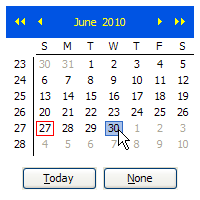
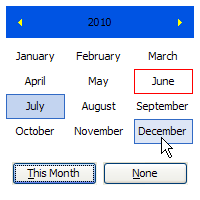
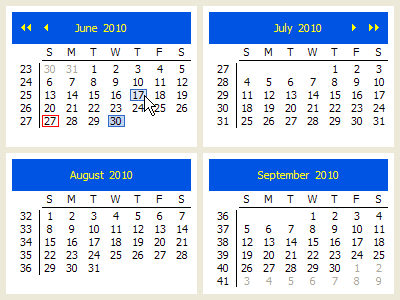
Just as with any Java object, properties may either be accessed with the Java accessor methods (e.g. getName() or setName(name)), or the Matlab get/set semantics (e.g. get(prop,’Name’) or set(prop,’Name’,value)). When using the Matlab syntax, remember to wrap the Java object in a handle() call, to prevent a memory leak (or use hPanel rather than jPanel):
jPanel.setShowWeekNumbers(false); % Java syntax set(hPanel,'ShowTodayButton',true); % Matlab syntax |
Retrieving the selected date is easy:
>> selectedDate = jPanel.getSelectedDate() selectedDate = Sun Jun 27 00:00:00 IDT 2010 % or: selectedDate = get(jPanel,'SelectedDate'); % Note: selectedDate is a java.util.Date object: >> selectedDate.get Class = [ (1 by 1) java.lang.Class array] Date = [27] Day = [0] Hours = [0] Minutes = [0] Month = [5] Seconds = [0] Time = [1.27759e+012] TimezoneOffset = [-180] Year = [110] |
We can enable selection of multiple dates (SINGLE_SELECTION=0, SINGLE_INTERVAL_SELECTION=1,MULTIPLE_INTERVAL_SELECTION=2):
jModel = hPanel.getSelectionModel; % a com.jidesoft.combobox.DefaultDateSelectionModel object jModel.setSelectionMode(jModel.MULTIPLE_INTERVAL_SELECTION); >> hPanel.getSelectionModel.getSelectedDates ans = java.util.Date[]: [java.util.Date] [java.util.Date] [java.util.Date] |
And of course we can set a callback for whenever the user modifies the selected date(s):
hModel = handle(hPanel.getSelectionModel, 'CallbackProperties'); set(hPanel, 'ValueChangedCallback', @myCallbackFunction); |
For the combo-box (drop-down/popup menus) controls, we obviously need to modify the displayed size (in the javacomponent call) to something much more compact, such as [10,10,100,20]. These components display one of the above panels as their pop-up selection panels. Users can access and customize these panels using the combo-box control’s getPopupPanel() function (or PopupPanel property).
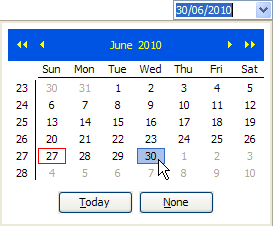
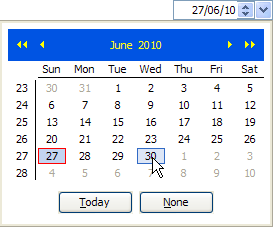
Numerous other customizations are possible with these JIDE components – have fun exploring (my uiinspect utility can be quite handy in this)! Just remember that JIDE evolves with Matlab, and so JIDE’s online documentation, which refers to the latest JIDE version, may be partially inapplicable if you use an old Matlab version. The older your Matlab, the more such inconsistencies that you may find.
Alternative components
There are several alternatives to the JIDE components:
If we have Matlab’s Financial toolbox, we can use the uicalendar function. Unfortunately, this control is not available if you don’t own the expensive Financial toolbox.
If we only target Windows-based platforms, we could use third-party ActiveXes such as the Microsoft Date-and-Time-Picker (MSComCtl2.DTPicker.2), Microsoft MonthView (MSComCtl2.MonthView.2) or the Microsoft Office Calendar (MSCAL.Calendar.7) ActiveX controls. Depending on your installed applications, you may have other similar controls. For example, if you have Symantec’s EndPoint Protection (SEP), you have access to the SEP Date Control (LDDATETIME.LDDateCtrl.1). Of course, these controls will not work on non-Windows platforms, or platforms that do not have these ActiveX controls installed.
We can also use other (non-JIDE) third-party Java controls from places like javashareware.com, swinglabs.org, downloadthat.com, sharewareconnection.com, easyfreeware.com, l2fprod.com, fileheap.com/software/components.html, swing-components.safe-install.com and many others. One specific example is NachoCalendar, from SourceForge.com.
Finally, we could use some of the utilities posted on the Matlab File Exchange: uical, uisetdate, calender (sic) and several others.
In my own biased opinion, none of these alternatives comes close to the ease-of-use and functionality of the JIDE components presented above. What do you think? Please add your comments here.

Could you please explain how to change the date format of the DateSpinnerComboBox? I poked around with the findjobj tool, but it appears the format must be a java class?
Currently it reads 30/06/10. How would you change it to appear as June 30, 2010?
Thanks.
@Mike – you can use the java SimpleDateFormat class:
Thanks, Donn. I appreciate your help.
Ok, I’m starting to love them java components in my GUI, but I still dont know anything about java.
How would I initialize a date for the DateComboBox?
@Mike – you can use the setDate() function, as follows:
Use my UIInspect utility or Matlab’s built-in methodsview function to explore the dozens of available methods.
Thanks for your response and your patience. Java syntax is completely new to me, so I have great difficulty reading the doc pages online.
I inserted the OK button with
Now I want the window to close when I push the OK button.
How can I do that by using callback?
@gunnar – there is no easy answer I think. If you wish, I could develop a small function that shows you how to do this – email me.
Thank you for posting this!
I created a DateChooserPanel with a ValueChangedCallback assigned to it, but it is not triggered when i change the month. Is there a separate callback for this? uiinspect only shows ValueChangedCallback.
Is there any way to get a callback to trigger when changing the month?
@Henric – clicking the month is not an actionable event in
DateChooserPanel– only selecting a specific date is actionable. If you wish to select a month, useMonthChooserPanelinstead.Hi, Yair,
I’m trying to implement a callback for the selection from a DateSpinnerComboBox. Unfortunately, it does not appear to have a date selection model, as you show in your example. I bought your book, but it has the same info as this web page. I’m assuming this is more complicated, since it it has several components (text field, spinner, and DateChooserPanel). Do I have to create some kind of listener for each component?
Thanks,
Amy
Yair,
You are amazing! Thank you! This worked like a champ! Maybe this will go into the next edition of the book? 🙂
Amy
@Amy – maybe 🙂 I’m not sure at the moment if and when a second edition of my book will be published. A lot will depend on the question of how much will the upcoming Matlab 8 change the Java internals and interfaces.
In the meantime I’ve already started working on an altogether different Matlab programming book, and this is taking up much of my time…
Hi,
First of all thanks for posting this. I’m trying to add a DateComboBox in my GUI, but I need to be able to make some custom dates non selectable (and if possible also display them in another color).
I think I need to override some of the java code (I found an example in jide forum), but I don’t know if it’s possible in Matlab. If it’s possible, how do I do it?
This is the code I found:
@Carlos – I’m not sure you can customize the controls this way. However, I think you can use something similar to this (untested):
Alternately, you can create a Java class that implements
com.jidesoft.combobox.DateFilter. This is a simple interface that just defines 3 methods:Once you compile this class, you can add an object of it to the jDateChooser via
Thanks a lot! It worked and it also changes de color of the non selectable dates to gray.
But the correct method was addInvalidDate instead of removeInvalidDate. removeInvalidDate is for making the invalid date selectable again.
I found out that you can also set a min date and a max selectable date easily with setMaxDate or setMinDate (calling them in the same way that addInvalidDate).
I’ve just seen your edited comment. I want to change the selectable dates during the execution of my program depending on several things so I guess it’d be more simple to just use addInvalidDate, setMinDate and setMaxDate.
Thanks a lot!
It would be possible to show an example in java which display multiple dates selected, for example if the dates are taken from the db and need to be shown on the calendar
Hey Yair, I am following your guide and I ran into a problem.
I did exactly the same as you wrote, and everything was good until the part where i wanted to select
multiple dates on a calendar. But when I type in this line:
jModel = hPanel.getSelectionModel;It says: “No appropriate method, property, or field getSelectionModel for class handle.handle.”
What am I doing wrong? I’ve tried everything.
Thanks in advance!
@Ivan – this means that the
hPanelwas not created properly, or perhaps was deleted by the time your program got to thejModelassignment line.So how do I fix that? I followed your guide and used exactly the same commands up to that point.
This would really help me a lot.
When I leave the figure window open and type the lines:
then it doesn’t report the error I mentioned above. But it still doesn’t change the ability to select more dates on a calendar.
I’m confused.
@Ivan – it is impossible to know exactly why this happens without debugging your code and knowing more details about your environment (platform, Matlab release, java version – basically what ver reports). Contact me via email (altmany at gmail) with all the details and I’ll send you a proposed quote for solving this.
I am not too clear about how to include this in my own GUI. I have an app for which I created a GUI using GUIDE. How do I embed calendar tools in my GUI?
@Varouj – use the javacomponent function.
This is probably something so obvious that, for 90% of the people here, it may not be worth mentioning. For the sake of people like me that are still learning the absolute basics, I’d like to note that a simple way to make the calender disappear after selecting the desired date is:
Also, a way of getting the date so that you can use it for whatever you may need would be:
@amodedude – thanks for taking the time to make this clarification 🙂
I have a MATLAB GUI app that uses the DateChooserPanel. The app works fine on my Windows machines and on most of my Linux machines too. However, on one of my Linux machines, I get the following error when starting the application: “Unauthorized usage of JIDE products. You get this message if you didn’t input a correct license key.” The application runs, and the DateChoosePanel seemingly works other than returning a null date upon click.
The linux box that I have this issue on is running V2.6.18. Another linux box running 2.6.18 runs the application just fine.
I did not install any JIDE products/licenses on any of the machines this application works fine on. I thought JIDE automatically is part of MATLAB and no additional license is necessary.
Any ideas from anyone what’s going on here?
@Peter – JIDE is indeed part of Matlab, but sometimes Matlab initializes JIDE after your application, and therefore when it first starts to use JIDE in your app then JIDE complains. You can workaround most of these cases by issuing the following command at the very top of your application:
In rare cases this is not enough, since Matlab’s JIT pre-compiles the application and tries to load the relevant JIDE classes before initJIDE gets called in runtime. The workaround in these cases is to simply use eval to force Matlab to only load these classes in run-time. For example:
My recent treeTable utility illustrates both of these workarounds.
[…] in 2010, I explained how we can use one of these components, DateComboBox, and its close associate DateSpinnerComboBox. […]
Hi, nice article!
I try to make calendarViewer on my figure. But then i run
I get calendarViewer, which is not filled. It looks like a 4×3 blue boxes with control arrows.
What I do wrong?
Win 8.1, Matlab R2014a
@Max – you can’t expect a full year’s calendar to appear nicely in 190×190 pixels – change the control’s position vector to [10,10,600,600] or larger if you wish to see the internal text
Sorry, I found the reason of problem. Argument [10,10,200,200] in javacomponent define too small width and height.
@Yair Altman
thanks a lot. You make my life a bit simpler with JIDE calendarViewer.
Hi again, Yair.
Is there some way to highlight holidays and colorize background in calendarViewer?
Hello,
I am trying to get a callback when clicking on a date but it returns the error :
Error using javahandle_withcallbacks.com.jidesoft.combobox.DateChooserPanel/set
The name ‘ValueChangedCallback’ is not an accessible property for an instance of class ‘com.jidesoft.combobox.DateChooserPanel’.
Error in ZenRX>date_push_Callback (line 358)
set(hPanel, ‘ValueChangedCallback’, @myCallbackFunction);
Here is my code :
http://undocumentedmatlab.com/blog/matlab-callbacks-for-java-events-in-r2014a
It still doesn’t work.
I tried :
and I get error :
Error using javahandle_withcallbacks.com.jidesoft.combobox.DateChooserPanel/set
The name ‘ValueChangedCallback’ is not an accessible property for an instance of class ‘com.jidesoft.combobox.DateChooserPanel’.
Error in ZenRX>date_push_Callback (line 359)
set(hPanel, ‘ValueChangedCallback’, @myCallbackFunction);
Thank you very much Yair. One last question. I would like to delete the jpanel and not just hide it [ jPanel.setVisible(false) ] like someone mentioned before. Is there a command for that ?
I tryed:
Error : Warning: File ‘jPanel’ not found.
Marc – come on!!!
I wrote hContainer – I did not write ‘jPanel’.
Hi Yair,
I have create a DateCombobox abnd I am having trouble customizing the PopupPanel using the getPopupPanel method. It appears that the PopupPanel only gets created once the down arrow button is clicked and gets deleted once a date has been clicked, thus I am unable to get the handle and make changes.
For instance if I implement this code:
An empty matrix is returned, implying the PopupPanel doesn’t exist yet.
However, If I then implement the following code:
The font in the PopupPanel does change, but doesn’t persist until the next instance, implying the PopupPanel got destroyed and recreated.
Lastly, I used your uiinspect tool and noticed the isPopupVolatile method returns true. I tried to change this using the setPopupVolatile method to false, but to no avail.
Any ideas how I can access the PopupPanel of a DateCombobox?
@Simon – You could try to trap the object’s PopupMenuWillBecomeVisibleCallback:
Inside the callback function I think that you would get a valid PopupPanel handle (untested)
Hi Yair,
Thank you. Implementing this code worked perfectly.
Even simpler:
Hi Yair,
I have create a DateCombobox and I am having trouble about how to retrieve the selected date.
@dingchi – the popup panel needs to be displayed at least once for the panel to be created. You can do this programmatically:
Hi Yair,
Maybe I posted to the wrong blog….
Here is the date selection. I want to know is there any function or component can do the hour, minute and second selection?
Sorry..little bit mess up. Thanks
@Emma – you can display a time-selector in the date panel using the following code snippet:
There are also the related TimeFormat (default=”) and TimeZone properties that you can set.
If you need to interact with the time-related aspects of the panel, then you will need to investigate this yourself or hire me for a short consulting gig, since it’s beyond the scope of a simple blog comment.
Hi Yair,
In my application, I have coupled the appearance of a DateChooserPanel with the selection of a pushbutton/calender icon. Here is my issue: the pushbutton is located in the middle of a number of edit/text boxes. As such, when the DateChooserPanel is made visible, it appears on-top of or behind the other objects around it, and stays that way even after I ‘close it’ (i.e. set visible to false). The only way I could figure to make a seamless appearance/disappearance of the DateChooserPanel involves creating and then deleting the java component handle ‘hPanel’ every time the pushbutton is selected. This works, but I was wondering if there was a better way? I have read in normal Java script, I would need to create a JLayeredPane or make use of GlassPane.
I am using this Calendar. I was wondering does this have the functionality to resize itself if you change the screen. It would be great if you help me in this process.
You can set the java component’s Matlab container’s Units property to ‘normalized’ in order to automatically resize when the figure resizes:
is there menu for other kind of calenders such as month date (in arabic language) …
or sun date(in nfarsi language)… thanks alot
Hi,
I only see day 1-9 of the month, all the other days are indicated with three dots (like this …). I work on linux matlab 2015a.
On windows, matlab 2014b it works properly!
Any suggestions?
Thanks,
@Efraim – try to enlarge the component so that it has more space to display the 2-digit numbers.
Works perfect! Thanks for the help.
Hi,
how to set the default date that Shows up when inititalizing the DateSpinnerComboBox?
Thanks,
Heiko
… found the solution: SetDate with Java date Format as Input java.util.Date()
Hi, Yair Altman!
I use this helpful functionality but got interesting problem:
Create calendar this way:
And Callback function:
The problem: if I use Debug mode it works correct (put date day into this edit_text Object) but in normal mode it stays empty.
I thought a lot about some local variables deleted after exiting from function but still can’t figure out it.
Thank you
@Mikail – try to add drawnow; pause(0.1) after you call javacomponent.
See http://undocumentedmatlab.com/blog/matlab-and-the-event-dispatch-thread-edt
Yes, that works! Thank you!
Dear Yair
I have inserted Date selection components into my MATLAB GUI but I do know how I can make a handle for the Date selection components in order to update the date which is selected by user.
Many thanks in advance….
Kind Regards,
Mohammad
Mohammad – read the post carefully: I explained near the bottom how you can get the handle and set callbacks to get the user-selected date.
Dear Yair,
Many thanks for your help….
Kind Regards,
Mohammad
Hi Yair,
I noticed that for the DateComboBox, the current date value was outlined in red (by default) and remained that way even when the selection was changed. Is there any way to move that red outline to another initialized date? Also, I wanted to set a selectable date range, was there any way to do that easily (say by greying out non-valid dates)? Thanks in advance for the help!
@Alex – You can disable certain dates and date-ranges in the calendar as follows:
Similarly, you can use
jDateModel.addInvalidDate(calendar)to add specific invalid dates within the relevant min/max dates.You can set the date chooser to have a different initial (default) date value, but the current date is always marked on the calendar and AFAIK this cannot be avoided.
If you’d like any additional assistance with your Matlab project, please contact me by email for a consulting offer.
Thanks so much for your help Yair, code worked perfectly, you’re a life saver.
Hi Yair
i’m trying to set default string in DateComboBox to display before selecting date from date panel
but neither statement produces an effect. what am I wrong?
Thanks in advance for the help!
@Claudio – I don’t know exactly what you did in your code, the following works perfectly fine for me on R2020a:
Hi Yair,
Thank you for this interesting post, I am finding it really useful. However I am facing an issue that I am not able to solve.
I am using DateComboBox to select a date. I was able to change the language of the calendar shown using the function setLocale after identifying all possible values with: Locale.getAvailableLocales. But after selecting the date, I am not able to modify the language (or the format) in which the date string is displayed in the pop-up menu. For example it would be enough if the month was shown as number instead of with the three initial letters.
Could you please give me some advice? Thank you very much in advance!
Yair,
How would I implement a renderer for com.jidesoft.combobox.DateSpinnerComboBox so that the editor remains the same (combo box with spinner) but the renderer displays as a simple center aligned text field (like javax.swing.JTextField)?
Thanks in advance,
Philip
Hi Yair,
I’m trying to use the
MonthChooserPanelclass.With
DateChooserPaneleverything works perfectly, but I need to select only the month and year and then output them in an edit field. The CellSelectionCallback function is not normally activated when I click on a month inMonthChooserPanel, only when the month is selected and then i click on the white area next to it, it reacts, but that is not acceptable. Therefore I would to know whether it would be possible to work correctly with this Java class in Matlab.Hi Yair,
i’m trying to use the MonthChooserPanel class.
With DateChooserPanel everything works perfectly, but i need to select only the month and year and then output them in an edit field. The CellSelectionCallback function is not normally activated when i click on a month in MonthChooserPanel, only when the month is selected and then i click on the white area next to it, it reacts, but that is not acceptable. Therefore i would to know whether it would be possible to work correctly with this Java class in Matlab.
There’s now a uidatepicker object, but still not one for times / timezones. Is there any update to suggested methods for acquiring a user entered time?
https://www.mathworks.com/help/matlab/ref/uidatepicker.html
@Tim – the new uidatepicker() function only works with web-based figures (created using the uifigure() function or App Designer); it is not available on the legacy Java-based figures, and practically everything in this article relates to Java-based figures, and the controls are Java-based (not HTML/Javascript based like
matlab.ui.control.DatePickeron which uidatepicker() is based).Hello, has anyone tried to change the language of the DateComboBox? For example
English -> French
——————-
January -> Janvier
April -> Avril
English -> Italian
——————-
Today -> Oggi
None -> Nessuna
Thanks in advance!