
Matlab has a variety of interfaces to external programming languages. We can easily access ActiveX and COM-enabled applications from Matlab. Matlab also provides easy access to most COM/ActiveX functionalities, with a few exceptions and limitations.
Unfortunately, Microsoft’s VBScript is not one of the supported interface languages in Matlab. Therefore, if we need to use VBScript to customize ActiveX or COM functionality or appearance, we have a problem. In some cases, the ActiveX/COM application provides internal methods or properties that enables us to bypass the need for direct VBScript. But in other cases, VBScript is unavoidable.
Today I’ll show one such example, and how we can run the required VBScript code in Matlab. Note that the entire discussion is Microsoft oriented, and therefore only applicable to Microsoft Windows. And yes – not a single word today about Java…
The need
One of the standard controls in Microsoft Windows is ListViewCtrl (more precisely, MSComctlLib.ListViewCtrl.2), which provides a simple sortable table ActiveX. ListViewCtrl should be available on practically all Windows installations, in \Windows\System32\MSCOMCTL.OCX. It is an ancient control (over a decade old), yet still widely used in the ActiveX world.
While Matlab includes a built-in uitable function, it is sometimes beneficial to use ListViewCtrl instead. For example, ListViewCtrl enables easy setting of cell-specific tool-tips (ok, yes, this can also be done in uitables but it’s not as easy as in ListViewCtrl). ListViewCtrl also enables easy setting of row color and other goodies.
So ok – all of these can be overcome in uitable which is cross-platform (not just Windows-specific) and has some very important features missing from ListViewCtrl (perhaps most importantly, uitable doesn’t look a decade old, as ListViewCtrl does). Still, when maintaining legacy code you sometimes don’t have the luxury of using modern controls.
Indeed, I once needed to use ListViewCtrl, when I ran into today’s issue. Here’s a simple usage example:
% Set the control's position to be just inside % the container's pixel position initPos = getpixelposition(hParent) + [2,3,-5,-5]; [hActiveX,hContainer] = actxcontrol('MSComctlLib.ListViewCtrl.2', ... initPos, gcf, ... @lbEventHandler); bgColor = get(hContainer,'backgroundColor'); bgColorDec = sum(floor(bgColor*256).*(256.^[0:2])); %#ok % Customize the control's appearance set(hActiveX, 'view','lvwReport', 'BorderStyle','ccNone', ... 'AllowColumnReorder',0, 'Appearance','ccFlat', ... 'Sorted',0, 'Checkboxes',1, 'FullRowSelect',1, ... 'HotTracking',1, 'HoverSelection',0, ... 'HideColumnHeaders',0, 'BackColor',bgColorDec); % Set the column headers panelPos = hgconvertunits(gcf, ... get(hContainer,'Position'), ... get(hContainer,'Units'), ... 'centimeters', hParent); panelWidth = panelPos(3)*955; % [Microsoft units...] colWidths = panelWidth * [0.2,0.2,0.6]; hColHeaders = get(hActiveX,'ColumnHeaders'); hColHeaders.Add(1,'Name','Name',colWidths(1)); hColHeaders.Add(2,'Type','Type',colWidths(2)); hColHeaders.Add(3,'Comment','Comment',colWidths(3)); % Add some data blue = hex2dec('FF0000'); % reverse HTML hex color: BBGGRR data = { 'Orange', 'Fruit', 'My favorite fruit'; ... 'Onion', 'Vegetable', 'An onion a day keeps everybody else away'; ... 'Apple', 'Fruit', 'An apple a day keeps the doctor away'; ... 'Tomato', 'Vegetable', 'You say tomato, I say tomato, let''s call the whole thing off'}; for rowData = data' row = hActiveX.ListItems.Add([],rowData{1},rowData{1}); row.ListSubItems.Add([],[],rowData{2},[],rowData{2}); row.ListSubItems.Add([],[],rowData{3},[],rowData{3}); row.ListSubItems.Item(1).ForeColor = blue; end |
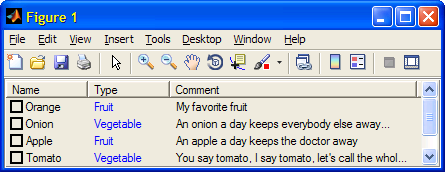
While most of ListViewCtrl’s features are accessible as internal properties and methods, one particular aspect requires VBScript. Which finally brings us to today’s topic:
Apparently, ListViewCtrl supports data sorting by simply clicking the column headers. Unfortunately, the sort icons (up/down arrows) have to be specified using an ImageListCtrl (
MSComctlLib.ImageListCtrl.2) that holds the images. ImageListCtrl in turn requires using the internal built-in VB function LoadPicture() to load the images.Unfortunately, Matlab does not enable direct invocation of VB code. So unless we find a way of calling VB’s internal LoadPicture() directly from Matlab, we cannot use sorting icons in our ListViewCtrl.
An ugly workaround
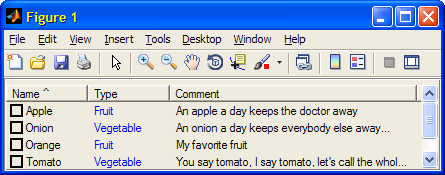
An ugly workaround for this problem is to modify the column name in run-time, so that clicking a column header (e.g., “Name”) will sort its data and also modify the column name to “Name ^” or “Name v”, depending on the sorting order:
% Event handler for ListBox item click % Note: see documentation within %matlabroot%\toolbox\matlab\winfun\private\comeventcallback.m function lbEventHandler(obj,eventId,item,eventArgs,eventName,varargin) try if (nargin<5) || ~ischar(eventName) return; % can't tell which event this is end switch eventName case 'ItemClick', item.Checked = 1 - item.Checked; doSomethingUseful(item); case 'ItemCheck', % do nothing case 'ColumnClick', % Update the sorting order for the new (clicked) column obj.Sorted = 1; newSortKey = item.Index - 1; if strcmpi(obj.SortOrder,'lvwAscending') && (newSortKey == obj.SortKey) obj.SortOrder = 'lvwDescending'; sortStr = ' v'; else obj.SortOrder = 'lvwAscending'; sortStr = ' ^'; end % Update the column header text with the sort "icon" string if (obj.SortKey ~= newSortKey) oldColHeader = obj.ColumnHeaders.Item(obj.SortKey + 1); oldColHeader.Text = strrep(oldColHeader.Text,' v',''); oldColHeader.Text = strrep(oldColHeader.Text,' ^',''); newColHeader = obj.ColumnHeaders.Item(newSortKey + 1); newColHeader.Text = [newColHeader.Text sortStr]; end obj.SortKey = newSortKey; otherwise, % do nothing end % switch eventName catch handleError; end end % lbEventHandler |
As can be seen, the result does not look very professional:
The solution
The solution to the problem is to use a not-well-known COM server component called ScriptControl (MSScriptControl.ScriptControl). By using ScriptControl’s eval() function we can call the built-in
% Load the images using ScriptControl hScriptControl = actxserver('MSScriptControl.ScriptControl'); hScriptControl.Language = 'VBScript'; picUp = hScriptControl.Eval('LoadPicture("..\Icons\UpIcon.gif")'); picDown = hScriptControl.Eval('LoadPicture("..\Icons\DownIcon.gif")'); % Now prepare an ImageList with these images [hImageListActiveX, hContainer2] = actxcontrol('MSComctlLib.ImageListCtrl.2',initPos); set(hContainer2,'Pos',[initPos(1:2),1,1]); % hide the control hImageListActiveX.ListImages.Add([],[],picUp); hImageListActiveX.ListImages.Add([],[],picDown); % Finally, attach the images to the ListViewCtrl headers hActiveX.ColumnHeaderIcons = hImageListActiveX; |
And now modify the sorting icon whenever a column header is clicked:
% Event handler for ListBox item click % Note: see documentation within %ML\toolboc\matlab\winfun\private\comeventcallback.m function lbEventHandler(obj,eventId,item,eventArgs,eventName,varargin) try if (nargin<5) || ~ischar(eventName) return; % can't tell which event this is end switch eventName case 'ItemClick', item.Checked = 1 - item.Checked; doSomethingUseful(item); case 'ItemCheck', % do nothing case 'ColumnClick', % Update the sorting order for the new (clicked) column obj.Sorted = 1; newSortKey = item.Index - 1; if strcmpi(obj.SortOrder,'lvwAscending') && (newSortKey == obj.SortKey) obj.SortOrder = 'lvwDescending'; sortIconIndex = 1; else obj.SortOrder = 'lvwAscending'; sortIconIndex = 0; end % Remove sort icon from previous column setSortIcon(obj.hWnd,obj.SortKey,-1); % Add the sort icon to the clicked column header setSortIcon(obj.hWnd,newSortKey,sortIconIndex); % Update the previous column header text, to remove '...' due to the sort icon if (obj.SortKey ~= newSortKey) oldColHeader = obj.ColumnHeaders.Item(obj.SortKey + 1); oldColHeader.Text = oldColHeader.Text; end obj.SortKey = newSortKey; otherwise, % do nothing end % switch eventName catch handleError; end end % lbEventHandler |
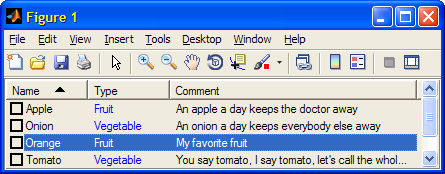
This code uses the MEX utility setSortIcon, which was developed (not by me, I can’t remember by whom) based on this. Simply unzip the setSortIcon.zip file into your favorite folder on the Matlab path. The zip file contains the c source code, that you can modify and mex-recompile if you wish.
Running VBA Macros
A related issue is running VBA macros from Matlab. This was very recently asked and answered on the CSSM forum, so I’ll just provide Peter Lorin Rasmussen’s code (read higher up in that CSSM thread for more details):
% Initiate active X component powerPoint = actxserver('PowerPoint.Application'); % Visible powerPoint.Visible=1; % Minimize powerpoint powerPoint.WindowState=2; % Load presentations object presentations = powerPoint.presentations; % Open file presentation = invoke(presentations,'open',fileName); % Load VBA project k = presentation.VBProject.Collection.get(); % Run Macro k = invoke(presentation.application,'run',macroName,varargin{:}); % Close all presentation.Save; presentation.Close; powerPoint.Quit; powerPoint.delete; |
Do you have any favorite code in another programming language that you run from Matlab? Don’t be shy – please tell us all about it in a comment below.

I am working on a project in Image Processing, in which I have to run a MATLAB program in VB.NET. In the project there is a VB.NET GUI, which contains a browse button. The user has to click on the browse button and select an image for processing. Then the user has to click on the Process button for processing the image.
After clicking the process button the image selected by the user has to go as input to the MATLAB program.
Q1) I want to know how to give the image selected by the browse button of VB.NET, as input to the MATLAB program for processing?
Also while the image is being processed in MATLAB, a message such as “The image is being processed” must be displayed on the VB.NET GUI.
Q2) Please tell me how to display the message “The image is being processed” on the VB.NET GUI, while the image is being processed in MATLAB?
After the image has been processed in MATLAB, the image must be displayed on the VB.NET GUI.
Q3) Please tell me how to display the image from MATLAB program in VB.NET GUI?
Plz plz plz provide a solution to my problem as soon as possible.
I want to connect to a Trio Motion Controller, in order to move a two-axis traverse system. There exists some visual basic code, which uses ActiveX, to communicate with the controller. It does this first by establishing a connecting through an IP address. A list of commands are then sent in the VB code to control the traverse. Should it be possible to do this in Matlab, either by: opening the connection and executing the commands directly in Matlab; or by calling the VB code, and passing certain variables from Matlab to VB.
@Tariq – it should be relatively easy for you to embed the ActiveX in a Matlab figure using the actxcontrol command or GUIDE. You could then control the controller via this ActiveX’s commands. There is no need to run VB code directly, if I understand the situation correctly.
[…] such control that is pretty standard is Microsoft’s MSComctlLib.ListViewCtrl.2. I showed an example of ListViewCtrl usage a few years ago, and readers are referred there for details. Here is the end result:Sorted […]
I recently looked at RTD functionality in excel and realised it could be very interesting to port into matlab.
Making a bridge without making excel crash would give access to a number of services I would like to use.
Would ScriptControl be a good starting point? I also read about writing a wrapper in C# that would expose rtd functionality to COM and then it would be easy to interface.
Any other hack you can think of?
You could try to use Mex and interface via C++
I am developing an expert system based on fuzzy logic using matlab and vb.net. but i dont know how to link the symptoms highlighted by the patient and do the inferencing in matlab. i really need an assistance
@Joseph – contact me via email (altmany at gmail) if you need consulting assistance.
This is a very long and roundabout way to do something there’s already a simple solution for in MATLAB:
In your VBS code, have the line:
Wscript.Echo MyOutputVariablesWhere “MyOutputVariables” is your desired output
Then call from matlab with dos:
Where myvbsfile.vbs is the name of your script. Message will contain the output you’re looking for.
voila!
cscript is an alternative to wscript (Windows default for VBS files) which will output the command to a console (vice a message box) – in this case, the MATLAB console since it was called from MATLAB.
I tried this in 2015a, but I’m sure it works in any version with the dos command and Windows version that supports cscript.
Hi,I’m a researcher at Control Engineering & Industrial Automation, Now i’m researching about how to connect a Fatek PLC to Matlab! I just used the interface program OPC server & VB code ,but it couldn’t answer .
can u help me how can i use my visual basic codes in matlab?
is there any way to export my vb codes?
Hi,
How to access excel user form using actxserver.?
see here
Hi Yair, big fan of your blog. Thank you for increasing the worlds productivity by a not insignificant margin.
On-topic then, I’m trying to learn from your example but I fear I’m missing something obvious. Why is hParent not defined in your example?
To troubleshoot it myself, I tried creating an ActiveX object in guide, but I can’t see MSCOMCTL in the list. (even after MSCOMCTL.OSX was successfully added to the registry in command prompt.)
It’s probably a bkac problem, but it has been a few years since your post, so I wonder if Windows or Matlab has changed and broken your example. I’m therefore not sure how much I should persist to get your example to work.
@Peter –
hParentis supposed to be the handle to the container (typically a uipanel) that contains your control.As to why MSCOMCTL is not available in your system, that’s probably because you’re using a new Windows version that does not have this control. After all, the post was originally written back in 2011, when Windows XP was king. You might find an alternative ActiveX control on your Windows, but my opinion is that ActiveX should be avoided in general – it’s an old and problematic technology. You’d be much better off using Java controls instead.