
Whenever we have a Matlab GUI containing user-modifiable controls (edit boxes, sliders, toggle buttons etc.), we may wish to include an undo/redo feature. This would normally be a painful programming task. Luckily, there is an undocumented built-in Matlab support for this functionality via the uiundo function. Note that uiundo and its functionality is not Java-based but rather uses Matlab’s classes and the similarly-undocumented schema-based object-oriented approach.
A couple of months ago, I explained how to customize the figure toolbar. In that article, I used the undocumented uiundo function as a target for the toolbar customization and promised to explain its functionality later. I would now like to explain uiundo and its usage.
The uiundo function is basically an accessor for Matlab’s built-in undo/redo manager object. It is located in the uitools folder (%MATLABROOT%\toolbox\matlab\uitools) and its @uiundo sub-folder. To use uiundo, simply define within each uicontrol’s callback function (where we normally place our application GUI logic) the name of the undo/redo action, what should be done to undo the action, and what should be done if the user wished to redo the action after undoing it. uiundo then takes care of adding this data to the figure’s undo/redo options under Edit in the main figure menu.
For example, let’s build a simple GUI consisting of a slider that controls the value of an edit box:
hEditbox = uicontrol('style','edit', 'position',[20,60,40,40]); set(hEditbox, 'Enable','off', 'string','0'); hSlider = uicontrol('style','slider','userdata',hEditbox); callbackStr = 'set(get(gcbo,''userdata''),''string'',num2str(get(gcbo,''value'')))'; set(hSlider,'Callback',callbackStr); |
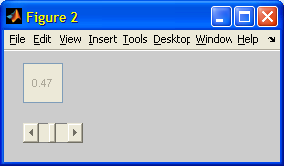
Now, let’s attach undo/redo actions to the slider’s callback. First, place the following in test_uiundo.m:
% Main callback function for slider updates function test_uiundo(varargin) % Update the edit box with the new value hEditbox = get(gcbo,'userdata'); newVal = get(gcbo,'value'); set(hEditbox,'string',num2str(newVal)); % Retrieve and update the stored previous value oldVal = getappdata(gcbo,'oldValue'); if isempty(oldVal), oldVal=0; end setappdata(gcbo,'oldValue',newVal); % Prepare an undo/redo action cmd.Name = sprintf('slider update (%g to %g)',oldVal,newVal); % Note: the following is not enough since it only % updates the slider and not the editbox... %cmd.Function = @set; % Redo action %cmd.Varargin = {gcbo,'value',newVal}; %cmd.InverseFunction = @set; % Undo action %cmd.InverseVarargin = {gcbo,'value',oldVal}; % This takes care of the update problem... cmd.Function = @internal_update; % Redo action cmd.Varargin = {gcbo,newVal,hEditbox}; cmd.InverseFunction = @internal_update; % Undo action cmd.InverseVarargin = {gcbo,oldVal,hEditbox}; % Register the undo/redo action with the figure uiundo(gcbf,'function',cmd); end % Internal update function to update slider & editbox function internal_update(hSlider,newValue,hEditbox) set(hSlider,'value',newValue); set(hEditbox,'string',num2str(newValue)); end |
And now let’s point the slider’s callback to our new function:
>> set(hSlider,'Callback',@test_uiundo); |
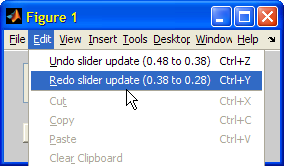
We can also invoke the current Undo and Redo actions programmatically, by calling uiundo with the ‘execUndo’ and ‘execRedo’ arguments:
uiundo(hFig,'execUndo'); uiundo(hFig,'execRedo'); |
When invoking the current Undo and Redo actions programmatically, we can ensure that this action would be invoked only if it is a specific action that is intended:
uiundo(hFig,'execUndo','Save data'); % should equal cmd.Name |
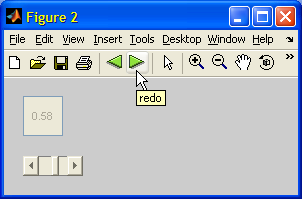
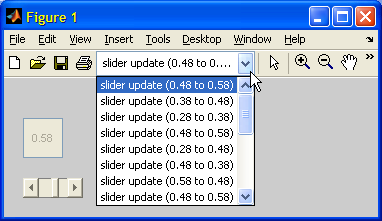
We can use this approach to attach programmatic undo/redo actions to new toolbar or GUI buttons. The code for this was given in the above-mentioned article. Here is the end-result:
In my next post, due next week, I will explore advanced customizations of this functionality.

Dear Mr. Altman,
I try to write my own UNDO function for the matlab editbox. I use the Keypresscallback but that’s a little bit to late. I need the originaltext before the keypress and the CaretPosition, SelectionStart, SelectionEnd. Do you know how to get all values before the Keypresscallback?
regards
@Xenia – you could modify your KeyPressedCallback function to store the latest values of the edit string, CaretPosition etc. in a persistent manner. For example, you could use the persistent keyword or the component’s ApplicationData property (that you can access via Matlab’s builtin getappdata, setappdata functions. Then, in your callback function you can always check the new value and compare it to the persistent value that was stored in the last callback invocation.