
Matlab’s built-in editor, like most other Matlab GUI, is Java-based. As such, it can easily be accessed programmatically. ImageAnalyst, a well-respected member of the Matlab community and a frequent CSSM (newsgroup) and FEX (File Exchange) contributor, recently asked whether it is possible to retrieve the name of the Editor’s currently edited file. The answer is that this is very easy, but I decided to use this opportunity to show how other interesting things can be done with the Editor.
Before we start, it should be made clear that this entire article relies on MathWorks internal implementation of the Editor and Desktop, which may change without prior notice in future Matlab releases. The code below appears to work under Matlab 6 & 7, but users who rely on forward compatibility should be aware of this warning.
We start by retrieving the Editor handle. This can be done in a number of ways. The easiest is via the Matlab desktop:
try % Matlab 7 desktop = com.mathworks.mde.desk.MLDesktop.getInstance; jEditor = desktop.getGroupContainer('Editor').getTopLevelAncestor; % we get a com.mathworks.mde.desk.MLMultipleClientFrame object catch % Matlab 6 % Unfortunately, we can't get the Editor handle from the Desktop handle in Matlab 6: %desktop = com.mathworks.ide.desktop.MLDesktop.getMLDesktop; % So here's the workaround for Matlab 6: openDocs = com.mathworks.ide.editor.EditorApplication.getOpenDocuments; % a java.util.Vector firstDoc = openDocs.elementAt(0); % a com.mathworks.ide.editor.EditorViewContainer object jEditor = firstDoc.getParent.getParent.getParent; % we get a com.mathworks.mwt.MWTabPanel or com.mathworks.ide.desktop.DTContainer object end |
Now that we have the Editor handle, let’s retrieve its currently open (active) file name from the Editor’s title:
title = jEditor.getTitle; currentFilename = char(title.replaceFirst('Editor - ','')); |
The entire list of open file names can be retrieved in several ways:
% Alternative #1: edhandle = com.mathworks.mlservices.MLEditorServices; allEditorFilenames = char(edhandle.builtinGetOpenDocumentNames); % Alternative #2: openFiles = desktop.getWindowRegistry.getClosers.toArray.cell; allEditorFilenames = cellfun(@(c)c.getTitle.char,openFiles,'un',0); |
At the top-level Editor-window level, we can prevent its resizing, update its status bar, modify its toolbar/menu-bar, control docking and do other similar fun things:
% Actions via built-in methods: jEditor.setResizable(0); jEditor.setStatusText('testing 123...'); jEditor.setTitle('This is the Matlab Editor'); % Equivalent actions via properties: set(jEditor, 'Resizable', 'off'); set(jEditor, 'StatusText', 'testing 123...'); set(jEditor, 'Title', 'This is the Matlab Editor'); |
Actually, the jEditor handle has over 300 invokable methods and close to 200 properties that we can get/set. Perhaps the easiest way to find interesting things we can programmatically do with the Editor handle, is to use my UIInspect utility on the File Exchange:
uiinspect(jEditor); % or: jEditor.uiinspect |
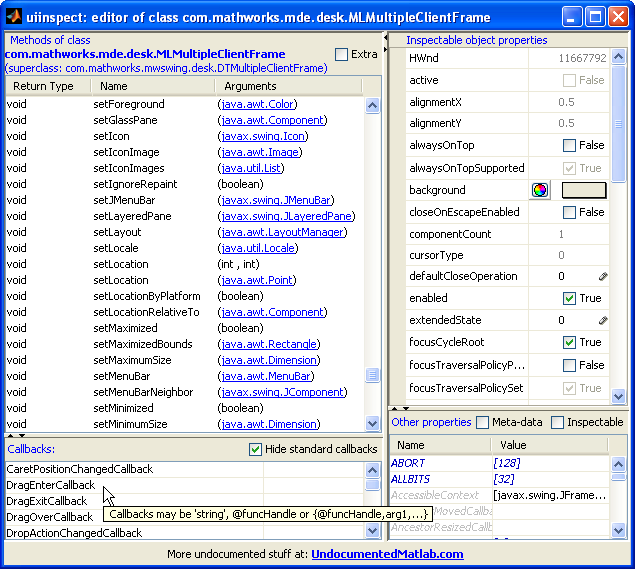
(click to zoom)
The Editor handle is actually a container for many internal panels (toolbars etc.) and documents. The entire object hierarchy can be seen with another of my File Exchange utilities, FindJObj:
findjobj(jEditor); % or: jEditor.findjobj |
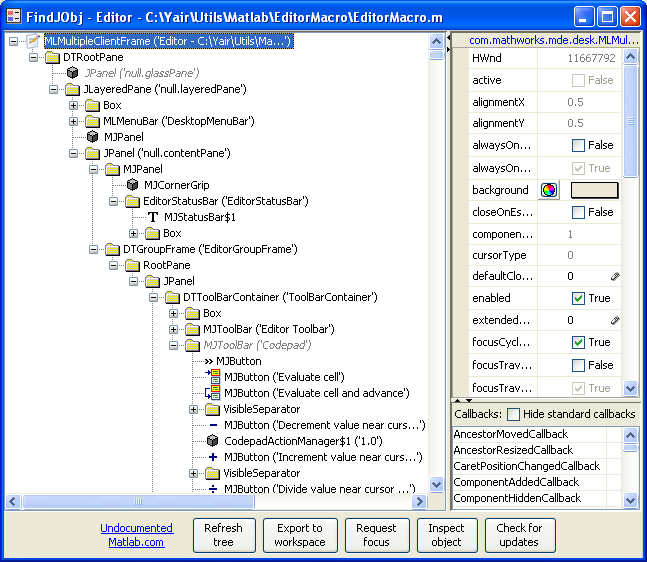
We can modify text within the open Editor documents, and instrument these document to handle event callbacks. To see how, I refer users to my EditorMacro utility on the Matlab File Exchange.
If you find some other nifty and/or useful things that can be done using the Editor handle, please post them in the comments section below.

To close all M-files in the editor, I use:
@Aurélien, in MATLAB >= R2009b you can try
editorservices.closeGroupAnd to leave the group up and just close all the open editors
For more about the “less undocumented” way to access the editor, see my new post:
http://blogs.mathworks.com/desktop/2009/10/26/the-matlab-editor-at-your-fingertips/
Do you know how can I find the bookmarks in the editor? I would like to get all bookmarks and save them on closing Matlab, so that on reopening, they could be restored.
Thx
Ruben – that was a hard question that kept me digging for hours. I discovered (via the FindJObj utility) that the bookmarks are displayed in a panel called ‘ExecutionArrowDisplay’ of class com.mathworks.mde.editor.ExecutionArrowDisplay$ExecutionPanel. I do not know whether the list of bookmarks are contained within this object, although I suspect they are. In any case, I did not find a method to programmatically retrieve this list since the ExecutionPanel object does not expose any method to do so.
So, the only way I could find is to loop over all the editor’s open files, and invoke the editor’s default action for <F2> (which is the ‘next-bookmark’ action reported by the EditorMacro utility) in a loop until you detect coming back to an earlier line number. It’s ugly, but it should work. The reverse, setting bookmarks, could be done in a similar fashion, using the ‘toggle-bookmark’ action.
I think it could be a great File Exchange utility. Care to try it? If you get stuck I can help out.
My editor window is docked and that stops title being the ‘Editor – ‘… form. I wanted to get the active document so I could invoke a command to open the directory of the current editor’s file.
Thanks to Aurélien I discovered the following to get the current editor’s file path:
For anyone interested, Jan Simon has just posted a few more useful things that can be done using the Editor handle:
Bring the editor to front:
jEditor.toFront;Is the editor active currently:
jEditor.isActive;Perform an action whenever the user activate the editor:
Or the usual function handle callback style.
See further properties:
and
This does not work on my Matlab 6.5.1, WinXP SP3, JavaVM 1.3.1_01
There is no getOpenDocuments method for the EditorApplication.
The solution is trivial: Do not use Matlab 6.5… Thanks, Jan
@Jan – I’m willing to bet that the solution for 6.5 is simply a variant of the Matlab 6 syntax. Try to run the following command in Matlab 6.5 to check whether the getOpenDocuments() method was renamed:
Nope. The EditorApplication knows: closeAll, closeDocument, equals, getClass, hashCode, isDocumentDirty, isStandalone, main, newDocument, newDocumentWithString, notify, notifyAll, openDocument, openDocumentToFunction, openDocumentToLine, reloadDocument, saveDocument, showJitZones (what’s that?!), toString and wait.
Surprising. Jan
Hi Yair!,
thank you for the undocumented stuff! really great!
Now i have one question: would it be possible to add a uitree to the editor? It would be great to browse through the opened files which are grouped by “projects” or something, especially if you opened large number of files…better than then a simple list.
Greeting form Germany,
Chris
@Christian – you can’t [easily] add a tree to the Editor, but you can create a simple tree in a regular Matlab figure (use the built-in uitree function), set the node callbacks to something like: edit(filename) and then dock this figure into the Editor (yes I know this sounds a bit strange) using my setFigDockGroup utility.
Hi,
I sent this question on MATLAB central but received no answer, so I post it here again in case you’ve not seen it!
I have a time tracking software that records the time I spend on each application. It recognizes the applications by their window caption. I’m used to have the MATLAB editor docked into the main window, so all my working time in MATLAB is reported under the name of “MATLAB 7.8.0 (2009a)”. I’m thinking of a way to change the main window title to the name of the document I’m currently working on. Thanks to undocumentedmatlab.com now I know how to get the name of the active document and how to change the window title by accessing related java components. What I need is to code a callback function to be triggered whenever I switch to another document in the editor. However I didn’t find the right callback property. Any idea?
P.S. What I said I know works when the editor is undocked which is not what I’m looking for! So I correct that: I don’t even know how to get the title of the active document in the editor when the editor is docked into the main window 🙁
Hi Yair,
as for MATLAB 7.11 the code
does not work anymore. Do you know any workaround?
Thank you for your constant efforts digging out the internals of MATLAB and sharing them with us.
Ralf.
@Ralf – in R2010b (Matlab 7.11), the Java class interface has changed. In R2010b, we get the editor handle as follows:
The method names and parameters have also changed from those of the pre-R2010b Java class. Each edited document now has a separate com.mathworks.mde.editor.MatlabEditor object. The jEditorApp.getActiveEditor() method returns the MatlabEditor object for the currently-edited document; the other documents can be retrieved using jEditorApp.getOpenEditors(), which returns a java.util.Collections.UnmodifiableList of such MatlabEditors.
Once you get your desired document (a MatlabEditor reference), its functionality can be accessed via its MatlabEditor’s methods (bringToFront(), close(), goToLine(…), reload(), replaceText(…), setEditable(…) etc.) or properties (e.g. CaretPosition, Document, Language, Length, LongName, ShortName, Selection, Text, etc.). I suggest using my CheckClass or UIInspect utilities if you want additional information about the supported properties, callbacks and methods. I may also post about this in the upcoming months, since it needs much more space than a simple comment here, so stay tuned.
Of course, you can always continue to use the partially-documented/supported editorservices object that Mike Katz introduced last year (see his comment above).
-Yair
Hi Yair,
Thanks a lot for undocumented matlab articles, those are really helpful.
I’m trying to build a GUI which has matlab editor in the figure. Currently I can use following program to show the editor in my GUE
but, a blank editor window still remains open, and when I close that window, the program displayed in the matlab figure is also closed. Is there any other way I can bring the editor in a matlab figure? I think this is not impossible because the GUI of s-function editor block in simulink has that facility.
Thanks
-Punit
@Punit – instead of re-parenting the Editor document as you had attempted, why not use one of the simpler options suggested in http://undocumentedmatlab.com/blog/syntax-highlighted-labels-panels/?
-Yair
Hi Yair,
Thanks a lot. That article is really helpful
-Punit
Hi
Would it be possible to add functionality to the context menu? I would like to be able to evaluate a function with the selected text as input, i.e size() of the variable i right-clicked on.
K
hi, Yair Altman, i want to add a run function of VBScript codes in the editor, now i just make a shortcut in the matlab desktop like this. can you give me some help? thanks a lot!
@Rex – Windows shortcuts cannot be run via the dos function, as far as I know. Instead, you need to refer to the actual file location (not a shortcut). Also, you might need to use winopen rather than dos.
Hi, Yair
This function works. I want to add a button to the Editor, with the same function. Or change the function of “Run” button.
Hi,
Thanks a lot for the undocumented articles , those are really very helpful .
I am trying to highlight the line number of the editor which has errors/warnings(syntax or runtime) using the object of the editor . Is there any specific property of the editor object(jEditor), which on being accessed can highlight particular line of the editor.
I have tried this using “matlab.desktop.editor.openAndGoToLine” but it doesnt work in lower versions of matlab.
Can you please help me out with this.
@Anubhav – try using Matlab’s built-in opentoline function
Hello Yair,
I would like to know, how register when the editor changes the
active document. (e.g. closing the current one, or opening a new one)
com.mathworks.mde.editor.MatlabEditorApplication has the method
“addEditorApplication” but i can create the needed object
due I do not know its constructor arguments
I also thought of listening to a change of its “ActiveEditor” property
but i dont know how to implement a property-listener for a java-object-property
and let me say: you are doing a great work at all!
You are making our matlab lifes much more comfortable. Thank you
Bluesmaster
@Bluesmaster – you can set the Editor object’s ComponentAddedCallback (=new doc) and ComponentRemovedCallback (=closed doc) properties with your own code. See the code in the EditorMacro functions getJEditor(), getJMainPane() and the main function for specifics. Here’s a bare-bones snippet that works for Matlab 7+ with a detached (non-docked) Editor window:
Hello Yair,
unfortunately this is not what I need due to the following lacks:
– not working for docked windows
– not working for multiple editor windows
– not working for switching to a document that is already open (sorry didn’t made that clear)
I need to assure, that I always know the active document.
So I think the graphic-container-layer is the wrong place.
I would like to do it though the data-model, and it is possible through:
OR
Observing
e.ActiveEditor (But I don’t know how to implement such a listener)
Kind regards
Bluesmaster
@Bluemaster – read the parts of EditorMacro that I mentioned above, they handle the cases of docked and detached editor window(s). You can also look at the callbacks of the EditorApplication (that you’ve shown you know how to get) – there’s probably a callback in there that could help you. Regarding listeners, search my website for the term “listener” and you’ll find plenty of examples. If you’d like me to spend real time on investigating this for you, send me an offline email and I’ll investigate this issue for you for a small consulting fee.
Hi Yair,
I have some questions which are related to this post but not quit….
I am using Git as source control.
I want to see a comment with the current working branch on the command window.
Is there a way
1) Changing only the title of the command window (such that all other things will work normally)
2) Updating the current branch every time the branch file is changes (something like that the opened files are updated if I edit them in the background with a different text editor)?
Thanks in advance,
Ruthy
Hi Yair,
I know this is not directly related to the content of this post but it is close…
I am using Git as the source control.
I would like that the current branch will be displayed on the workspace\editor as the name of the window (only title displayed so that matlab will keep working as usual).
I know where to find the current branch.
My question is how do I keep track on a specific file and each time it changes to update the view. My second question is how to change only the display and not the window name for the system.
Thanks!
Ruthy
@Ruthy – see http://undocumentedmatlab.com/blog/jgit-matlab-integration/
[…] easier access, and in the Matlab Editor in general. Only a few days ago, a reader on this blog has shown interest in […]
Cool idea… Combine the ability to “mess with the editor” and the interface to git and make a complete, platform independent “project switcher”.
Hmmmm… Off to scratch my head and see what comes out 🙂
Bruce
[…] retrieve the Java Desktop instance (in the same manner as we do to get the Desktop instance to customize the Editor). From this instance we can find the handle to the appropriate […]
hi Yair
is there a way to open a function and then save the function as text or load it as a text in order to make some analysis over the function (like counting how much for loops there is in a function).
BTW , your work on undocumented Matlab is great 🙂
Thanks
Gil Rafalovich
@Gil – I don’t understand the problem:
Hi Yair
I try to reset file code folding settings stored in ‘MATLAB_Editor_State.xml’ following your suggestions in your book: “the editor will need to be closed and reopened for changes
to take effect” by
1. closing Editor
2. manipulating xml file
3. reopen all editor files
Unfortunately closing and reopening might be not enough that changes in ‘MATLAB_Editor_State.xml’ take effect. (I tested in R2014b)
Do you have any suggestions how to reset code folding? or how to force MATLAB to read ‘MATLAB_Editor_State.xml’?
Hope that the function I wrote helps somehow.
Sorry, some parts of the pasted code (mainly in the ‘remove code folding info’ section) are not displayed correctly – due to html.
@Andre – Try to restart Matlab (not just the editor)
Hi Yair
thanks for your immediate answer. you are totally right, but when restarting matlab I have hardly a chance to edit ‘MATLAB_Editor_State.xml’ using matlab code after it is updated by matlab during closing procedure or before it is read during matlab start.
I am rather searching for a function to actively reread ‘MATLAB_Editor_State.xml’ while matlab is running. Do you have any suggestion?
Thanks
Andre
Hello,
I need help in accessing Matlab editor’s file bar. I managed to find how to do it manually using the findjobj utility (which is rocks, by the way :)).
For example, I wanted to change a color of certain file in editor’s file bar.
So I’ve found using findjobj that I need to change backgroundcolor property in com.mathworks.widgets.desk.DTDocumentBar$DocumentButton.
What I want to do is get there from matlab, without using graphic interface of findjobj.
I guess, my question should be more general – once I’ve located some element in findjobj, how can I get his handle/access to its properties from matlab itself?
Thank you very much.
Arye
Hi Yair,
Many thanks for your (un)documented work and book.
Here is my question:
[SHORT]
Is there an easy way to emulate the in ‘block’ C code editing
that is available in the “Embedded Matlab Function” (SimulinkBlock).
[MORE Detailed]
I was using the old
JSyntaxPaneJava library, to call for inline editing of hidden block userdata field, and to replace the ugly Usercode blocks managed by the “ccextopenfcn”.However,
JSyntexPaneLib is now a bit obsoleted and not more maintained. Therefore I was intended to replace it with more efficient and portableEmbeddedMatlabEditor, thus minimizing also external java dependencies.Using the post guidance it is easy to open the Docs and flush some actions, but I did not found clear methods to switch syntax parsing to “C” and to intercept the file saving actions (even if a save interceptor method exist in the
com.mathworks.mde.editor.MatlabEditorApplication)Thank you again for your work.
[EVEN MORE]
Here is an example how I integrated the JSyntax
@Alberto – try
SyntaxTextPane.If you liked my book, please be kind enough to post a favorable review of it in Amazon (link)
I’d like to generate a warning when I close the MATLAB editor. Any ideas how one would go about achieving this?
Hi Yair,
I’m writing a function in Matlab that will auto-generate header information for a Matlab .m file using key-phrases and context throughout the file. It would be great if I could also auto-wrap comments programmatically, do you know of a way to do this either through Matlab’s matlab.desktop.editor class or the Java classes discussed on this page? Ideally, it would be equivalent to manually selecting text in the editor, then pressing CTRL+J to wrap any selected comments.
Thank you for this website, it’s been helpful on many occasions!
Hello,
It seems something changed lately (At least on MATLAB R2016a).
For most methods (Such as changing the bounds / size properties) I get the following error (This case for setBounds):
No public field setBounds exists for class com.mathworks.mde.desk.MLMultipleClientFrame.
How can one now access those properties?
One could still edit some of the properties by:
inspect(jEditor).
Thank You.
@Royi – setBounds is not a field but a method (that accepts either a
java.awt.Rectangleobject or 4intvalues as input parameter(s)). As far as I can tell, it still exists in R2016a, you simply have a usage bug in your code.Dear Yair,
I am using pretty old version of Matlab 7.6.0 (R2008a) and I noticed that there is a file named mfiletemplate.m in
toolbox/matlab/codetools/.I suspect that it should be used for templating a new file, i.e., I click on the New M-File and it shows a new m-file with some template (containing copyrights, etc.). However, it seems it is never called and I can’t find any documentation about this function. Do you know this function and how is it used?
In general, my problem is, that I would like to create an m-file containing some header each time I click on New M-file icon. I can do that using custom shortcuts (there is plenty of codes on fileexchange), but the main problem is that the custom shortcuts are not visible in editor window (only desktop). Is there probably a way to “hack” the new m-file icon that it would call my own script?
Thank you a lot.
Dear Yair,
I am using MatLab 2016a. Right now I am working on analyzing raw EEG data from emotiv epoc headset. Sometimes when I extract data from the headset, some inconsistencies come along with sensor values. I need to remove these to get clean data. I can use ‘Find and Replace’ icon for that. But I want to script this task in my program so that I dont have to do it manually every time.
I need to script ‘ Find and Replace’ icon in the editor window. Could you please help!
Thank you.
use the
strrepfunctionThank you for your reply sir!
the thing is strfind or strrep wont detect the inconsistency i am talking about. It shows error something like this:
>> ans{1,1}
ans =
F@@@@@@@@@@@@@@@7
>> strrep (ans, ‘@@@@@@@@@@@@@@@@’,”);
strrep (ans, ‘@@@@@@@@@@@@@@@’,”);
↑
Error: String is not terminated properly.
>>