
A CSSM poster asked a few days ago whether it was possible to add a context (right-click) menu to uitree nodes. Uitree is an internal, undocumented and unsupported Matlab function, which does not enable easy setting of a uicontextmenu like its uicontrol relatives.
However, using some undocumented Java magic, it is possible to do so. Being undocumented and unsupported, this solution might break in future releases, although this is unlikely since it relies on some very basic Java functionality that is unlikely to be broken soon.
Note that the context-menu in the following example uses HTML formatting. As explained in an earlier post, all Swing components (and by extension, most Matlab uicontrols) support HTML formatting.
% Prepare the context menu (note the use of HTML labels)
menuItem1 = javax.swing.JMenuItem('action #1');
menuItem2 = javax.swing.JMenuItem('<html><b>action #2');
menuItem3 = javax.swing.JMenuItem('<html><i>action #3');
% Set the menu items' callbacks
set(menuItem1,'ActionPerformedCallback',@myFunc1);
set(menuItem2,'ActionPerformedCallback',{@myfunc2,data1,data2});
set(menuItem3,'ActionPerformedCallback','disp ''action #3...'' ');
% Add all menu items to the context menu (with internal separator)
jmenu = javax.swing.JPopupMenu;
jmenu.add(menuItem1);
jmenu.add(menuItem2);
jmenu.addSeparator;
jmenu.add(menuItem3);
% Set the tree mouse-click callback
% Note: MousePressedCallback is better than MouseClickedCallback
%       since it fires immediately when mouse button is pressed,
%       without waiting for its release, as MouseClickedCallback does
set(jtree, 'MousePressedCallback', {@mousePressedCallback,jmenu});
% Set the mouse-press callback
function mousePressedCallback(hTree, eventData, jmenu)
   if eventData.isMetaDown  % right-click is like a Meta-button
      % Get the clicked node
      clickX = eventData.getX;
      clickY = eventData.getY;
      jtree = eventData.getSource;
      treePath = jtree.getPathForLocation(clickX, clickY);
      try
         % Modify the context menu or some other element
         % based on the clicked node. Here is an example:
         node = treePath.getLastPathComponent;
         nodeName = ['Current node: ' char(node.getName)];
         item = jmenu.add(nodeName);
         % remember to call jmenu.remove(item) in item callback
         % or use the timer hack shown here to remove the item:
         timerFcn = {@removeItem,jmenu,item};
         start(timer('TimerFcn',timerFcn,'StartDelay',0.2));
      catch
         % clicked location is NOT on top of any node
         % Note: can also be tested by isempty(treePath)
      end
      % Display the (possibly-modified) context menu
      jmenu.show(jtree, clickX, clickY);
      jmenu.repaint;
   end
end
% Remove the extra context menu item after display
function removeItem(hObj,eventData,jmenu,item)
   jmenu.remove(item);
end
% Menu items callbacks must receive at least 2 args:
% hObject and eventData – user-defined args follow after these two
function myfunc1(hObject, eventData)
   % ...
function myFunc2(hObject, eventData, myData1, myData2)
    % ...
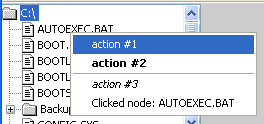
(note the HTML formatting of menu items)
If the issue of undocumented Matlab interests you, please review the list of future post topics and let me know if you have any preference, or would like to see some other (unlisted) topics.
Yair

Yair,
I’m glad to see you’ve got a blog — I remember learning from your newsgroup posts a couple years ago that I could add custom properties and event listeners to handle graphics objects, and both features have helped me immensely (and made it into the Matlab documention!)
My votes on your to do list include customizing menus and the two schema topics.
Cheers,
dg
Yair,
It’s interesting to know that it is possible to add uicontextmenus to uitree.
Your post saved my time.
Thanks a lot
If you have access to the figure handle (stored as User Data for instance) you could also use the click event coordinates to display a GUIDE created context menu:
[…] months ago I explained how to set a context (right-click) menu on a uitree control. I shall now show how to implement a similar dynamic context-menu on a listbox. The code is an […]
Awesome article.
I was looking for something that would allow me to create a right click context menu for any figure or uitable.
When I use similar code (see below for example with a figure) I don’t get any context window displayed (although the mousePressedCallback is called). The same code using the handle of juitable, doesn’t even result in the mousePressCallback being called
Am I doing something wrong or is this
@Bassam – you forgot the all-important display of the jmenu:
(jComponent can be real or [])
[…] As an example customization that uses jtree, consider one of my earliest articles on this website: Adding a context-menu to a uitree. […]
Hi Yair,
Good work, very useful post. I was wondering if you can also add specific Tool Tip on nodes (not for the entire tree) possibly different ones depending on node hierarchy.
Thanks!
@Yan – you could trap the relevant events using Matlab callbacks, as I have explained in http://undocumentedmatlab.com/blog/setting-listbox-mouse-actions/. You’d probably be looking for the MouseMoved event/callback. I explain the mechanism in Section 6.6.3 (page 406) of my Matlab-Java programming book.
Hello Yair,
First of all, congratulations for your book and excellent blog.
I’ve been trying to implement a context menu to my needs but I’m stuck.
Say my uitree displays a list of text file names (e.g. image1.txt, image2.txt, …)
I want my context menu’s first option to be something like ‘visualize matrix’ of the image I right click in…
How do I pass that information to my 1st context menu option’s callback function?
Thank you very much in advance!
Nuno
Nevermind, I figured out a solution.
Thank you anyway 🙂
Well, now I have another problem and I suck at java; perhaps you can help?
One of my mtree’s context menu options is ‘delete file’ so, in my callback, after I delete the file, I’d like my tree to be ‘refreshed’ (I’m displaying it in a GUI, with a uipanel as parent).
My approach to create the original nodes was through a for cycle, reading all the files in a given folder and creating the nodes one by one. That works fine, but after I delete one file is there a simple way to ‘redraw’ my mtree inside the same uipanel?
Thanks!
@Nuno – you’d need to remove the relevant node and then repaint() the tree object
Dear Yair,
Is it possible by double clicking a specific node of the uitree to open a new GUI window or figure? Can you give an example?
Thanks
Hi Yair,
Great article! I’m trying to implement this in MATLAB R2014a, but I am unable to set the ‘MousePressedCallback’ for the uitree object. I get the following error when I try to set it on the tree object returned by uitree
The following does not work either
Do you know of any other way to set the MousePressedCallback, or is this undocumented feature broken now?
hi Yair
just to let you know that the new version of matlab, 2014a, has somehow removed all callbacks from JMenuItem. I found this when I tried to use create table with JMenuItems and “ActionPerformedCallback” as a callback (line 493). I’m not sure there’s any way to fix this problem,
best
ramiro
You can used the ‘MousePressedCallback’ instead. See Yair’s response to my question above.
hi Yair and Chris
thanks Chris for the tip, but unfortunately the bright minds at Mathworks remove more than just the callbacks for JMenuItems but also almost everything linked to Java. I have many GUIs depending on JTextFields, JComboBoxes, etc, and none of the callbacks show up anymore.
best
@Ramiro – MathWorks only removed the ability to access callbacks on naked Java references, but you can still use the handle(javaObject,’CallbackProperties’) syntax to use them, just as before. In fact, this has always been the preferred alternative, as explained here. If you look at my answer to Chris above, this is exactly what I did.
thanks Yair, the handle syntax works ok now. By the way, I also noticed that the functions enableDisableFig and statusbar don’t work well with the R2014a. I fixed some issues with enableDisableFig (e.g. when using R2014 and setting the enable/edit state, it must be using 1 or 0, nor ‘on’ or ‘off’ as in the past).
hi Yair
I just realized that if I use handle(javaObject,…) anytime in a JMenu, this will prevent normal function of any java controls launched after firing any of the callbacks of the Jmenu. The callbacks of the java controls are triggered but if any of those tries to call subimage, bar, plot, etc, they won’t do anything at all and no errors will show up. Any ideas on this?
best
This sounds very strange to me. I haven’t encountered a similar phenomenon before. The HG functions are supposed to be entirely independent of Java, they don’t mix at all.
hi, I agree it’s very odd behavior. It’s easy to reproduce. If you create a GUI (let’s name it FirstGUI) with let’s say a jslider controlling the display on the same GUI of 2 images (use subimage to display them). Then create another GUI figure with a table (use createtable for this) and associate a contextmenu that will just launch the first GUI (the one with the jslider). Now, if you run FirstGUI and launch the jslider GUI using the contextmenu callback, the jslider GUI will display normally and the jslider will work fine scrolling between the 2 images. However, if you use the handle function when creating the JMenuItem of the contextmenu, the jslider callback will be fired but the image shown will not refresh.
a guy at mathworks fixed the problem, I just needed to add:
to allow for this bug to go away.
best
It sounds like you have updated the GUI using gcf, gca, or direct plotting (via plot or image), without directly specifying the target container handle. Since you use hidden handles in your code, the function targets whatever GUI container that has a non-hidden handle was last made active. By setting the ShowHiddenProperties of the root you simply made all handles visible, but this merely hides the root cause of your problem, which is the fact that you have not directly specified the target handle. Once you do that, there will no longer be a need for setting ShowHiddenProperties.
In short, it’s an application bug, not a Matlab bug.
I’m not sure it’s an application bug. Before subimage I actually target both the figure and the axes by using “figure(handle); axes(axeshandle)”. I have not used gcf or gca at all. Thanks anyway,
best
Hi,
I am also trying to set the MousePressedCallback of jtree where jtree is com.mathworks.hg.peer.utils.UIMJTree.
I dont know Java at all but I am modifying an exisiting code to work with ML2015. I get the error
Any Ideas how I can do this: i noticed that the jtree.getTree is also not present.
I just have the following.
jtree.getTreeSelectionListeners
Help will be appreciated
http://undocumentedmatlab.com/blog/matlab-callbacks-for-java-events-in-r2014a
Yair,
I am trying to create a uitree one a resizable panel created with your uisplitpane() function.
The tree won’t show up at all in the figure until I drag the divider around with the mouse to resize the panes, and then it shows up like it should. Do you have any suggestions on how I could fix this?
I am using MATLAB 2011a, if it matters.
@Ian – try to call the Java object’s
repaint()method (function), after adding it to the panel (presumably using a call to javacomponent)Hello Mr. Altman
Thank you for this variable informations
How could I get the Output variable from the function “myFunc2” using the command
“
set(menuItem2,'ActionPerformedCallback',{@myFunc2,data1,data2});” at this case?I need to get the variable “output” into my main function after the mouse right button action was performed.
Will you please advise me for this?
Thanks in advance
Best regards
Hiro Tokuno
@Hironori – callback functions run asynchronously, not synchronously, so they do not return any value. You can save the results in some persistent place (like a global variable or the figure’s UserData property) and in your main program you can later access this data. You can read about Matlab callbacks and how to use them in Matlab’s standard documentation.
Hello Mr. Altman,
how can I disable menu items in the context menu?
E.g. when I am trying to do this:
I get an error: “The name ‘setEnabled’ is not an accessible property for an instance of class ‘javax.swing.JMenuItem’.”
Thank you.
Best regards,
Yerlan
Yerlan – either use
menuItem1.setEnabled(0)orset(menuItem1,'Enabled',0)