
Last week, I described the built-in PopupPanel object, and showed how it can be used to present popup messages with HTML content and even entire webpages. I explained that PopupPanel uses an internal browser object to achieve this. In fact, Matlab’s browser object predates PopupPanel by many years and quite a few releases. This browser object can be used as a stand-alone component that we can easily embed in our Matlab GUI applications.
Here is a simple example in which a Matlab Listbox uicontrol is used to select the contents of an adjacent browser component:
% Create a blank figure window f=figure('Name','Browser GUI demo','Num','off','Units','norm'); % Add the browser object on the right jObject = com.mathworks.mlwidgets.html.HTMLBrowserPanel; [browser,container] = javacomponent(jObject, [], f); set(container, 'Units','norm', 'Pos',[0.3,0.05,0.65,0.9]); % Add the URLs listbox on the left urls = {'www.cnn.com','www.bbc.co.uk','myLocalwebpage.html',... 'www.Mathworks.com', 'undocumentedmatlab.com'}; hListbox = uicontrol('style','listbox', 'string',urls, ... 'units','norm', 'pos',[0.05,0.05,0.2,0.9], ... 'userdata',browser); % Set the listbox's callback to update the browser contents cbStr=['strs = get(gcbo,''string''); ' ... 'url = strs{get(gcbo,''value'')};' ... 'browser = get(gcbo,''userdata''); ' ... 'msg=[''<html><h2>Loading '' url '' - please wait''];'... % no need for </h2></html> 'browser.setHtmlText(msg); pause(0.1); drawnow;'... 'browser.setCurrentLocation(url);']; set(hListbox,'Callback',cbStr); |
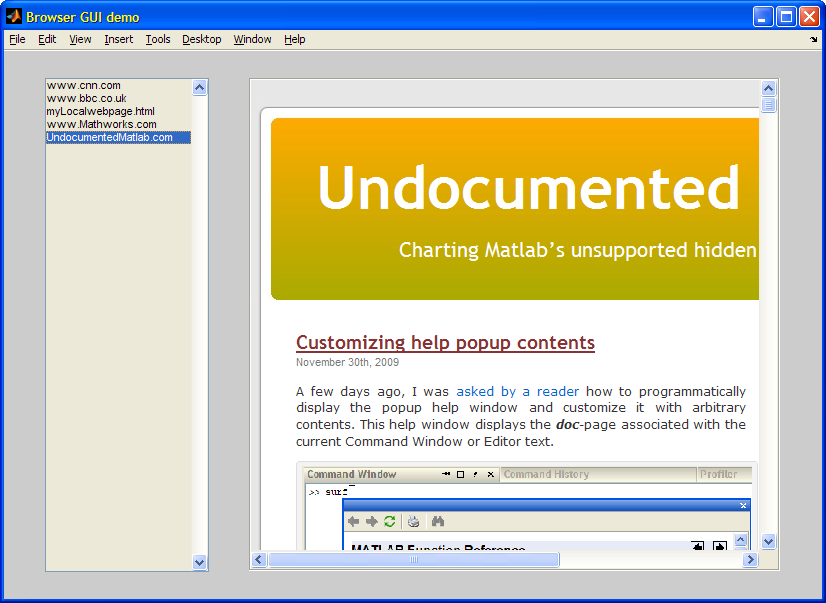
In this simple example, we can see how the Java browser object can easily be controlled by Matlab. Specifically, we use two modes of the browser: first we present an HTML message (‘Loading www.cnn.com – please wait‘) and then replacing this content with the actual webpage, if accessible. If the webpage is not accessible, an error message is displayed:
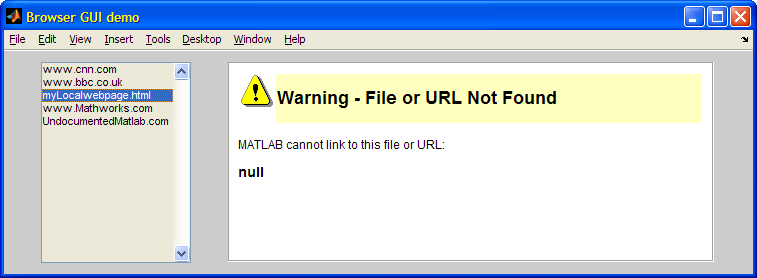
We can easily expand this simple example to display any HTML message or webpage, in a seamless integration within our GUI.
Now, who ever said that Matlab GUI looks static or boring???
In an unrelated note, I would like to extend good wishes to Ken Orr, who has left the Mathworks Desktop development team to join Apple a few days ago. You probably know Ken from his good work on the Desktop and the official Matlab Desktop blog. Hopefully, in his new position Ken will be able to influence Mac Java in a way that will reduce the numerous recurring issues that afflict Matlab Mac releases.
Addendum October 1, 2022: In R2020a or thereabout, the builtin com.mathworks.mlwidgets.html.HTMLBrowserPanel object stopped displaying webpages. Instead, we can use the builtin com.mathworks.mlwidgets.help.LightweightHelpPanel object, which uses the new Chromium-based CEF, which replaced the JXBrowser component that Matlab used until then. Usage of the new object is as follows:
hContainer = figure; % can also be a uipanel or uitab handle jBrowserPanel = javaObjectEDT(com.mathworks.mlwidgets.help.LightweightHelpPanel); [jBrowserPanel, browserContainer] = javacomponent(jBrowserPanel, [], hContainer); set(browserContainer, 'Units','norm','Position',[0,0,1,1]); jBrowserPanel.getLightweightBrowser.load('https://UndocumentedMatlab.com'); |
To enable easy usage of this control, I created a utility called displayWebPage, which can be found on the Matlab File Exchange. Enjoy!

Thanks Yair! I’ll do what I can to help influence Java on the Mac.
Thanks for a great tip! I have been struggling with the limited HTML capabilities of the JEditorPane but now you gave me a solution that really works out of the box.
Hi Yair,
Is it possible to view non-html links, say, a pdf file from within the matlab web browser? That should be without opening a new acrobat reader window.
Thanks
Sid
@Sid – I don’t think so. Even regular browsers need to use Acrobat (or another PDF reader like Foxit) to display PDF.
Hi Yair,
I’m designing a dialog similar to a throbber, indicating that some computation is running, but autonomous, contrary to matlab’s native waitbar. In order to save CPU ressources, i try to take advantages of animated GIF. After having considered timer functions for refreshing an axes, i finaly came out to use an HTML browser that can render basic animated GIFs. Your tip provides me a great solution, however, i’m wondering how i can remove the scrollbars that appear when i set the url to any image file :
I can’t see any method dealing with scrolling by typing :
I will try to work on browser size, but i appreciate if you can provide some hints.
Thanks.
Arnaud
@Arnaud – here’s a much lighter-weight alternative:
Hi Yair,
I’m just reading your response to my post I wrote… 2 years ago.
The need for a throbber was off the radar during this time, but finaly rises again, and your piece of code is actualy exactly what I was looking for.
Thank you for your help, and continue to keep this extremly usefull website alive.
Arnaud
Followup article: http://undocumentedmatlab.com/blog/animated-busy-spinning-icon
Hi,
This works great.
I do have a slight problem – if the page I’m viewing has some dhtml pop up window, it shows like an error message and there’s nothing I can do – the whole program is stuck until I turn it off (click ok or something).
Here’s an example of such a web page:
http://www.domainscalping.com/ (simply let the page load, and then refresh the screen to see the popup).
Is there a way to monitor such messages and handle them via the code? Or maybe disable them?
Thanks 🙂
[…] Mike has been with MathWorks since 2005 and has been responsible for maintaining the official MATLAB Desktop blog, together with Ken Orr. I’m not sure yet which direction the Desktop blog will take, and by whom, but in any case it won’t be the same. […]
Hi, Yair!
Is it possible to track changes in browser object? For example, change listbox when we follow a link to another site.
Thanks.
Ivan.
@Ivan – the easiest way would be to check whether the browser object (or one of its sub-components) has a built-in event (Matlab callback) that you can use. Alternatively, you could try using a property-change listener as explained here.
I am having an issue with grabbing the HTML text from a particular website using the embedded browser. I took your code and dropped in the following URL:
http://www.physionet.org/cgi-bin/atm/ATM
In the “Database” drop down under the “Input” cell, select any one of the databases. It will load the data for that particular study.
OBJECTIVE: Capture the text on the page for the time section of the study being viewed; the text in the blue bar just above the graphs (“Selected Input:”).
PROBLEM: HTML text field in browser object is not updated after navigating away from welcome page. Need to find a way to get the HTML code that is specific to the study data that is being displayed.
METHODS:
1) Used uiinspect.m (http://undocumentedmatlab.com/blog/uiinspect/) to find the displayed HTML for the data page of the study. Can’t find any field containing the new info.
2) Right clicked on the page and used the “Page Source” option. It shows the original welcome screen html
3) Right clicked on the page and used the “Refresh” option. This did not update the HTML text field of the browser object. It did keep you on the study page, and did not refresh to the welcome page, even though it had to resend the POSTDATA query.
4) Viewed the same page in Firefox and inspected the page source code. This gave me what I want; HTML code specific to the study.
Any help would be greatly appreciated. Thank you.
Here is the modified m-code from this post that has a link to the page that I am working with:
@thnxtay – I suggest that you load your webpage in some external browser that has more abilities to display the inner HTML code (e.g., Firebug on FireFox). Then you’d be able to see what goes on behind the scenes and try to use this info in the more-limited Matlab browser. If you would like further assistance on a consulting basis, please contact me via email.
Hi
I tried to use the code example above, to load an html file that I have created into the GUI, but I got the following message (inside the UI browser):
“This file exceeds the maximum size for the MATLAB Web Browser. It will open in your system browser.”
and indeed the html was opened with in internet explorer.
Any idea how to solve this problem?
Thanks
Kobbi
@Kobbi – try to minify your HTML
This works great, thanks! Is there any way to add the browser menu bar to this panel (i.e. forward/back buttons?)
@Brian –
Yair,
Do you know how to disable or modify the popup context menu that I get when using com.mathworks.mlwidgets.html.HTMLBrowserPanel ? I’m deploying a compiled app with an HTML viewer component, and I don’t want the users to be able to click “Evaluate selection” on selected text.
Thanks,
Mike
@Mike – this will require investigation. If you would like me to investigate this for you (for a consulting fee), send me an email.
Hi,
As writen above, we can browse web page in the matlab GUI. Now there is a video frequency embed in the web page which is realized by applet(java), how can i process every frame image such as adding a moving mechanical arm to realize fusion
@Lichen – you need to download the relevant video into Matlab and process it in Matlab. You cannot directly interact with it on the webpage.
hi yair.
is it possible to integrate GUI on a web browser?? could you please show me how to solve this?
@Clara – There is no simple answer. You can have your webserver call Matlab (on the server-side) to generate HTML/images. If you need interactivity then consider getting the Matlab Production Server ($$$).
Can this widget be used in a deployed application via MATLAB Compiler? I tried compiling your sample code in MATLAB R2013b and got the following error:
@Bryant – this article is an oldie, written in 2009. Since then (I believe in R2012a) Matlab changed its internal browser to the new JXBrowser. This means that you will need to modify the above code. I did it some months ago and I remember that it wasn’t too hard, but I can’t remember at the moment exactly what I did and I do not have the code (it’s at a client). So either you try to modify the code like I did back then, or contact me by email for a short consultancy to recreate what I did.
I have the same problem. this Java widget got error in compiling via Matlab 2018!
Could you please show me how to solve this?
Could you tell how to download a video file to matlab from web browser?
@Ragni – don’t do it directly in Matlab: download the video using external software, save it on your disk, and then load this file in Matlab.
Hello,
Thanks for your answer.
I have one more doubt. I have live video streaming running in Google Chrome browser. How can i import/read this live streaming to MATLAB such that I can read it using matlab function “inputvideo”.
Hello,
I have this error:
I’m using the 2013 version. thanks.
more one thing, how to play a video with audio in a gui matlab?
I think the error message is pretty much self explanatory…
Hello,
I have a little trouble using this component in a Matlab class UI I have developed: although I delete the java objects in my destructor, “jxBrowser Chromium Native Process” remain in memory, until I close Matlab. Any idea how I can properly cleanup that?
Thanks!
@Clement – apparently you can dispose the browser object using its dispose() method. You can simply call it when the window closes. For example:
Hi Yair,
Thanks very much I love your website, it is so helpful.
I have a question.When I tried to run the above code it gives an error of Undefined variable”com” or class ”com.matworks.mlwidget.html.HTMLBrowserPanel” ıf you help that would be great. Thanks!
@Nurden – of course Matlab gives this error if you mistype the class name (
com.mathworks.mlwidgets.html.HTMLBrowserPanel) !!!Next time copy-paste from the blog, don’t try to memorize long class names!
Hi Yair,
Sorry for taking your time, I found that mistake pretty shortly after I asked the question here. Now it works and I cant thank you enough.
One more question; instead of a listbox, I would like to put a tree on the left side inside a panel so whenever I click on an item in the tree it would take me to a specific url that belongs to that item that I picked. I can create a tree with the help of other sources on the internet, but how can I put that tree in a uipanel? Any help will be appreciated. Thanks again!
search this website for “tree”
Hello Yair,
Lets assume there is a link to ‘www.cnn.com’ on the RIGHT side in the browser in above example(GUI integrated browser control) and when I click on it , it will start showing cnn website. How can I move the selection highlight (blue) on to ‘www.cnn.com’?
Thanks very much!
@Nurdan –
Hi Yair,
It works great after creating the figure using:
in Matlab 2015a. Several times I found useful codelets in this page, thanks!
I have a question. If the page is longer than the container, I need to scroll through. Can I track this scroll position in the webpage? Is this information available in any variable while scrolling?
Thanks you very much!
It’s not clear to me how to interact with HTML components from the resulting browser object. For example, if my HTML contains a simple form input box, how do I return the current string from the box? I imagine the procedure would be the same for a drop-down menu, or any other form component.
Is there a way to get/set HTML form component properties?
Looks like one solution to accessing HTML components can be seen here:
https://www.mathworks.com/matlabcentral/answers/355723-tab-key-disabled-in-embedded-browser
Hi Yair, Please let us know how to create the same integrated browser control with uifigure.
Perhaps the uihtml function can help you (R2019b or newer). In any case, uifiures use a radically different underlying technology than Java-based figures, so everything mentioned in this post is not relevant to uifigures.
Hello Yair,
Have you, or anyone else, had an opportunity to try this demo in R2022a/b? I cannot get the HTMLBrowserPanel object to update with html text (nor with an html file, if I try that route). The HtmlText and CurrentLocation properties do not appear to update upon setting; whether set directly or with the set methods. In addition, I installed R2021b and it all works wonderfully. Here is a simple example I’m using to test:
In 2022a, when retrieving the html text above, both
browser.HtmlTextandbrowser.getHtmlText()return empties (as though it was never set). Using 2021b, of course, returns ‘Testing HTML Text’.One final oddity is that some properties do appear to be settable. ‘Enabled’, for example, is reactive to being set.
Any ideas on analogous use of HTMLBrowserPanel in R2022a/b? Or perhaps if it’s known that this option no longer at our disposal?
Thanks so much!
In R2020a or thereabout, the builtin
com.mathworks.mlwidgets.html.HTMLBrowserPanelobject stopped displaying webpages. Instead, we can use the builtincom.mathworks.mlwidgets.help.LightweightHelpPanelobject, which uses the new Chromium-based CEF, which replaced the JXBrowser component that Matlab used until then. Usage of the new object is as follows:To enable easy usage of this control, I created a utility called displayWebPage, which can be found on the Matlab File Exchange. Enjoy!
Yair, this works wonderfully! I can’t thank you enough!
In case anyone is looking for more info on the toolbar:
I ran into some problems creating a toolbar with the lightweight panel. Previously, the Browser Panel had an addToolbar method to build off of, but that isn’t available with the lightweight panel. The displayWebPage function Yair referenced works great, but, as he points out, its toolbar functionality is limited to standalone figures. There are hints of the uitoolbar working with a uipanel, but it errors for me (R2022b U5). At any rate, that wasn’t going to work for me anyway because of legacy framework using GUILT (I needed the toolbar on a panel embedded deep in a[n extended] figure’s hierarchy).
I found that a JToolBar could just be added to the lightweight panel. Below is a example figure with GUILT components and the toolbar added to the LightweightHelpPanel, which is child to a VBox/uipanel. The goal here was embed the panel and toolbar to the lower portion of the VBox – not directly to the figure itself (other options/functionality included for demo completeness).
Thanks again, Yair, for the valuable CEF info!
I have been using this functionality in 2016b since it works in deployed applications and have not had a reason to need to upgrade but with java 7 being flagged as a security risk I am trying to update my application to 2019b since it mostly works. The functionality works completely in the full desktop MATLAB but part the part that doesn’t work in the deployed application is where I call back to MATLAB with javascript.
I use the following javascript code…
My guess was that MATLAB runtime does not get installed with the full set of jxbrowser classes that allow it to communicate back to MATLAB but I have had success with a work around.
I’ve never tested javascript callbacks, but perhaps you should try removing the extra space after the “matlab:” protocol specifier. Does it make any difference?
No luck with removing the space.
I have been using this browser functionality in 2016b because it works fully in deployed applications in that version. However, because of Java 7 being flagged as a security risk, I have to update to a newer version that uses Java 8. I found that 2019b gets me the closest functionality in the deployed application. The part that doesn’t work is the calling of MATLAB functions from javascript from within the browser. An example of the javascript code I use is below.
My guess is that the MATLAB runtime does not have the complete set of jxbrowser classes to allow this communication to work. I am trying work arounds that include some of the missing jar files in my deployed application installation and then add those to the javaclasspath when the application starts but have not been successful yet. Is there something that I am not thinking of or is this even possible?
The javascript code works fine running the application from the 2019b desktop version and the 2016b deployed version.
Seth,
I have had some success executing javascript that requires no return value by executing it directly (sort of) on the
org.cef.browser.CefBrowserthat acom.mathworks.html.LightWeightBrowserwraps.Continuing Yair’s code (in the Addendum at the bottom of main text)
Collin,
What version of MATLAB are you using?
Seth
Good point, I am using 2022b, mathworks seems to have started using CEF browsers from 2019a, best I can tell.
take a look at the package com.mathworks.toolbox.matlab.matlabwindowjava for implementation.
Collin
@Yair @Collin,
I figured out a sort of work around to pass the information i needed to MATLAB in the newer versions that use the cef browser. I just pass a string of number IDs seperated by a comma. In a javascript function, I collect the text I need from the HTML browser input, create a temporary “textarea” element, write the text in that element, copy that text to the clipboard, and read the clipboard text with MATLAB. I can trigger the function from either HTML or MATLAB click but it is more stable from the MATLAB side. You do need to override the focusable attribute of the MATLAB side java browser like here (https://undocumentedmatlab.com/articles/fixing-a-java-focus-problem).
example javascript code
needed_text = “Hello”;
const temp = document.createElement(“textarea”);
temp.value = needed_text;
temp.style.position = “fixed”;
document.body.appendChild(temp);
temp.focus();
temp.select();
document.execCommand(“copy”);
document.body.removeChild(temp);
I am looking for setting a UI that allows following process: opening a web site, navigate inside this web site and at some specific moments (i.e. when the figure is closed or a button is pushed) picking up the current url.
Is there any method to access the current url opened in the browser?
@Iñigo – your query is related to Seth’s question above. We can access the currently-browsed URL in JavaScript (for example:
jBrowserPanel.executeScript('alert(window.location)')), but we cannot communicate this data back to Matlab for some unknown reason.Likewise,
jBrowserPanel.getCurrentLocationalways returns ‘about:blank’ for some unknown reason.Until someone finds a way to get the currently-displayed URL, the integrated browser is a one-way street: you can set the displayed URL, and you can click hyperlinks to modify the displayed URL, but you cannot report it back to Matlab.
Thanks Yair. I didn’t realize it was posted just above. It would be great to know about a solution soon
Creating a Matlab wrapper for JCEF, if anybody wants to collaborate
https://github.com/RocketWrench/Browser
Collin
Hi Yair,
Have you attempted your displayWebPage utility (or the LightweightHelpPanel in general) within a compiled application? It appears to fail in apps derived from both R2022b and R2023a, at least (the two I’ve tried). I get the same failed results with displayWebPage or various simplified figures I’ve assembled for testing/debugging. They all compile and launch successfully, but the same error is thrown whenever the LightweightHelpPanel is called. The Java error stack below seems to indicate a missing class, but I can’t tell for sure. Can you discern if something is missing and, if so, what is missing?
Or any other tricks up your sleeve?
This was written to one of the app’s output log:
Java exception occurred:
java.lang.NoClassDefFoundError: com/mathworks/instutil/InstutilResourceKeys
at com.mathworks.mlwidgets.help.DocCenterRoot.initDocRelease(DocCenterRoot.java:54)
at com.mathworks.mlwidgets.help.DocCenterRoot.(DocCenterRoot.java:36)
at com.mathworks.mlwidgets.help.HelpPrefs.(HelpPrefs.java:57)
at com.mathworks.mlwidgets.help.DocCenterDocConfigParams.(DocCenterDocConfigParams.java:32)
at com.mathworks.mlwidgets.help.MLDocConfigBase.getInstance(MLDocConfigBase.java:27)
at com.mathworks.mlwidgets.help.docconfig.WebDocConfig.(WebDocConfig.java:28)
at com.mathworks.mlwidgets.help.DocCenterDocConfig.getInstance(DocCenterDocConfig.java:56)
at com.mathworks.mlwidgets.help.LightweightHelpPanel.initDocConfig(LightweightHelpPanel.java:62)
at com.mathworks.mlwidgets.help.LightweightHelpPanel.(LightweightHelpPanel.java:57)
at com.mathworks.mlwidgets.help.LightweightHelpPanel.(LightweightHelpPanel.java:53)
Caused by: java.lang.ClassNotFoundException: com.mathworks.instutil.InstutilResourceKeys
at java.net.URLClassLoader.findClass(URLClassLoader.java:382)
at java.lang.ClassLoader.loadClass(ClassLoader.java:424)
at sun.misc.Launcher$AppClassLoader.loadClass(Launcher.java:349)
at java.lang.ClassLoader.loadClass(ClassLoader.java:357)
… 10 more
Nicholas – yes, I used it in a compiled Windows app using R2022b (no update). You didn’t specify the Matlab code location that threw the error so I can’t help you much. Maybe you’re not running on Windows? Anyway, try compiling a simple program that just calls
displayWebPageand see what happens.Hi Yair,
Thanks for the reply. I am on Windows 10. I also forgot to mention that this all works wonderfully out of the editor. It only fails once compiled.
So, yes, I have tried a simple program with ‘displayWebPage’. Among many other tests, I’ve also built a figure with only the LWHP embedded. They all fail when LWHP is created. Using your function to test, the log reports the error at line 79 (createBrowserIn call), but I show below that it dies at line 111 (LWHP).
However! I should note that displayWebPage will load a page, but it does so only by way of the catch and subsequent ‘web’ call! For me, this loads Undocumented in a new Chrome tab, not the expected ML figure. The log was initially empty, so, I added a few ‘disp’ calls to your function to track what was going on.
Namely, in the catch block I now have:
I have also added displays before and after LWHP is created to see if it makes it through (it does not):
So, for the sake of clarity, no functional changes to you code, just command window displays. This is what’s written to the Log File:
Line before LWHP
error caught!

ans =
    'Error using displayWebPage>createBrowserIn
     Java exception occurred:
     java.lang.NoClassDefFoundError: com/mathworks/instutil/InstutilResourceKeys
     	at com.mathworks.mlwidgets.help.DocCenterRoot.initDocRelease(DocCenterRoot.java:54)
     	at com.mathworks.mlwidgets.help.DocCenterRoot.(DocCenterRoot.java:36)
     	at com.mathworks.mlwidgets.help.HelpPrefs.(HelpPrefs.java:57)
     	at com.mathworks.mlwidgets.help.DocCenterDocConfigParams.(DocCenterDocConfigParams.java:32)
     	at com.mathworks.mlwidgets.help.MLDocConfigBase.getInstance(MLDocConfigBase.java:27)
     	at com.mathworks.mlwidgets.help.docconfig.WebDocConfig.(WebDocConfig.java:28)
     	at com.mathworks.mlwidgets.help.DocCenterDocConfig.getInstance(DocCenterDocConfig.java:56)
     	at com.mathworks.mlwidgets.help.LightweightHelpPanel.initDocConfig(LightweightHelpPanel.java:62)
     	at com.mathworks.mlwidgets.help.LightweightHelpPanel.(LightweightHelpPanel.java:57)
     	at com.mathworks.mlwidgets.help.LightweightHelpPanel.(LightweightHelpPanel.java:53)
     Caused by: java.lang.ClassNotFoundException: com.mathworks.instutil.InstutilResourceKeys
     	at java.net.URLClassLoader.findClass(URLClassLoader.java:382)
     	at java.lang.ClassLoader.loadClass(ClassLoader.java:424)
     	at sun.misc.Launcher$AppClassLoader.loadClass(Launcher.java:349)
     	at java.lang.ClassLoader.loadClass(ClassLoader.java:357)
     	... 10 more

     Error in displayWebPage (line 79)

     Error in display_main (line 1)'

class('jBrowser') returns: double
exist('com.mathworks.mlwidgets.help.LightweightHelpPanel') returns: 8
url displayed in system browser instead
As you can see, the error is thrown at line 79 (at createBrowserIn); ‘Line after LWHP’ is not displayed to log; and the jBrowser class remains double from initialization (@ line 71). This all points to the compiled app failing when attempting to call:
Thanks!
The error indicates that the
LightweightHelpPanelexists, but fails to load due to some funky preference of your deployed Help documentation. Try to set your Matlab Preferences/Help/Documentation Location to “Web” instead of “Installed locally” and see if this helps. You could also try to update the “Quick help display” preference beneath it.Yair,
Changing the desktop help options did not solve the issue. Though, it’s unclear how I could change these options in the Runtime, if that’s what you meant?
I should clarify that the app is functional from the full desktop MATLAB, but it does not if only the Runtime is installed.
I should also clarify my original question: Have you successfully run the BrowserPanel in a compiled application on a machine with only the Runtime (i.e., no desktop installed)?
I found that with both Desktop and Runtime installed, the compiled application is functional when the desktop’s Path Environment Variable supersedes the Runtime’s version. But it fails when they’re swapped and the Runtime is given precedence.
This seems to corroborate what Seth and Collin were talking about above, where Seth supposed “My guess was that MATLAB runtime does not get installed with the full set of jxbrowser classes […]”. I wonder if this is similar, where the Runtime has the LightWeightHelpPanel class, but not all dependencies to load it.
Any thoughts?
@Nicholas
I finally figured out a workaround for communicating what I need back to MATLAB in version 2024b using javascript in the HTML browser. Since I was able to get that to work, I next needed to get it compiled.
It worked for me to just replace both the jar and jarext folders in the “C:\Program Files\MATLAB\MATLAB Runtime\R2024b\java” folder with the ones in the “C:\Program Files\MATLAB\R2024b\java” folder. You also have to copy the classpath.txt file from the “C:\Program Files\MATLAB\R2024b\toolbox\local” to the “C:\Program Files\MATLAB\MATLAB Runtime\R2024b\toolbox\local” folder.
There is probably only a certain set of these java files that are necessary for it to work but I just wanted to make sure it worked before traversing down the rabbit trail of missing java classes.
Now I just need to create a wrapper installer for the user to do this on installation. I could probably build it in to the startup of the compiled application but that would probably require an administrator to open the software once after installation.
Thanks for your update to the now unsupported `HTMLBrowserPanel`. I tried to replace it with the `LightweightHelpPanel` but the application I am working on is showing generated HTML code. Is it possible to display a HTML string in the `LightweightHelpPanel`? I only see the ‘load’ method which tries to resolve a URL.
In theory you could use the data: URI scheme (e.g.
.load('data:text/html,<html><body>Hello world</body></html>')), but for some reason it doesn’t work well in Matlab GUI, I’m not sure why.Instead, try to store your HTML in a temporary text file and then load that file using the file: URI scheme, for example:
.load('file:/C:/path/to/file.name')I have the same problem as Nicholas, The function works fine on R2022, but when compiled it fails (I used com.mathworks.mlwidgets.help.LightweightHelpPanel), I tried compiling with the previous class “com.mathworks.mlwidgets.html.HTMLBrowserPanel” (which was suitable for previous MATLAB release) it also failed.
I tried many tricks to make it work, also asking ChatGPT, but has not yet succeeded… Any tip is appreciated.