
In one of my projects, I had to build a GUI in which users could interactively add and remove plot lines from an axes. The problem was that the legend needed to be kept in constant sync with the currently-displayed plot lines. This can of course be done programmatically, but a much simpler solution was to use legend‘s semi-documented ‘-DynamicLegend’ feature. Here’s a simple example:
We can see how the dynamic legend automatically keeps in sync with its associated axes contents when plot lines are added/removed, even down to the zoom-box lines… The legend automatically uses the plot lines ‘DisplayName’ property where available, or a standard ‘line#’ nametag where not available:
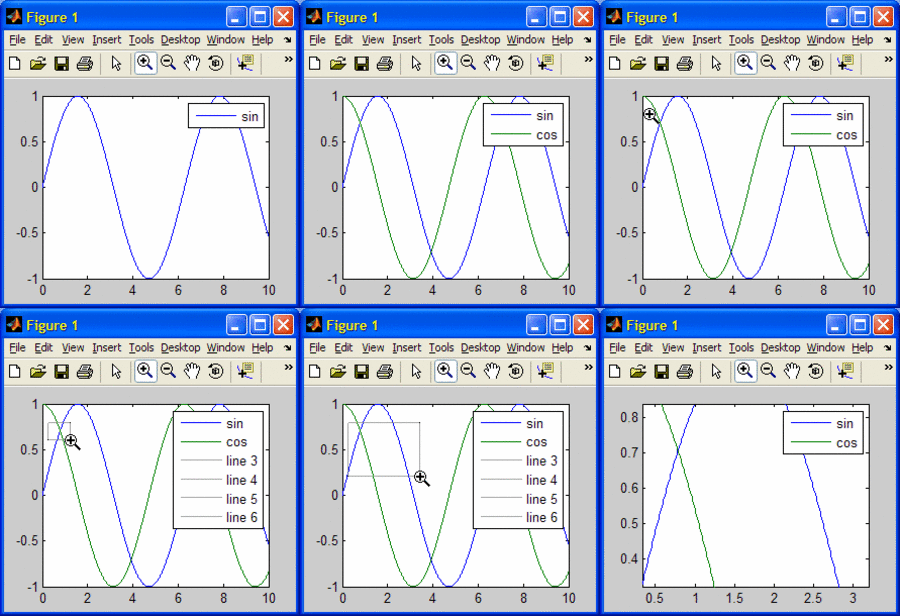
DynamicLegend works by attaching a listener to the axes child addition/deletion callback (actually, it works on the scribe object, which is a large topic for several future posts). It is sometimes necessary to selectively disable the dynamic behavior. For example, in my GUI I needed to plot several event lines which looked alike, and so I only wanted the first line to be added to the legend. To temporarily disable the DynamicLegend listener, do the following:
Unfortunately, this otherwise-useful DynamicLegend feature throws errors when zooming-in on bar or stairs graphs. This can be replicated by:
The fix: modify %MATLABROOT%\toolbox\matlab\scribe\@scribe\@legend\init.m line #528 as follows:
The origin of the bug is that bar and stairs generate hggroup plot-children, which saves the legend strings column-wise rather than the expected row-wise. My fix solves this, but I do not presume this solves all possible problems in all scenarios (please report if you find anything else).
p.s. – object visibility in the legend can be controlled on an object-by-object basis using the semi-documented hasbehavior function.
Semi-documented
The DynamicLegend feature is semi-documented. This means that the feature is explained in a comment within the function (which can be seen via the edit(‘legend’) command), that is nonetheless not part of the official help or doc sections. It is an unsupported feature originally intended only for internal Matlab use (which of course doesn’t mean we can’t use it). This feature has existed many releases back (Matlab 7.1 for sure, perhaps earlier), so while it may be discontinued in some future Matlab release, it did have a very long life span… The down side is that it is not supported: I reported the bar/stairs issue back in mid-2007 and so far this has not been addressed (perhaps it will never be). Even my reported workaround in January this year went unanswered (no hard feelings…).
DynamicLegend is a good example of a useful semi-documented feature. Some other examples, which I may cover in future posts, include text(…,‘sc’), drawnow(‘discard’), several options in pan and datacursormode etc. etc.
There are also entire semi-documented functions: many of the uitools (e.g., uitree, uiundo), as well as hgfeval and others.
Have you discovered any useful semi-documented feature or function? If so, then please share your finding in the comments section below.

Thanks for this tip.
I was in a similar need, and was getting the legend cell via get, appending the new string, and setting the cell back.
This seems much simpler.
I was looking for an undocumented matlab feature named ‘feature’ and google luckied me here. Maybe you know something about. I tried
which featureand I found out this ‘feature’ is an undocumented built-in function.
How I got across it?
I typed configinfo.m M-file attached to Matlab white paper on performance.
Nice blog, useful even for a beginner in Matlab as I am. 🙂
Thanks Pietro.
I plan to write a post about some of feature‘s features in the future. Keep a look-out for this on this blog. You can see this in my TODO list.
So much to do, so little time…
Yair
[…] uitools in the %matlabroot%/toolbox/matlab/uitools/ folder, uitree and its companion uitreenode are semi-documented, meaning that they have no support or doc-page, but do have readable help sections within […]
[…] under the hood, hgsave uses the semi-documented built-in handle2struct function to convert the figure handle into a Matlab struct […]
[…] After many years in which the uitable was available but semi-documented and not officially supported in Matlab, it finally became fully documented and supported in R2008a […]
I was searching for a way to use a legend’s “refresh” function (that is available when right-clicking on the legend with the mouse) in a script. When I came across this post I first thought this was the way Matlab implemented the “refresh” functionality.
However, ‘DynamicLegend’ only seems to react to additions or deletions to the axes: switching the ‘Visibility’ of a line to ‘off’ or switching the legend entry off by
is ignored by the ‘DynamicLegend’ feature. The “refresh” function correctly removes the corresponding legend entry in these cases.
Do you know how to use “refresh” from the command line?
@Stephan – yes: You can access the Refresh uicontextmenu item (and any other context-menu item) directly from the legend axes, and then run it via the hgfeval function, as follows:
For the record, this invokes the refresh_cb function within %matlabroot%/toolbox/matlab/scribe/@scribe/@legend/methods.m. You can place a breakpoint there to see exactly what it does internally.
I got the same Problem/Question as Stephan I do plot all data in the Fig however only some data is visible but in the legend all data even the one not visible is listed. Only by right klick an refresh I can get rid of them however I can’t do that with every single file….
Hope there will be a solution in the future.
@Stephan and @Andy – the Legend’s DynamicLegend functionality only listens to newly-created axes children (in %matlabroot%/toolbox/matlab/scribe/@scribe/@legend/init.m line 102 [for R2012aPR]), and axes children deletions (in %matlabroot%/toolbox/matlab/scribe/@scribe/@legend/methods.m line 1281 [R2012aPR again]).
It should be relatively easy to modify any of these two places to listen to changes in the Visible property of axes children. I described the mechanism for doing this in several articles (here for example).
wow, i never knew there was a function like this and i have been thinking on how to program it. thanks, this is gonna save me lots of time
Hi. Thank you for this post. At the moment I am a bit stuck as trying to get the ‘ScribeLegendListeners’ throws a ‘MATLAB:class:InvalidProperty’ exception. There seem to be no such property…
My University is using Matlab-R2011a. Could it be something related to their installation?
What I am doing is using -DynamicLegend for plotting data in multiple iterations. However, I need to remove from the legend some plotted lines.
Could you recommend other solutions? Thank you.
@Teodor – try placing a drawnow after plotting the lines and before trying to access the hidden ScribeLegendListeners property. It is also possible that you are trying to access this property on a handle of another object (maybe one of the line plots, or a figure, or another axes), rather than the handle of the axes that holds the plots for the requested legend.
[…] Menu callbacks generally use internal semi-documented functions (i.e., having a readable help section but no doc, online help, or official support) […]
[…] Yair Altman m’a contacté pour me notifier qu’il avait également écrit un billet sur ce sujet le 4 juin 2009 : Legend ‘-DynamicLegend’ semi-documented feature […]
[…] is not updated directly (although there is absolutely nothing to prevent this), but rather via the semi-documented built-in accessor functions hggetbehavior and hgaddbehavior […]
[…] Matlab 7.0 (R14), Matlab has included a built-in GUI table control (uitable), at first as a semi-documented function and in release 7.6 (R2008a) as a fully-documented function. Useful as this control is, it […]
Thanks for letting the world know about the -DynamicLegend feature. Note that it appears to be limited to at most 50 entries, at least in R2015b. Plots beyond the first 50 simply don’t appear in the legend created by legend(‘-DynamicLegend’)
@Clark – if your plot contains so many dynamic plot lines, then for both visual design and performance reasons I would strongly suggest using some other mechanism…
Thanks a lot man for letting us know about -DynamicLegend…i was really needed this kind of function as i was using for loop and in that plotting plot for n times while required to have legends for each plot…Again Thanks a lot
Thx for providing DynamicLegend, I really like it!
One question though: Is it possible, to add new items on the bottom instead of a vertical legend? That would be really great. Or maybe this even works with a general command to flip the legend after it was generated? But I couldn’t find such thing 🙁
Thx & Best,
Manuel