
Can you guess which built-in Matlab function is the top search-term on UndocumentedMatlab.com and yet one of the least discussed topic on the CSSM forum?
The answer is uitree – Matlab’s built-in function for displaying data in a hierarchical (tree) GUI component. uitree has been included in all Matlab 7 releases, but has never been officially supported. Like most other uitools in the %matlabroot%/toolbox/matlab/uitools/ folder, uitree and its companion uitreenode are semi-documented, meaning that they have no support or doc-page, but do have readable help sections within their m-files. In our case, edit the uitree.m and uitreenode.m files to see their help section.
Note the following comment within %matlabroot%/toolbox/local/hgrc.m, which implies that uitree may soon become fully supported, although its interface might change somewhat (as was the case when uitable became supported in R2008a):
Temporarily turn off old uitree and uitreenode deprecated function warning… When we introduce the new documented uitree to replace the old undocumented uitree …
Like most other uitools (e.g. uitable and uitab), uitree is based on an underlying Java component, which ultimately extends Swing’s standard JTree. uitree sets up a scrollable JTree on-screen without the hassle of setting up a scrollable viewport and other similar nuts and bolts. In fact, you don’t need to know any Java to use uitree (although knowing JTree can greatly help you customize it) – uitrees can be manipulated using pure Matlab code, as shall be seen below.
uitree accepts an optional figure handle followed by P-V (property-value) pairs. Settable properties are Root, ExpandFcn, SelectionChangeFcn, Position (also Parent, but read on). As in uitab, a ‘v0’ input argument may be necessary to suppress a warning message. Note that uitrees are always created as a direct child of the containing figure, ignoring creation-time Parent values. However, the Parent property can be modified following the tree’s creation:
[mtree, container] = uitree('v0', 'Root','C:\', 'Parent',hPanel); % Parent is ignored set(container, 'Parent', hPanel); % fix the uitree Parent |
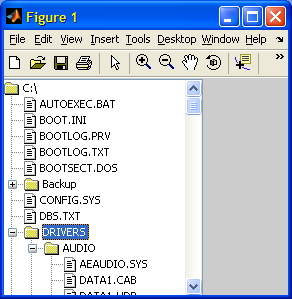
uitree returns two arguments: a handle to the created tree (a Java object wrapped within a Matlab handle) and an entirely-undocumented second optional argument holding a handle to the Matlab GUI container of the created tree. These two arguments are exactly the two arguments returned from the javacomponent function that I described last week.
uitreenode
uitree automatically understands Root objects of type Handle Graphics, Simulink model or char string (interpreted as a file-system folder name). Other Root types require setting dedicated ExpandFcn, SelectionChangeFcn Matlab callbacks (see uitree‘s help section or below for examples).
If we need to create a custom tree hierarchy (i.e., our root node is not an HG object, Simulink model or folder name), then we need to use the semi-documented uitreenode function as follows:
node = uitreenode('v0',handle(mtree),'my root','c:\root.gif',false); mtree.setRoot(node); set(mtree,'Root',node); % alternative to mtree.setRoot() |
uitreenode accepts 4 arguments: a string or handle value (the node’s “internal” value), a string description (shown next to the node’s icon), an icon filename ([] will result in an icon assigned based on the node value), and a flag indicating whether the node is a leaf (no children) or not.
uitreenode returns a node object, which is little more than a Matlab handle wrapper for a Java Swing DefaultMutableTreeNode.
Node manipulation
Nodes can be added, moved or removed by node methods: node.add(anotherNode) adds anotherNode to the end of this node’s children list (possibly detaching it from its previous parent); node.insert(anotherNode,index) does the same but inserts anotherNode at a specific child index, rather than at the end; node.clone() makes a duplicate of this node that can then be added to another node; node.remove(index) and node.remove(node) remove a specific node whereas node.removeFromParent() removes this node; node.removeAllChildren() removes all children, if any, of this node.
Nodes can also be added and removed at the tree level: mtree.add(parent,nodes) allows adding a list of nodes to a parent node and mtree.remove(nodes) removes the specified nodes.
In order to programmatically collapse and expand nodes, use mtree.collapse(node) and mtree.expand(node).
Nodes can be programmatically selected using mtree.setSelectedNode(node). Multiple nodes may be selected using mtree.setSelectedNodes, if an earlier call to mtree.setMultipleSelectionEnabled(true) was made (default is multiple-selection disabled):
mtree.setSelectedNode(root); % root is a node mtree.setSelectedNodes([root,node1,node2]); % select 3 nodes |
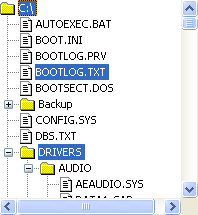
The currently-selected node(s) can be accessed using mtree.getSelectedNodes. Node selection callbacks often require knowledge of the currently selected rows:
% Tree set up mtree = uitree(..., 'SelectionChangeFcn',@mySelectFcn); set(mtree, 'SelectionChangeFcn',@mySelectFcn); % an alternative % The tree-node selection callback function nodes = mySelectFcn(tree, value) selectedNodes = tree.getSelectedNodes; if ~isempty(selectedNodes) % ... end end % mySelectFcn |
Interested readers might also benefit from looking at the tree manipulations that I have programmed in my FindJObj utility.
Next week’s article will show how uitrees can be customized. There are numerous possible customizations, including icons, labels, appearance, and behavior. So if you have any special request, please post a comment below.

Hello,
I’m trying to make a tree to store links to interesting m-files.
So I’d like to learn a bit more about using Uitree.
This is the code I have so far.
I have problems adding nodes in the tree : I don’t get my tree refreshed without restarting my gui.
Any feedback is welcome
Luc VDP –
Yair will correct me if I’m wrong but I think some of your problem might be related to the fact the ML tree is set up for lazy loading. The leafs aren’t actually created until you expand. So if you want a leaf to show up on a refresh (rather than a user actually clicking on it) you’ll actually have to expand to its location programmatically (I know there’s an .expandrow method but there are probably other ways to).
Scott
For Luc : maybe this is too late or you figure it out, but to refresh the display after altering nodes, you should use the reloadNode() method on the parent node.
Any idea on how to enable Drag and Drop on older versions of uitree? In Matlab 7.0.4 (Windows), uitree.m mentions a “DndEnabled” but it appears to have no affect. However, with ML 2007a DnD appears to be enabled by default.
What would be really useful is to have DnD available across a figure and or between panels but I’d imagine that’s pretty complicated.
Scott
Scott
Below are some generic solutions that I have taken out of some code I developed to simulate drag-and-drop between a JTree and a MATLAB figure using the WindowButtonMotion callback.
You may need to shake the mouse to initiate the callback on faster PCs- but that becomes second nature surprisingly quickly.
Error. The “@GUIWindowButtonMotionFcn” in the code above should be “fcn” for a generic solution. GUIWindowButtonMotionFcn is just the standard callback in my particular application.
Is there anyway to have the parent of a tree be a panel rather then a figure?
Thanks.
@Stephan – as explained in the article, you can set a tree’s parent to a uipanel using the Parent property, but only after the tree has been created:
I would like to say, I just discovered this blog, and am really blown away. I’m loving all the new stuff I’m learning.
I’ve been trying to implement a GUI with three tabs. Each tab has a child panel and in one of the tabs I’ve tried to place a uitree. However, regardless of how I set the uitree’s parent value, it always seems to be the figure, and not the panel on the tab. As a result, the uitree is always displayed regardless of which tab is selected.
I’ve included the code below. Is there something obvious I’m doing incorrectly?
@Drew – thanks for the compliment.
uitree is basically just a Java component, and Matlab’s implementation of uitab has a known bug that it does not hide Java or ActiveX objects when switching tabs.
The link I just gave provides some leads to solving this issue; you can try modifying the m-files in the folders %matlabroot%/toolbox/matlab/@uitools/@uitabgroup and /@uitools/@uitab, or you can use an actual JTabbedPanel (or one of several other Tab implementations mentioned in my uitab article) rather than Matlab’s built-in uitab.
No easy fix, I’m afraid…
– Yair
Hi Yair, Hi Drew,
The following seems to do the trick:
1) Define the tree through javacomponent and hide it (‘Visible’, 0)
2) Attach SelectionChangeFcn to the uitabgroup (after defining uiTreeH !), where the uiTreeH visibility is toggled depending on the tab selected:
-:) Simon
Hello,
I have a question regarding tree creation.
Typically, I would use node.setSelectedNodes() to mark a parent and then create a new child node below using treeModel.insertNodeInto().
The problem I am having is that Matlab seems not to wait for the setSelectedNodes-command to be finished before resuming its own code, and therefore, the order of the nodes gets mixed up (some times).
My first and rather unsatisfying solution to the problem was to use pause() after each selection, making the tree build up very slowly.
Is there any way to determine how long the java element exactly needs to finish the setSelectedNodes-command?
Or is this error maybe due to the old Matlab version I am using, 2006a?
Many thanks for any thoughts on this,
Tony
@Tony – You do not need to select the parent node.
As I said in the main article above, nodes can be added directly: node.add(anotherNode) adds anotherNode to the end of node‘s children list (possibly detaching it from its previous parent); node.insert(anotherNode,index) does the same but inserts anotherNode at a specific child index, rather than at the end of the children list.
I have created a tree inside a GUI, I do this in the figure create function. So the tree will be available to all the widgets, I put the tree into handles (handles.mtree=tree;). When I leave the create function a get(handles.mtree) returns a tree. But when I try to access it from other widgets, the command get(handles.mtree) returns the container that was created in the in my call to uitree. How do I get back to the actual tree?
@Teresa – I’m not exactly sure what you mean, but if I guess correctly, you may be missing a call to guidata(hObject,handles); after you modify the handles struct with the uitree handle. If you don’t use guidata(), then the handles struct is not updated outside the function.
-Yair
Thanks for your answer. I found another way to get back to the tree. But now I have another question.
I am trying to store information into the node of the tree to be accessed later in my processing.
I am:
1) creating the tree
2) createing a new node and putting data into it’s UserData area
3) inserting it into the tree
4) selecting that node and trying to get the data back.
My question is how do I get back to the userdata in the
javahandle.com.mathworks.hg.peer.UITreeNodeobject create earlier?@Teresa – Use the handle method ie: selNode.handle. This will return the
javahandle.com.mathworks.hg.peer.UITreeNodeyou need. So for your exampleselNode.handle.UserDatawill return your struct. handle and java are complementary methods for converting to and from the javahandle package.Thank You!
Thank You!
Thank You!
besides to return the UserData, is it possible to change it?
just realized you can set it the same way
I’ve got a giant Excel file (~6000 entries) with values like this:
/CE_2/CE2_Normal_Telemetry/CCE_Amp_Temperature_Trip_Low
/CE_2/CE2_Normal_Telemetry/CCE_Amplifier_Temperature_Rate
/CE_2/CE2_Normal_Telemetry/CCE_Converter_Temp_Trip_High
/CE_2/CE2_Normal_Telemetry/CCE_Converter_Temp_Trip_Low
/CE_2/CE2_Normal_Telemetry/CCSDS_API
/CE_2/CE2_Normal_Telemetry/CCSDS_Sequence_Count
/CE_2/CE2_Normal_Telemetry/CCSDS_Size
/CE_2/CE2_Normal_Telemetry/CCSDS_Time
/CE_2/CE2_Normal_Telemetry/CRC
/CE_2/CE2_Normal_Telemetry/CSYNC
Writing gargantuan code to decimate and rebuild this list manually in a UITREE.
Anybody know of a shortcut?
Hi
Great post and discussion about “the tree”. Is there any way to make “Computer” or “Desktop” root, so the entire PC can be browsed?
Regards,
Henrik
Henrik,
You could do it yourself, or use uigetfile instead.
Regards,
Jason
All,
I’m having a lot of problems with uitree – specifically with the expand function. If I give the root node more than one child and It returns those two node’s in the roots expand handler, uitree chokes… This is topping off two days of frustration in using uitree.
All this frustration has got me thinking… What’s the advantage to uitree over simply implementing a JTree? What’s the advantage to all these ML wrapped java objects? I’ve put JTree’s in my ML apps before with little or no problems whatsoever. What am I getting for all the uitree frustration? Simplicity? Ease of use? I’m not seeing it.
@Joe – I tend to agree that if you know your way around Java’s JTree (or better still, JIDE’s JTree extensions) then you don’t gain much with uitree. However, keep in mind that many if not most Matlab users are not so comfortable using Java – a built-in Matlab wrapper would be something they would happily use, but not a Java JTree.
It was the same story with Matlab’s uitable. After many years in undocumented limbo, uitable (which was initially not much more than a JTable wrapper) finally became documented in 2008. Perhaps the same will happen to uitree some day…
Thanks for the reply Yair. I agree with you. I’m not a Java power coder but the online doc is very thorough. I can bump my way though. Java in ML is somewhat tedious although a lot less so now that I’m in ML 2010 and awtinvoke is no longer needed. If you write software for a living and have the time to learn, picking up Java is time well spent I think. I think I’ll go back to a JTree for now and maybe pick up uitree when it’s full grown. Thanks for all you Java support on this forum. I wouldn’t have gotten very far without it.
Hi,
I have problem using uitree and uicontrol together. I am using a tree and a edit box on a figure window. I am trying to read different data through edit boxes for each node.
Edit box’s callback function is not getting called when I immediately click on the tree’s node after entering data in edit box. After entering data in edit box, If I click enter or click on any other uiobject or on figure, then the callback is invoked. Edit box Callback is not working if I click immediately on tree’s node. Can someone suggest me how to fix this problem?
@Venkat – try to set your edit-box’s FocusLostCallback property, because the standard Matlab handles indeed do not update the edit-box’s value in such cases. You’ll need to gain access to the edit-box’s underlying Java handle for this, using the findjobj utility.
I have a problem with NodeSelectedCallback, in a GUIDE project when the function is called for some reason it doesn’t consider the calling figure as its current figure
I tested that using the below simple program that draws a a tree with one node, in the callback function I ask for the current figure using gcf, it creates a new one.
Any clue why this happens ?
@Johnson – gcf only returns the current figure if its HandleVisibility property is ‘on’. Otherwise, it skips this figure and if no other figure is open that has HandleVisibility=’on’, then gcf will simply create a new (empty) figure.
To solve this, you have several choices:
1. Set your figure’s HandleVisibility property to ‘on’
2. Run set(0,’ShowHiddenHandles’,’on’) – (the default is ‘off’)
3. Use gcbf instead of gcf
Hi,
is there a way to add additional informations to the tree? Something columnwise like it is in a file browser: 1st column = filenames, 2nd column: file size, 3rd column: modification date…
Regards,
Mola
@Mola – yes: you can use
com.jidesoft.grid.TreeTablefor this. JIDE components are discussed in several places in this blog and in section 5.7 of my Matlab-Java book, althoughTreeTableis not extensively covered in either of them. In fact,PropertyTableis a specialized class ofTreeTablethat only has two columns (the property name and its value), and this is extensively covered both in this blog and the book. If you want to useTreeTable, you will need to use the JIDE-grids programmer’s guide for more information.Hi,
if possible I’d like to use drag & drop to move nodes from one tree to another.
I partly suceeded using drag&drop within two trees with to code below.
With the nodeDraggedCallback as is, any dragged node is simply added to the dropped-over node.
This however stops working as soon as I try to drag a node from tree1 to tree2.
The drop than results in matlab dropping the node that was last selected in tree2.
Is there a callback or similar possibility to set the “drop-data” for a jtree manually?
Glad about any help,
sebbo
how to display all the first leval nodes by default(without clicking)
[…] I have chosen to use the built-in component com.mathworks.hg.peer.UITreePeer that underlies the built-in uitree function. […]
Yair-
Thanks so much for your great website, I use it extensively,
simple question,
Is there a way to change the displayed name of the root object when using uitree with a file system folder without using uitreenode and having to create the expand functions. I basically want the automatic functionality created by the example below but I want a different Name displayed so the user does not see the entire folder path..?
ex: [mtree, container] = uitree(‘v0’, ‘Root’,’C:\’);
Thanks very much,
CJ
@CJ – you can point the root to a different path (e.g., ‘C:\Yair\’).
If you wish to modify the root node (name, icon etc.) you can use the direct reference
mtree.Root. For example:You can automatically expand the Root node as follows:
More alternatives for controlling and customizing the uitree can be found in section 4.2 of my Matlab-Java programming book.
I updated to Matlab 2013a and after that my tree will appear in a very, very small window. Is there any way I can affect the size of the uitree window?
@Peke – you can set the uitree’s parent container’s Position property to any large position vector that you like. See the top of the article on this page.
Hi Yair,
I would appreciate if you can tell me how to update size and the position of a uitree embedded in a guide GUI, when the guided GUI resize behavior is proportional.
Thank you.
Regards,
Mohammad
@Mohammad – update the
mtree‘s Units and Position properties (example).[…] in a table control that can be used in Matlab GUI. Such a control, which is a combination of a uitree and uitable, is typically called a tree-table. We can find numerous examples of it in everyday […]
Hi Yair,
First of all, awesome post, it’s been incredibly useful, and also thanks to everyone who’s posted such useful questions too!
I have a quick one, is there any way of saving the created tree and its nodes in a *.mat file without loosing the javahandle properties? I’m storing all components in a structure for future callback, but when I save said structure it warns me that it can’t serialize the objects… what I’m trying to do is a ‘save/load project’ function and I’d like the user to be able to store everything in the tree and then load it back after closing the gui.
Thanks beforehand for your valuable response!
Daniel
@Daniel – I am not aware of any direct way of doing this (which does not say that there isn’t any, only that at the moment I can’t think of one…)
@Daniel
I faced a similar issue saving MATLAB figures containing Java Swing components. The problem is that the MAT-file format does not support serialisation of most Java objects, while the standard Java bean encoder does not support MATLAB.
JTree, like all Swing components has the following warning in its docs:
Warning: Serialized objects of this class will not be compatible with future Swing releases. The current serialization support is appropriate for short term storage or RMI between applications running the same version of Swing. As of 1.4, support for long term storage of all JavaBeansTM has been added to the java.beans package. Please see XMLEncoder.
The solution I used was to create 2 files in a folder:
[1] an XML file using java.bean.XMLEncoder for Java objects (a package like xstream could also be used). Java-containing property fields are set empty after saving.
[1] a MAT-file with properties containing MATLAB contents. As all Java objects are removed at step 1 – no exceptions get thrown.
Reload by loading the MAT-file then setting the Java properties from the XML file.
At least when nested fields are all MATLAB or all Java the two serialization steps should then be fairly automatic – xstream might save some work there compared to the bean encoder which needs persistence delegates to be added.
An alternative might be to convert all fields to Java and save as XML- but then you need to save info about which to convert back.
@ Malcolm
Thank you for your reply! I’d like to try that solution, while Mathworks decides to provide more support for this function… However I’m not completely familiar with encoding java objects, I hope I’m not being a pest if I ask you if you could be so kind of giving me a little example.. Your response is highly appreciated!
Hello Yair,
I have a “node” given by the “uitreenode” function. With “mtree” by “uitree” function I am able to simply expand the nodes with:
But before expanding I would like to know if the node is already expanded. With “jtree” there is a function “isExpanded” which does not exist with “uitree” unfortunately. And even the following does not work:
as a “UITreeNode” is not accepted by “isExpanded” but a “TreePath”, and I am not able to convert it to it.
Any ideas how I can solve the problem?
Thanks and regards,
Domenico
@Domenico – I think that
jPath = javax.swing.tree.TreePath(node.getPath)should return theTreePathobject that you need.Great! That was the solution. Thank you very much Yair!
Cheers,
Domenico
Hi.
Thanks for this excellent website (as well as your book)
Quick question:
I have a lazy loaded uitree, where the icon colors are dependent on the status of nodes downwards in the hierarchy.
When the status changes, I basically want the tree to “forget” abaout all earlier expanded branches in the tree, i.e. to re-execute the nodeExpandedFunction when I expand the tree…
Hello
I’m working on a GUI which simply includes a graphical area and a tree.
I’m using uisplitpane by Y.Altman and uipanel and uitab from undocumented matlab functions.
The tree is generated within a tab.
I get no error when running my script but I cannot see the tree correctly within the tab if I try to move panes or resize the figure. It seems it is independent from the panel which is its parent.
See the example below.
I also followed this tread https://www.mathworks.com/matlabcentral/newsreader/view_thread/268477 but I’m unable to find a solution as I’m not expert in programming. I
Can anyone help me please?
here is the code:
Hello,
I was wondering if there is a simple method to move a node up and down the tree (place it above its sibling for example) or change it’s parent such that it is one level higher or lower.
Thanks,
Yuval
P.S. Great web site.
@Yuval – here’s a simple example:
Hi Yair,
First of all, thank you so much for this blog and your book. In the last few days they have been instrumental. I have been working with uitree and trying to incorporate it into my own version of Matlab’s “Find Files” tool. Uitree is amazing for grabbing a directory and displaying its contents. What I cannot seem to figure out for the life of me is how to get the selection the user makes in the uitree back into the GUI to allow for use as a variable in the rest of the function. I’ve tried setting up callback functions similar to the above and some other things I found on google. Do you have any recommendations as to how I could go about doing this? (My alternative is to rewrite the program from scratch and just not use uitree. But it would be so much cooler if I could get this to work.) Thanks so much for any advice/recommendations.
Very Respectfully,
Carla
@Carla – this is explained in the following articles of the uitree miniseries, as well as in my book (section 4.2).
Hi Yair,
As everyone else has said, this website is a wonderful resource. I’ll be sure to check out your book too.
I’ve looked through the uitree miniseries, but I’m having a little trouble getting my entire tree to expand. I’ve made too many attempts to remember them all, but they include:
Unfortunately, none of these work, and most of these methods aren’t found by Matlab. How can I expand an entire tree?
Additionally, I’ve been having some difficulty with drag and dropping multiple nodes into another node. I can select multiple nodes and I can drag and drop a single node into another node, but when I select multiple nodes and try dropping them into another node, only one of them is added. The code I’m using is below and obviously getSourceNode() only gets a single source node. Is it possible to get multiple source nodes and add each of them?
Actually, since yesterday I’ve been able to solve both of these problems, but in doing so I’ve introduced another. I now import javax.swing.tree.*; and create the treeModel and tree a little differently. Now when nodes have no children there is no unnecessary little expansion button next to them.
Additionally, I realized I could simply loop through the selected nodes and move them one at a time. Unfortunately, the ‘add’ function doesn’t seem to be working as documented. I interpretted ‘targetNode.add(draggedNode)’ to effectively move draggedNode to become a child of targetNode. Instead, draggedNode is becoming a child of targetNode but the original draggedNode is remaining when it’s supposed to be removed from its previous parent.
I’ve tried programatically selecting nodes and expanding nodes and reloading nodes, but none of these have fixed the problem. Below is the new callback function I’m using when a group of nodes is dragged and dropped.
So… I’ve fixed the updating issue. The problem was that I was using reloadNode() on the dragged node when I should be using it on the (previous) parent node of the dragged node.
The nodeDropped callback function now looks like this:
Unfortunately, this has brought me back to the previous issue: whenever I drag and drop a new node, the rest of the tree’s nodes collapse. Is there a quick way to expand all of the tree nodes?
@Forrest, try this:
Unfortunately I get
the tree that I pass to this function is
I have seen I can create a jtree with
where ctree is my uitree, but should I be doing something with this jtree?
As I wrote above, expandAll() expects a jtree parameter, not a uitree (
UITreePeer).Even if I try accessing the jtree that I create in my OpeningFcn through handles, I get an error. Can I convert the UITreePeer into a jtree just for the expandAll() command?
Thanks so much
Hello Yair,
I created a uitree in my GUIDE created UI:
And I also created a function, which should create my tree:
I have the feeling, that I miss to call a function to update my tree. So my question is, what is missing to complete my code, that it works.
Best Regards
Daniel
@Daniel – you did not specify what exactly is wrong, but perhaps you are not calling your
createUITreefunction from your main code. Anyway, if you’d like me to fix your specific program, I’d be happy to do it for a small consulting fee – send me an email and I will try to help.Hi, i could solve it with
. This was the function to update the tree. But i have to say, now i have problems with this part of your article
.
In my source code, he just select the first entry
I really don t know why (Multiselection is enabled) lol I am a student and this work is for my Bachelor’s Degree 😀
i found the mistake. mtree.setMultipleSelectionEnabled(true) don’t work. It works with mtree.MultipleSelectionEnabled=true;
Best Regards and a happy new year 😀
Hello everyone,
I’m delighted to find commands to create trees easily in MATLAB without using Java, many thanks Yair !
I’m designing a tree in a Matlab program, and I’m searching through the commands to find a node’s information. I’ve found commands such as getChildCount, getLevel, getName, getValue that return results (doubles or strings), but there’s one I’m struggling with, and I believe it would be very useful if I could get it to work, it’s getIndex. It returns nothing, could you help me please ?
Many thanks !
hi….thank u ur very mach usefull web site ….really really
u can help me ,,how i rtl my uitree in matlab
thank for all
how i inverse orientation of my uitree:from left t right 2 right to left …plz help me
Hallo ,
Thanks for the great work. i used it in several applications and it is working perfectly.
However in my current application i need the root node to point to a specific folder which has some sub-folders (up to 9 levels of sub-folders)
Thanks
Would anybody know how I can use a Fixed Width font in a uitreenode?
Set the node’s label to an HTML fixed-width font, for example:
'<html><pre>tree node label</pre>'I would like to know if there are any limitations with MATLAB Compiler. I think it should work but I just want to be sure.
@Oro – I don’t believe there are any limitations, but don’t take my word for it – simply compile and test! – it’s much faster to test it yourself than to wait for an answer on a public blog…
Hello, I want the root node to be a folder selected form the hard drive and to open its content (subfolders and files) in a tree, so I tried using uigetdir as an input argument for the uitreenode. It displays it on the figure as the root node but does not open the subfolders and files located in it. How can I be able to open the folder?
Any help appreciated.
Follow the code in the article to select and display the root note, and then simply double-click the root node to open its sub-folders.
When I run:
tree = uitree(‘v0’, ‘Root’,uigetdir, ‘Parent’, []);
I am able to select the folder from the computer and it is set as the root folder. I click on the root and the files and subfolders open, however when I click on the subfolders they do not open and the plus on the side just disappears. Is there a way to open them recursively? Thank you.
Hello.
Thank you for sharing. I would like to know if someone could help me with the syntax it takes to use uitree on “Appdesigner”.
When I use the syntax you have indicated above, it opens a .fig window (where the tree appears) in addition to the Appdesigner window (The tree does not appear). I tried several combinations of code but it didn’t work. I hope someone can help me out.
Thanks in advance …
See the documentation of the uitree function. The text in my article refers to the legacy (Java-based) uitree version, which is not documented, whereas it is documented and supported (with slightly different syntax) for web-based figures (uifigure and figures created by App Designer).