
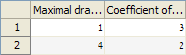
I often need to present data in tabular format in Matlab GUI, and this data often has relatively long column headers such as “Maximal draw/gain” or “Coefficient of elasticity”. When the table has many columns, these long column headers do not fit in the small space that is available:
uitable('data',magic(2),'ColumnName',{'Maximal draw/gain','Coefficient of elasticity'}) |
Creating multi-line headers
It makes sense to split such long column headers into a multi-line string. In the new (R2008a+) uitable, this can easily be done by adding the | character wherever we wish the line to be split; in both the new and the old uitable, we can also use the built-in HTML support by adding a simple <br/>. The following code snippet demonstrates both of these alternatives:
uitable('data',magic(2), 'ColumnName',{'Maximal|draw/gain', '<html><center />Coefficient<br />of elasticity</html>'}); |
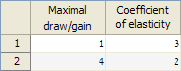
Much more readable and useful, I think. Note that HTML code is left-aligned by default, so to center the header I added the
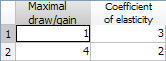
<center> tag in the snippet.If the text appears too crowded in the header cells, we can slightly reduce the header font, to make it appear more spaced-out. The following snippet illustrates this for the old uitable (available since Matlab 7.0 all the way until today), which can only use the HTML alternative since it does not support |:
headers = {'<html>Maximal<br />draw/gain</html>', ... '<html><center /><font size=-2>Coefficient<br />of elasticity</font></html>'}; uitable('v0','data',magic(2),'ColumnNames',headers); |
Dynamic multi-line headers
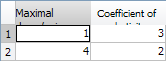
While adding | or <br/> solves the problem for the majority of cases, it is sometimes difficult to know in advance where to place the line-split. This often happens when the column headers are dynamically generated by the program. If we omit the <br/> from our header strings, we get sub-optimal rendering: The new uitable simply hides all overflow terms, and the old uitable pushes them to the bottom:
headers = {'<html>Maximal draw/gain</html>', ... '<html><center /><font size=-2>Coefficient of elasticity</font></html>'}; uitable('v0','data',magic(2),'ColumnNames',headers); |
I’ve tried numerous things, including CSS wrapping directives etc. None seem to work (I’ll be happy to hear a new idea that does work), except for the following weird-sounding trick: add a “
<br/> ” at the end of the HTML header string. If the column is wide enough, then this will be disregarded; otherwise, it will automatically split the string nicely:
headers = {'<html>Maximal draw/gain<br /> </html>', ... '<html><center /><font size=-2>Coefficient of elasticity<br /> </font></html>'}; uitable('v0','data',magic(2),'ColumnNames',headers); |
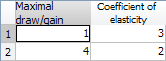
Note: the
part is important – the trick will NOT work without it!
Controlling the headers
HTML provides some degree of control over the table header row. Some additional aspects can be configured by accessing the underlying Java’s TableHeader sub-component. But here’s another trick that I found handy: I hide the table header row altogether, and use the top table data row for my headers. I can control this row’s height using JTable’s standard setRowHeight() method. Using some fancy cell background colors I can make this row stand out, and I can easily control other aspects as well.
The same trick can also be used for the row-header column: I can dispense with the standard one and use the table’s first column as a row-header column.
For more information on uitable customization, refer to section 4.1 of my Matlab-Java book, or to my uitable customization report.
Do you have a favorite trick with multi-line strings in Matlab GUI? If so, please share it in a comment below.

Thank you, great tips !
Can you have a two-level header, where items in the top line cover more than one column?
Like in this example where I have 3 autocorrelation columns:
Autocorrelations
1 2 3
@Luc – yes, this is indeed possible. Contact me by email for a short consulting proposal.
In the:
Creating multi-line headers
section, you have two examples, the first having the flat default matlab tan color on the headers,.. the other has a ’rounded’ silver looking header section…
How was this done?
Thank you
@Christopher – this is because the flat header is used by the new (R2008a+) uitable, whereas the gradient-colored header is used by the “old” uitable (R14-today), accessible via uitable(‘v0’,…). A detailed description of the two uitable variants can be found in my Matlab-Java book (section 4.1), or in my uitable customization report.
Thank you very much for all your great tips.
Do you know if it is possible to rotate an entry in the header of an uitable to keep columns small (e.g. for checkbox-columns)?
@Jette – I am not aware of a way to do this
Is it possible to the do the same for data as well? I mean the table ‘Data’ and not just the headers.
@Pooja – yes of course:
But you will need to reduce the font-size or to use the underlying Java object (
jtable) to fix the row-heights, so that the multi-line contents appear properly.Thanks Mr Altman. I’m using the newest version of MATLAB (2015b). I can’t access the java handles. Did this,
Line 4 throws an error -> ‘No appropriate method, property, or field ‘getViewport’ for class ‘matlab.ui.control.Table’.
Tried using ‘ColumnNames’ property to use the old uitable version but MATLAB moans saying it’s an obsolete version and errors out.
So guess I can’t change the row height.
Any thoughts on this?
Thanks much.
Use findjobj, not findobj
Hi Mr Altman,
No I’m unable to use that. It says ‘Undefined function or variable ‘findjobj”.
Is there a work-around?
Best regards,
Pooja
@Pooja – did you read the findjobj article that I linked in my answer?! findjobj is not part of the core Matlab, you need to download and install it
Hi Yair – Can we control Old uitable Table Header height using Java’s TableHeader sub-component? If so then how? If it is mentioned in any of your published texts please let me know where, I must be overlooking.
Thanks,
Amit
Amit – I concentrated in my book and report on the interface with Matlab, and this is purely an internal Java thing, part of the underlying
JTable. So, you will need to search Java resources for the answer.Interestingly I have managed to get the dimensions of the header of jtable using:
Now, d.height returns the height of the header and d.width returns the width of the header. The only problem is whilst setting this property.
It returns no error when I do this: d.height = 50 and I see the new property is set to 50 but it does not update the uitable. Any help on how can I make it to set this property so that it is updated in uitable too will be appreciated?
Hi Yair – I have a managed to set the height using
theader.getParent.setPreferredSize(d)and it works. However it does not apply it on uitable until I resize it. How can I make it to update dynamically i.e. as soon as I update the property it should be updated in uitable.Also running
theader.getParent.setPreferredSize(d)in m-file throws an error ‘Attempt to reference field of non-structure array’ which I have also raised (in addition to above) at Matlab forums.If you know the answer from top of your head it would be appreciated. If not then I understand you don’t use your time on this.
@Amit – try
jtable.revalidate(); jtable.repaint();Hi,Yair
Thanks you createTable.m and it is really work using uicontextmenu in uitree.while I find a bug, I really can set uicontextmenu in old uitable through createTable.m. In container it really have a uicontextmenu defined by program. but in the uitable, it shows also the default uicontextmenu. How can show the Custom menu?
Hi , Yair.
¿Do the HTML options still work in the uitables created with the app designer?
No. In the new web-based uifigures you need to use uihtml and uistyle to update the table appearance.