Outside the official Matlab blogs, perhaps the most widely known Matlab-related active blog is BlinkDagger. This blog is certainly worth following, especially for novice Matlab users who could gain fresh angles on regular programming tasks that have a simple solution in Matlab.
In one of their latest posts, BlinkDagger described how to use tooltips in Matlab GUI. In one of this blog’s very first posts, I described how HTML can easily be used with Matlab uicontrols. Let’s now combine these ideas to show how HTML support can easily be used to spice-up the tooltips.
Let’s start with a simple styled multi-line tooltip:

This technique was used to display the informative tooltip for my Java-based data table utility on the Matlab file Exchange:
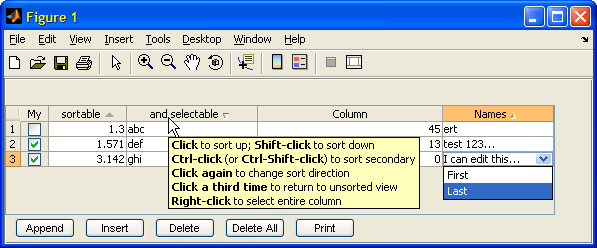
Tooltips can also be used to present images, using the HTML <img> tag. However, the image src (filename) needs to be formatted in a URL-compliant format such as ‘https://undocumentedmatlab.com/images/table.png‘ or ‘file:/C:\Yair\Undocumented Matlab\Images\table.png’.
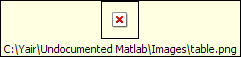
If you try to use a non-URL-format filename, the image will not be displayed. Instead, a placeholder box will appear. For example, let’s take the table screenshot above and try to place its filename directly in the tooltip HTML:
If we fix filePath to be a valid URL, it now looks as intended:
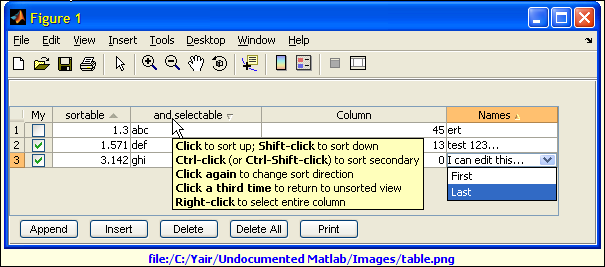
Tooltip with HTML image and caption
Note that the tooltip looks enormous (it’s actually even downsized to fit this post…). This is because our HTML <img> was not limited in size and so the tooltip was created to display the screenshot in its original large size. In order to limit the tooltip size, simply add the height and width attributes to the HTML <img> tag, remembering to preserve the original image aspect ratio.
Now that we know the basics, we can really go wild with HTML and CSS formatting. Have you configured any kick-butt tooltip in your application? If so, please share it here.

Yair, Could handle2struct/struct2handle pair be extended to cover all java objects?
@wei – handle2struct/struct2handle are internal Matlab functions that cannot be modified. However, you can easily build your own m-file version that try’s to call the built-in version and if an error is thrown, then the catch segment will create the necessary output object based on inspection of the Java object.
This could be a nice File Exchange submission – care to tackle it?
You can get some pointers by looking at the code within my UIInspect utility on the File Exchange.
[…] Yair’s Undocumented Tips on How to Spice up Tooltips […]
That looks like a really handy feature! On a slightly related note, do you know of any way of forcing a tooltip to display (or update one that is already being displayed)?
@Ben – this was challenging: Until you asked I thought I knew the standard answer, which is “no” – tooltips use the system’s ToolTipManager object that can’t be modified. But then I found this Java hack, which I’m not even sure is documented in Java… Assuming you get the Java reference in jHandle:
The mouse does not even have to be anywhere near the GUI object!
Unfortunately, this hack requires the Java reference of the GUI object, and is not available for Matlab handles. To get a Matlab handle’s underlying Java reference you can use my FindJObj utility on the File Exchange and then use the hack.
Offtopic, sorry, but just wanted to reiterate – great blog idea, you should definitely keep it up. How about a post on systemdependent() ?
@Alan – thanks.
I’ll do a post or two about systemdependent but look at my long TODO list: so little time, so much to do…
[…] Was aber funktioniert ist html, es gibt ein undokumentiertes Feautre, mit dem einfach html eingefügt werden kann – Java machts möglich. […]
Great post as usual — any idea how to get this to work on the text popups when using datacursormode?? It seems like it would be similar to the tooltips but doesn’t seem to work by default. Thanks in advance for your time!
@Koelemay – take a look at my DataMatrix utility, which does this:
Hi Yair,
Sorry I think my question was too ambiguous; I was wondering if it is possible to get html markup in the datacursor mode popups. So, for example, using datamatrix I’d like to use html markup in the strings for the dataTips input. Hopefully I’m not missing something horribly obvious! Thanks again for your help!
@Koelemay – datacursor popups are not tooltips and they don’t support HTML to the best of my knowledge. There’s probably a way to make them HTML-aware, if you dig deep enough in the datacursor code (\toolbox\matlab\graphics\@graphics\@datacursor\*.m, \@datatip\*.m and their relatives within \@graphics). Let us all know if you find a workaround.
[…] In this blog, I have already posted several articles about how to tweak tooltip contents (here, here, and here). Today I would like to expand on one of the aspects that were already covered, […]
Is it possible to use HTML to reference an image file from a compiled MATLAB executable? Is the format for the HTML “img” tag the same?
img src=”file:\c:/user/mypic.png” worked when running my application in MATLAB, but I think the path isn’t correct when I run from my compiled exe. (Crazy MCR!)
Also, are relative paths accepted? I could only get this to work with a full path so far.
I ended up getting this working by adding the image file to the executable’s CTF archive (using the -a option to MCC) and then referencing it in my code by:
Then I provided imagePath as the path in the “img” tag. So…this was less of an HTML question, more about proper use of MCC.
@Yair,
The code to display tooltips programmatically does not work for uitables in newer Matlab versions anymore:
matlab output:
action = []Hi Yair ,
Thanks for the tremendous amount of good tips on this blog, it s really helpful.
i was wondering how to put tooltip on a matlab toolbar icon.
As ‘TooltipString’ is not an accessible property for an instance of class ‘uitoolbar’.
any idea how to work around this ?
Thanks,
L.
@Laurent – set the TooltipString property on the toolbar icon’s handle (uipushtool, uitoggletool, uisplittool, or uitogglesplittool) – not on the toolbar handle.
Hi Yair. Your article is excellent, but i see in column “Names” you realized different data for popup in different rows. Please, can you says how you do this?
@Konstantin – you can set up a custom cell-editor that displays a different list of drop-down/pop-up values based on certain conditions (such as the data in another column in the same row). I explain how to do this in my book Undocumented Secrets of Matlab-Java Programming or in my uitable customization report: