
Three years ago I published an article on undocumented profiler options. Since then, I’ve posted several articles about performance tuning and profiling (for example, memory profiling) but nothing specifically about the Profiler. There are several additional undocumented aspects of the Profiler that I’d like to expose. Today’s article will focus on benefits that require a bit of tweaking to Matlab files (fixing a font issue and increasing the reported time resolution). Next week’s article will explain undocumented switches of the profile function, which can be used to profile built-in functions, as well as to provide detailed history timeline of the function calls.
Fixing a Profiler font problem
On my system, starting in R2012a, the code lines in the detailed profiling report look awful. The reason is that they are rendered using a proportional font, rather than the monospaced (fixed-width) font that is specified in the Matlab Preferences and used everywhere else (the Editor, Command Window etc.):
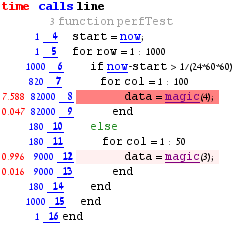
I have seen this phenomenon on several of my clients’ systems, so I’m pretty sure that this is not an isolated issue. However, I do not know whether this problem is wide-spread.
In any case, the solution is very simple: Edit the %matlabroot%/toolbox/matlab/codetools/matlab-report-styles.css files and replace the following CSS directives near the top of the file:
PRE { font-size: 100%; } |
with this one:
pre, tt { font-family: monospace font-size: 100%; } |
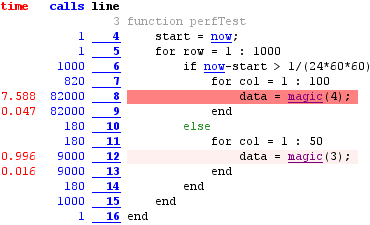
(note the 1-millisecond timing resolution)
A very similar problem seems to afflict the Help browser. I could not add the CSS fix there because the help pages use the docstyle.css files that are bundled within the \help\techdoc\help.jar file. If you wish, you could update them there (a JAR is a simple zip file after all).
You may perhaps recall my related article last year, where I showed how to convert a proportional-font multi-line tooltip into a nicely-formatted monospaced tooltip.
Increasing the reported timing resolution
The Profiler records information at a system-dependent time resolution, typically 1 millisecond. However, the profiling report only displays information at a granularity of 10 ms. I often find it useful to increase the reported resolution to 1 ms, and in fact the screenshots above reflect this change. This can easily be done by editing the profview function (%matlabroot%/toolbox/matlab/codetools/profview.m. This function can be edited in the MATLAB editor via edit(‘profview’)).
The following is from lines 1410-1418 of profview.m in R2012a:
% Display the time if timePerLine > 0.01, s{end+1} = sprintf('<span style="color: #FF0000"> %5.2f </span>',... timePerLine); elseif timePerLine > 0 s{end+1} = '<span style="color: #FF0000">< 0.01 </span>'; else s{end+1} = ' '; end |
which could be replaced by the following (modified lines highlighted):
if timePerLine >= 0.005, s{end+1} = sprintf('<span style="color: #FF0000"> %6.3f</span>',... timePerLine); elseif timePerLine > 0 s{end+1} = '<span style="color: #FF0000">< 0.005</span>';else s{end+1} = ' '; end |

[…] Past articles explained how to profile memory, improve timing resolution and fix a font issue, and display the call history. […]