
Once again, I would like to welcome guest blogger Levente Hunyadi.
Non-standard property renderers and editors
Last week, I discussed JIDE’s property table and showed how we can add custom properties and present this table in our Matlab GUI. Today, I will extend the previous week’s example to include more sophisticated renderers and editors.
Cell renderers and editors are the backbone of JTable implementations, JIDE’s property grid included. Each property is associated with a type, and a renderer and an editor may be registered for a type. The cell renderer controls how the property value is displayed, while the editor determines how it is edited. For example, flags (Java Booleans) are often both rendered and edited using a checkbox, but can also use a text renderer with a combo-box editor. PropertyTable automatically assigns a default renderer and editor to each property, based on its type: Flags are assigned a combo-box editor of true/false values, and similarly for other types.
Let us now modify the preassigned editor. First, let’s set a checkbox editor (BooleanCheckBoxCellEditor) for flags and a spinner for numbers:
% Initialize JIDE's usage within Matlab com.mathworks.mwswing.MJUtilities.initJIDE; % Prepare the properties list: % First two logical values (flags) list = java.util.ArrayList(); prop1 = com.jidesoft.grid.DefaultProperty(); prop1.setName('mylogical'); prop1.setType(javaclass('logical')); prop1.setValue(true); list.add(prop1); prop2 = com.jidesoft.grid.DefaultProperty(); prop2.setName('mycheckbox'); prop2.setType(javaclass('logical')); prop2.setValue(true); prop2.setEditorContext(com.jidesoft.grid.BooleanCheckBoxCellEditor.CONTEXT); list.add(prop2); % Now integers (note the different way to set property values): prop3 = com.jidesoft.grid.DefaultProperty(); javatype = javaclass('int32'); set(prop3,'Name','myinteger','Type',javatype,'Value',int32(1)); list.add(prop3); prop4 = com.jidesoft.grid.DefaultProperty(); set(prop4,'Name','myspinner','Type',javatype,'Value',int32(1)); set(prop4,'EditorContext',com.jidesoft.grid.SpinnerCellEditor.CONTEXT); list.add(prop4); % Prepare a properties table containing the list model = com.jidesoft.grid.PropertyTableModel(list); model.expandAll(); grid = com.jidesoft.grid.PropertyTable(model); pane = com.jidesoft.grid.PropertyPane(grid); % Display the properties pane onscreen hFig = figure; panel = uipanel(hFig); javacomponent(pane, [0 0 200 200], panel); |
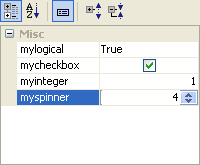
Notice how the EditorContext is used to specify a non-standard renderer/editor for myspinner and mycheckbox: The mylogical flag displays as a string label, while mycheckbox displays as a checkbox; myinteger uses a regular integer editor that accepts whole numbers, while myspinner uses a spinner control to modify the value.
Note that instead of creating an entirely new properties list and table, we could have run last week’s example, modified list and then simply called model.refresh() to update the display.
Also note that Matlab types are automatically converted to Java types, but we must be careful that the results of the conversion should match our setType declaration. The logical value true converts to java.lang.Boolean, but 1 by default would be a double, which is the standard numeric type in Matlab. The int32 wrapper is needed to force a conversion to a java.lang.Integer.
Spinners with indefinite value bounds are seldom useful. The following shows how to register a new editor to restrict values to a fixed range. Remember to unregister the editor when it is no longer used:
javatype = javaclass('int32'); value = int32(0); minVal = int32(-2); maxVal = int32(5); step = int32(1); spinner = javax.swing.SpinnerNumberModel(value, minVal, maxVal, step); editor = com.jidesoft.grid.SpinnerCellEditor(spinner); context = com.jidesoft.grid.EditorContext('spinnereditor'); com.jidesoft.grid.CellEditorManager.registerEditor(javatype, editor, context); prop = com.jidesoft.grid.DefaultProperty(); set(prop, 'Name','myspinner', 'Type',javatype, ... 'Value',int32(1), 'EditorContext',context); % [do something useful here...] com.jidesoft.grid.CellEditorManager.unregisterEditor(javatype, context); |
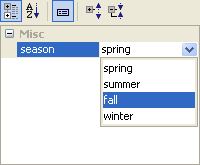
The principle is the same for combo-boxes:
javatype = javaclass('char', 1); options = {'spring', 'summer', 'fall', 'winter'}; editor = com.jidesoft.grid.ListComboBoxCellEditor(options); context = com.jidesoft.grid.EditorContext('comboboxeditor'); com.jidesoft.grid.CellEditorManager.registerEditor(javatype, editor, context); prop = com.jidesoft.grid.DefaultProperty(); set(prop, 'Name','season', 'Type',javatype, ... 'Value','spring', 'EditorContext',context); % [do something useful here...] com.jidesoft.grid.CellEditorManager.unregisterEditor(javatype, context); |
Nested properties
Properties can act as a parent node for other properties. A typical example is an object’s dimensions: a parent node value may be edited as a 2-by-1 matrix, but width and height may also be exposed individually. Nested properties are created as regular properties. However, rather than adding them directly to a PropertyTableModel, they are added under a Property instance using its addChild method:
propdimensions = com.jidesoft.grid.DefaultProperty(); propdimensions.setName('dimensions'); propdimensions.setEditable(false); propwidth = com.jidesoft.grid.DefaultProperty(); propwidth.setName('width'); propwidth.setType(javaclass('int32')); propwidth.setValue(int32(100)); propdimensions.addChild(propwidth); propheight = com.jidesoft.grid.DefaultProperty(); propheight.setName('height'); propheight.setType(javaclass('int32')); propheight.setValue(int32(100)); propdimensions.addChild(propheight); |
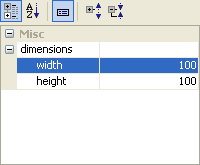
PropertyTableModel accesses properties in a hierarchical naming scheme. This means that the parts of nested properties are separated with a dot (.). In the above example, these two fully-qualified names are dimensions.width and dimensions.height.
Trapping property change events
Sometimes it is desirable to subscribe to the PropertyChange event. This event is fired by PropertyTableModel whenever any property value is updated. To expose Java events to Matlab, we use the two-parameter form of the handle function with the optional CallbackProperties parameter.
hModel = handle(model, 'CallbackProperties'); set(hModel, 'PropertyChangeCallback', @callback_onPropertyChange); |
The callback function receives two input arguments: The first is the PropertyTableModel object that fired the event, the second is a PropertyChangeEvent object with properties PropertyName, OldValue and NewValue. The PropertyTableModel‘s getProperty(PropertyName) method may be used to fetch the Property instance that has changed.
Callbacks enable property value validation: OldValue can be used to restore the original property value, if NewValue fails to meet some criteria that cannot be programmed into the cell editor. We may, for instance, set the property type to a string; then, in our callback function, use str2num as a validator to try to convert NewValue to a numeric matrix. If the conversion fails, we restore the OldValue:
function callback_onPropertyChange(model, event) string = event.getNewValue(); [value, isvalid] = str2num(string); %#ok prop = model.getProperty(event.getPropertyName()); if isvalid % standardize value entered string = mat2str(value); else % restore previous value string = event.getOldValue(); end prop.setValue(string); model.refresh(); % refresh value onscreen |
The JIDE packages that are pre-bundled in Matlab contain numerous other useful classes. Some of these will be described in future articles.

Levente,
Using your example with width and height, is there a way to reflect the change of one of those properties in the dimension field? for example, have the dimensions field read [100 100]?
Thanks
Jason
@Jason – of course: First, set the parent property’s initial value:
Next, set a callback on the model’s PropertyChange event:
And in this callback function, update the parent’s value whenever one of its child values changes:
-Yair
How do you remove the “Misc” category?
@Praminder –
‘Misc’ is the default category. You can set a different category name using the Category property or the setCategory() method, as follows:
-Yair
Hello! Yair, congratulation on your blog, the best Matlab resource I have seen.
I do not know if this tread is too old, but here goes nothing.
I am trying to create a property editor, I found that when I create a dropdown menu and register the editor it does so for every combobox so the dropdown menus are the same for all controls even if at first render the value shown is valid.
A small example: (inspired by your examples)
The question is: how to have a proper dropdown list for each property?
Thanks Baudilio
@everyone
Ok, problem solved. The name of the editor context is the one that determines which editor is used…
Fixed code:
Is there any of complete removing “Misc” category, to receive table without categories?
@Dmitr – yes there is a way:
If you only need uncategorized view, you will probably wish to remove the categorization toolbar above the grid:
@Yair: I’m trying to validate data input in my propertygrid, using “onPropertyChange” callback.
All values of my data is interlinked, so even if a single value can be ok, if the relation between some properties is not the right one, that value is not valid anymore. i.e, let’s suppose I have 3 properties, A, B, C, and always A+B=C. You can set any value to A and B, but if C is not A+B, then you have to change A, B or C to have valid data.
My idea is to highlight wrong values with red background, so i tried to change TableCellRenderer color. My problem is that it changes all cells color and not just the cell(s) i want to highlight. I’m not too good using java, so most probably there’s another way. Maybe i should use different TableCellRenderers for valid/invalid cells? Or do i need to use other java object to handle my propertygrid cells background?
Thanks
@Jose – the easiest solution is to use HTML colors for cells where you wish to have a non-default color. This can be done by setting the cell’s string to something like
'<html><font color="red">123.456'.Unfortunately, HTML processing in Java table cells is relatively CPU intensive and slow, so it is not advisable for use in numerous cells together, and/or for fast-changing cell values. A better alternative is to use a dedicated
TableCellRendererJava class that enables cell-specific colors. But this requires more advanced Java knowledge and is a subject for a dedicated blog article all on its own (one day I’ll write about it… – it’s somewhere on my TODO list)Thanks for your input, Yair.
I will use the HTML trick as first method (i already use it for tree nodes somewhere else), but i will still try to learn and use the
TableCellRendererJava class. I’m more a C++/Qt guy, but… 🙂I will share my results if i get a solution.
@Jose – you can start to learn about JTable cell renderers with this link: http://download.oracle.com/javase/tutorial/uiswing/components/table.html#renderer
Hello!
A rapid way to apply a format to a specific cell:
Elia.
I’m trying to mimic part of the Lineseries Property Editor in a custom configuration dialog. This property editor is a great start. I’m looking forward to more details on how to customize the rendering of the controls, such as showing color pickers, line styles, etc.
Alternatively, I would be interested in forgoing the property editor, if I could just directly access the MATLAB controls used to change lineseries properties.
Hopefully, it’s clear what I’m trying to do…
Thanks for the great blog!
Why don’t you simply use inspect(hLine)?
It’s a configuration dialog for a much larger plotting application I’ve built, so I want complete control over the interface. The end users don’t want to see a list of dozens of options, just the basic few properties for changing the line and marker styles.
I just posted another possible solution: http://undocumentedmatlab.com/blog/borderless-button-used-for-plot-properties/
[…] JIDE’s DateSpinnerComboBox can be used as the cell-editor component in tables. An example of this was shown in the article about Advanced JIDE Property Grids (and section 5.7.5 in the book). […]
I have tried to run your code with the nested properties.
The error message:
??? Undefined function or method ‘javaclass’ for input arguments of type ‘char’.
Error in ==> nestedprop at 13
propwidth.setType(javaclass(‘int32’));
Do I have to install any java api?
Thanks a lot!
@Philip – no: you just need to download the javaclass function. See the previous article in this series for details.
@Yair
I’ve downloaded the code, the error does not occur anymore.
But also there is no figure displayed!?
I am a total beginner with emmbedded java in matlab, I just can’t figure out whats wrong with my system.
@Philip – the component should appear onscreen when the code reaches the javacomponent function call at the bottom of the code snippet. Use the Matlab debugger to discover why it doesn’t reach that point.
Anybody succeeded at adding a dialog to choose a file or a folder?
I’ve try using FileChooserExComboBox as briefly described in http://www.jidesoft.com/products/JIDE_Grids_Developer_Guide.pdf but I still have
NullPointerExceptionerror when I click the button to popup the file dialog (ex:@Jonathan – try using a
com.jidesoft.grid.FileCellEditor, in a similar way to theSpinnerCellEditorandBooleanCheckBoxCellEditorshown in the article.Thanks, it worked.
I appreciate Propertytables very much and am using it to build a Matlab GUI. Thanks Yair to investigate these functionalities and for sharing your findings with the rest of the world! Of course I cross fingers that the undocumented functionality will not disappear in future Matlab releases 😉
How could I add two buttons into a property cell? I guess there might be a fitting CellEditor. I’d love to see an example on how this is commonly done.
Thanks in advance!
Elia.
@Elia – I’m afraid that I do not have an example or reference for you. Your best bet would be to search/ask on the JIDE forum, or on StackOverflow.
Hi,
actually I found out that the Jide solution to implement buttons in Propertytable cells turns around the Editor/Renderer HyperLinkTableCellEditorRenderer as demonstrated in the Jide HyperlinkCellDemo. Unfortunately that class does not seem to be included in the Matlab Jide package.
I wonder how Mathworks implemented the buttons in the property inspector.
Best regards!
Elia.
@Elia – MathWorks probably created a custom renderer that included a JPanel with a JButton. I’m guessing that if you take a look at the JIDE renderers you could relatively easily adapt them to do the same. Alternately, you could perhaps use Matlab’s renderers.
Hello! New query: Did anyone succeed in making a context menu appear related to the PropertyTableModel? I tried to set the UIContextMenu value of the PropertyTableModel value to a uicontextmenu handle, but nothing happens when I right-click anywhere on the Property table.
thanks in advance!
Hi dear Yair
I create a combobox with some item like below:
comboBox = javax.swing.JComboBox({‘?’,’?’});
But after load data I have to update combobox with numeric data
data = [20.2;30.3;15.22;-5.65;0.365;10.00];
I tried like below:
comboBox.add({num2str(A)});
but it is not work…
what should I do?
Greetings Yair,
The default column width is 50:50, but I need to set it to 75:25. How can I resize the columns in the property panel? I found that there is autoResizeAllColumns(), but nothing on setting the column widths programmatically.
Thanks in advance!
isoboy
I don’t know if you already found a solution for your problem, but using setPreferredWidth on the column following worked for me:
Gustaf
Like several other posters, I have wanted to dynamically add my own controls to a property grid cell. For example, I want to add a small Save button on each property so a user can permanently save a particular property as a default. Or, I’d like to open a custom dialog box with a button.
I’m having some luck with the following approach (hack). I’m not an expert in Java/Swing or the implications this approach could have on memory or performance in Matlab so please comment if you have any guidance.
As noted by Yair, you’ll need a JPanel to start with so I made a simple cell renderer/editor class in Java
There’s a lot of overhead but I add renderer and editor components for each row. So for one row where I want a combo box and save button I add a renderer panel and editor panel. On the renderer panel I add a JTextField and JButton. On the editor panel I add a JComboBox and JButton. Then register each with CellRendererManager and CellEditorManager respectively.
One drawback is you don’t get a PropertyChangeCallback. I use focus lost/gained to check values (validate) dynamically. I wonder if there’s a cleaver way to use a hidden control.
Anyhow, I hope this is useful to someone and please post feedback.
Scott
Hi Yair,
is there a callback whenever I select a property, not just if it changed? I want to create a kind of an “own” description field that updates everytime another property is focused.
Thanks,
Jan
@Jan – take a look at the SelectionModel. A sample usage is in my treeTable utility here.
Also take a look at the
PropertyPane‘s ShowDescription property, which could be much simpler in your case.Hi Yair,
thanks for your quick reply.
I managed to get the ‘ValueChangedCallback’ as you suggested. But unfortunately, I only get the actual java ID of the selected component. So, having 8 properties in 3 categories, the ID I get goes from 0 to 10. The components are all stored in a java.util.ArrayList (just like in your example above), which goes from 0 to 7 (for 8 components). Is there a way to get the ‘complete’ list of the property grid, where also the categories are stored in?
Unfortunately, I have no knowledge of java (yet), so I can’t figure it out myself …
Best wishes,
Jan
Oh, nevermind. it was not as difficult as I thought it would be:
… and
… actually works fine.
Thanks, for everything! This blog is helping a lot …
Jan
Hi! This is great and inspirative work.
Is it possible to perform a ‘reset property value to default’ with jide grid controls?. I was thinking of using .NET PropertyGrid instead which allows this behaviour. Following sample code works great:
But then i don’t know how to embed resulting “.NET form” inside a “matlab figure/panel” (+ Need a workaround to add/remove properties on the fly because .NET grids work from attributes ==> http://stackoverflow.com/q/313822/684399)
I do not know of a way to integrate .NET controls in Matlab figures, but I’m guessing that this may be a solved problem in the Java world. So if you find a way to integrate a .NET control in a Java container, it should be pretty straight-forward to extend this to Matlab figures.
Hi,
Thanks for your reply. I gave up using a .NET grid to be able to reset edited field to default values (too complex). Anyway, as I dived much into your code, I updated it to accept a ‘callback’ as input argument so as to get more control on how fields are edited (editor type, field description, field name, category, etc…). See ‘uipropedit.m’ and ‘DemoCallback.m’ routines here:
https://gist.github.com/CitizenInsane/3ce1755bf0901f0bae38
Contribution is not perfect but it’s a first try to get more control on how values are edited. Additionally, the new routine manages for n-dimensional fields (or n-dimensional objects themselves!) using ‘ind2sub’ instead of ‘reshape’ to 3D at max; this is a litle more appealing when editing n-d data.
Dear Yair,
I’ve been using your inspiring hints smoothly up to R2012b. Since R2013a – and including R2014a – I receive a Java NullPointerException when I click with the mouse pointer on a CheckBoxListCombo in a grid table. Any suggestions on a fix?
For example:
I get the same issue as above using jide grids on r2014b. The com.jidesoft.grid.ListComboBoxCellEditor editor seems to trigger the exception. Anybody has a hint?
Hello
Does anybody know how to add another column to the property grid?
I’m displaying some physical values in a property grid.
Now I would be happy to have a third column to display the units of values.
Thank you in advance
Dear Yair
I’m trying to make own property inspector. i try step by step on your code. but there are some errors. it’s in combo-box and logical value. making combo-box, logic works well but when i choose other options (ex. your script combo-box spring, summer, fall, winter) i can’t see other options (summer, fall, winter). the error in java , grid . how can i solve the problem..
Thanks
@Suk – you are probably configuring your cell-array of options incorrectly. Read my blog examples carefully and/or read my book on Matlab-Java programming to see how to configure Java components in Matlab.
Dear Yair~
I solved problem that java error. Matlab & Java version is not same on my laptop…
i have more question!
your example is greatly work..
is there methods to align property value , and change heights of description zone?
Thanks..
Hello ~
is there editor style like inspector background / foreground ?
there are color in value section and have colour picker front.
i want make inspector in color picker & background
thanks.
@Cho – my article on color-selection components might help you: http://undocumentedmatlab.com/blog/color-selection-components
Hi, I tried your code but I get the following error:
??? Undefined variable "com" or class "com.jidesoft.grid.DefaultProperty".I’m a newbiew and would appreciate ideas.
Thanks!
hi
how can make live searchable in jtable ?
Yair,
Using the example above, I created a ML custom class called a ‘project’ which has certain public properties of class
com.jidesoft.grid.DefaultPropertyso that the properties of the project can be edited from thePropertyTable. The default properties are added to a list of classjava.util.ArrayList, which is also a property of the custom project class. I then created a tree that lists all the projects. I adapted the mousePressedCallback you wrote in Customizing uitree nodes – part 2, so that when each project node is double clicked its properties are displayed in thePropertyTableusing:I thought that each instance of project would control its list and the UI would simply load the list when I double click on the project node, but it appears as though my current implementation of
Arraylistis not localized to the instance of project that called it. It seems that the same list continues to be updated with every new call to project and when I double click on each project node, I get a concatenated grid of the project properties from all projects.Any help you can give with this would be greatly appreciated.
@Philip – you probably have a bug in your code, for example reusing the same
ArrayListobject for all projects, rather than using a newArrayListinstance for each project instance. For example: http://undocumentedmatlab.com/blog/handle-object-as-default-class-property-valueYair,
This is with reference to your response to my post on August 5, 2019. Thank you for the response. The problem I was facing was directly related to the link in your comment. The problem was fixed by simply programmatically setting the property’s default value (of class
java.util.ArrayList) in the class constructor for an instance of custom class project, as opposed to setting the default value in the properties declaration.Philip
Yair,
Could you please shed some more insight on how to use color choosers (specifically the
ColorComboBox/JideColorSplitButton/ orcom.mathworks.mlwidgets.graphics.ColorPicker) in JIDE Property Grids? I’ve been referencing the notes you outlined in this post as well as the following two posts on your undocumented site ( http://undocumentedmatlab.com/blog/color-selection-components and http://undocumentedmatlab.com/using-jide-combo-boxes ), however my efforts to insert the component into the grid were unsuccessful.Philip – you cannot directly use a Java control inside Java tables, such as a Property Grid. Inside a table you should use a Cell-Editor and Cell-Renderer. Showing how to integrate them inside a JIDE Property Grid is well outside the scope of this blog. You can search in Java forums, or the code within my propertiesGUI utility.
A description of how to integrate color cell renderers and editors in Java-based Matlab uitables can be found in my uitable customization report (note: this is related, but not directly applicable, to property-grids).