
Last week, I wrote an article about the hidden/undocumented LineSmoothing plot property. This week, I want to introduce another useful hidden/undocumented property – the plot axes’ LooseInset property. This follows on the wake of an email I received from a reader about this property, which had some new information for me (thanks Ben!).
Apparently, LooseInset, which is automatically set to a factory value of [0.13, 0.11, 0.095, 0.075], is used by Matlab axes to reserve a small empty margin around the axes, presumably to enable space for tick marks. These empty margins can be very annoying at times, especially when we have directly control on the axes contents.
figure; t=0:0.01:7; plot(t,2*sin(t)); |
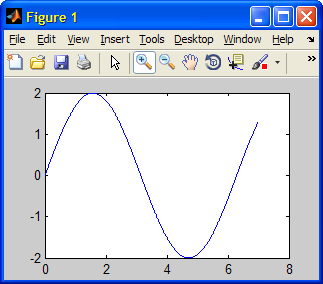
(note the excessive margins)
If you set Position to [0 0 1 1], the labels are cut-off; if you set Position to something like [0.05 0.05 0.9 0.9], you can get the labels to show up, but if you now resize the image the labels may be cut off… Similarly, setting TightInset also does not work.
Theoretically, the solution should be to set OuterPosition to [0 0 1 1]. This is supposed to make the axes (including labels) take up the entire figure. However, it usually over-estimates the required margins, causing wasted space. Using OuterPosition also causes unexpected behaviors with sub-plots.
Solution: simply set LooseInset to [0 0 0 0]:
set(gca, 'LooseInset', [0,0,0,0]); |
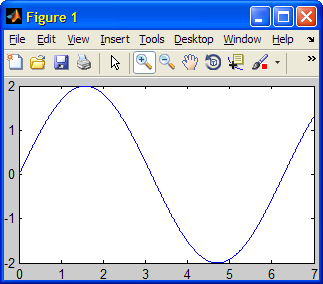
To modify all future axes in the same way (i.e., have an empty LooseInset):
set(0,'DefaultAxesLooseInset',[0,0,0,0]) |
Clearing the LooseInset margins has a drawback: if the axes is zoomed or modified in such a way that the labels change, then the active axes plot region needs to shrink accordingly. For example:
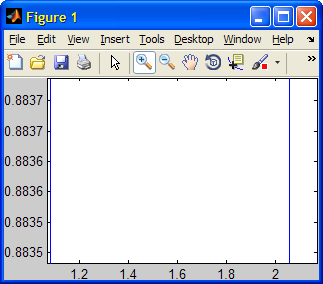
(note the changed plot region size)
When determining the size of the axes, it seems that Matlab takes into account larger of the documented TightInset and the undocumented LooseInset. So, perhaps a better generic solution would be the one suggested by another blog reader:
set(gca,'LooseInset',get(gca,'TightInset')) |
Note that the LooseInset property was first reported on CSSM back in 2007 (also here). The LooseInset property has remained hidden and undocumented to this day (Matlab 7.10, R2010a), although it has even featured in an official MathWorks Technical Solution to a reported problem about unexpected axes sizes last year.
p.s. – another undocumented property of Matlab axes, ContentsVisible, was described by Matt Whittaker in a comment on my original article that introduced undocumented properties.

Nice to see that there is a simple solution for this problem and I do not have to write a Figure Resize Callback function for this purpose. However, in the case of “axis equal” the described procedure does not work since the figure position has to be set to produce a cropped window. Does anybody knows whether there is a simple method to compute cropped figure dimensions for equal axis with labels?
@Ralf – I would need this too.
Is there any similar defalut property like ‘DefaultAxesLooseInset’ for subplots?
@Maurizio – there is only one DefaultAxesLooseInset property in the root (0) handle – there is no distinction between main axes and sub-plots, since sub-plots are simply a set of axes that are distributed (laid-out) nicely within the figure. So, setting the DefaultAxesLooseInset property affects all the subplot axes.
This statement:
set(0,’DefaultAxesLooseInset’,[0,0,0,0])
.. seems don’t work (R2012a)
recall on my previous post:
.. seems does work, but only at main axes level..doesn’t affect subplot behavior.., so gray wasted spaces between figure’s subplots remain as default..
@Vladi – the subplot function overrides the default LooseInset value and sets its own ([.13,.11,.095,.047] in normalized units). After the subplots are created you can override their LooseInset and OuterPosition property values to get the desired effect.
This (set(gca,’LooseInset’,get(gca,’TightInset’))) works well for me in case of plots generated using the plot command. But it does not work for me for figures generated using imshow command.
Any suggestions?
Thanks
@Sundar – it does work for imshow, but it is possible that you see no difference and the reason is that imshow preserves the image aspect ratio and other such factors that affect image display in the axes. If you’ll do set(gca,’Visible’,’on’,’Box’,’on’) I think you will see this more clearly. Also, resize the figure window to see the figure axes change its size.
Both LooseInset and Visible didn’t work for me.
The following code works samely with and without any sets.
@Dims – LooseInset doesn’t work on subplots, only regular axes; try setting Visible after imshow()
I’ve noticed that
sometimes seems to work best after a short delay following resizing and positioning a subplot. If it doesn’t seem to make much difference when first applied, I use
I’m guessing this ensures the plot has been rendered on-screen before the command is applied.
@Chris – I assume that drawnow would be more appropriate than pause in this case
If an imagesc in a figure has a colorbar, setting LooseInset to [0 0 0 0] causes the colorbar to be outside the figure, hence not visible. LooseInset can be set to some other value that keeps the colorbar visible, for example [0 0 .1 .01], but if the figure is resized the value of the 3rd element of LooseInset needs to be different. This could possibly be addressed with a resize callback function but I have not been able to figure out how to automatically determine a good value for LooseInset. Anybody have a solution?
Thanks,
Richard
I’ve noticed that if I use
set(gca,'LooseInset',get(gca,'TightInset'))to remove the white space, after I save the figure and reopen the figure the xlabel is cut-off for larger sized figures (1206 x 785 pixels) because MATLAB changes the ActivePositionProperty from'outerposition'to'position', and MATLAB also reduces the figure vertical size by 6 pixels. Anybody else run into this?@Gerald – odd. A possible workaround is to set the figure’s CreateFcn callback property to a function that fixes this. Whenever the figure will then be opened, this callback will execute, fixing this (and any other) oddity. I use this trick to recreate toolbar customizations that would otherwise get lost across figure save/load.
Thanks a lot.
Like others, I’m struggling to use this to get rid of white space in subplots. Perhaps an example would help? And is it best to resize the figure before apply this commands?
Many thanks,
[…] And voila, your plot should fill the whole window without creating much whitespace, which is perfectly fine for exporting plots for documentations. You can also check out some more propertys at http://undocumentedmatlab.com/blog/axes-looseinset-property […]
Thanks a million, super useful
It doesn’t work when axes in uipanel?
Why?