
Continuing my previous post about setting system-tray icons, I will now show how to set informational popup messages next to these icons.
Asynchronous informational messages can be presented next to the sys-tray icon, in a fashion similar to what we came to expect from modern programs. This could be used to indicate some unexpected event that was detected, or the end of a complex calculation phase. The message title, text and severity icon are all customizable.
Unfortunately, the Java method used to display messages, java.awt.TrayIcon.displayMessage(), expects an object of type java.awt.TrayIcon.MessageType, which is an enumeration within the TrayIcon class. However, Matlab’s dot-notation does not recognize what should have been the following correct notation, so we need to resort to Java reflection:
>> trayIcon.displayMessage('title','info msg',TrayIcon.MessageType.INFO);
??? No appropriate method or public field MessageType for class java.awt.TrayIcon
>> trayIconClasses = trayIcon.getClass.getClasses;
>> trayIconClasses(1)
ans =
class java.awt.TrayIcon$MessageType	<= hurray!!!
>> MessageTypes = trayIconClasses(1).getEnumConstants
MessageTypes =
java.awt.TrayIcon$MessageType[]:
    [java.awt.TrayIcon$MessageType]	<= 1: ERROR
    [java.awt.TrayIcon$MessageType]	<= 2: WARNING
    [java.awt.TrayIcon$MessageType]	<= 3: INFO
    [java.awt.TrayIcon$MessageType]	<= 4: NONE
>> trayIcon.displayMessage('title','info msg',MessageTypes(3));

and another example, now with a WARNING icon:
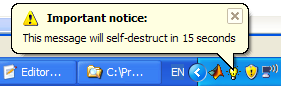
If the title string is left empty, then neither title nor the severity icon will be displayed. The message can still be manually dismissed by clicking within its boundaries:

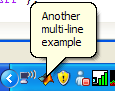
Informational popup messages are automatically aligned and positioned by the system. Messages are automatically dismissed by the system after some time, if not dismissed by the user first. The exact time is determined by system and user activity and other such external factors. Informational messages replace one another, if the previous message has still not been cleared by the user.
I have created a utility function called SYSTRAY, which is a convenience function that facilitates the setup and update of system tray icons and messages. SYSTRAY (with source code) can be downloaded from the File Exchange.
I would be happy to hear if and how you’re using the new system-tray functionality in your application – let me know below.

Yair,
Thanks again for this utility, just thought I would let you know that I’m using this to replace any helpdlg boxes that I previously used to give process direction during a program, like click here, or define this range. Using this, a user can breeze through a program if they know what to do, or go slowly and read the pop-ups.
[…] Unfortunately, Matlab prevents using Java classnames containing a period (e.g., Port.Info) or static Interface values, so we cannot directly access Port.Info.SPEAKER or FloatControl.Type.VOLUME. I’ve reported this bug to Mathworks earlier this year, and I do not know in which Matlab release (if at all) they intend to fix it. Until then we need to use workarounds, as in the code above. I posted a similar issue (and its workaround) earlier in this blog, when setting system-tray popup message. […]
On the version (R2007b) of Matlab I use this statement does not work:
trayIconClasses = trayIcon.getClass.getClasses;
??? No method ‘getClass’ with matching signature found for class ‘java.awt.TrayIcon’.
Is it supprted on later versions?
Albert – it should work on Matlab installations that run JVM 1.6+. To determine your JVM version, type the following in your Command Window:
version -javaIf this is not helpful, try to inspect the trayIcon object using the methodsview function, to see why the getClass method fails:
i couldn’t run SoundVolume function on Matlab.. When i write SoundVolume=10; then nothing happens .. How can i run the SoundVolume function which is written at
http://undocumentedmatlab.com/blog/updating-speaker-sound-volume/
@andandgui – did you even read the SoundVolume help?
SoundVolume is not a variable that you can assign like SoundVolume=10, but a function that accepts input parameters like SoundVolume (1.0) and it only accepts values between 0.0-1.0 so 10 is not a valid value.
Also, next time, please post the question in the relevant page (http://undocumentedmatlab.com/blog/updating-speaker-sound-volume/) – your question has nothing to do with this page.
Dear Yair
This looks like a great utility. Unfortunately it does not work properly on my system (Matlab 2010a, Windows XP, Java 1.6.0_12-b04). To start with I call
Afterwards, the only command that works is the set command for deletion. Setting message pop-ups and the like does not work (does not yield any error messages, but does not affect the icon).
Furthermore, if I click the icon in the system tray I get the exception pasted below.
Have you any suggestions on how to get around this. I have tried the exception fix you link to on the uisplitpane post, but that does not help either. Thanks for a great site and lots of cool applications
Peter
That looks like a “bug.” I’ll ask them to fix it, but the earliest it would be done would be 12b, if at all…
@Mike – thanks – couldn’t ask for anything more
[…] Note: Users interested in non-intrusive status-bar messages, may also be interested in another non-intrusive messaging mechanism which I have described some months ago: Setting system tray popup messages. […]
Dear Yair,
as all the others I’d like to thank you for the wonderful systray tool. It’s really great.
While I implemented it these days in an old 2007b installation, it worked without any problem. (At least after having included the solution for the messages as pointed out in your uisplitpane entry).
Now I’m trying to migrate to 2010bSP1 and stumbled over two problems:
a) Java complained about setting the popup entry enabled using your line
As I’m not familiar with java: Is the workaround
valid?
b) I get the same error message as Peter mentioned above when trying to access the popup menu:
As I learned, this is an Java 1.6 issue. Is there a workaround on the Matlab-level for systray available? Or what else could be done?
Best wishes,
Alexander
Update:
Going through the implementation in 2010b I found a second problematic point. In line 232, the “ActionPerformedCallback” is set. This also drops an warning. Now I found on of your infos on using set/get with core java object in the entry on Uicontrol callbacks. Is it thus reasonable to change
to
If so, I’d suggest to make an update of the FileExchange version (also including the comments made in the uisplitpanel entry). If not, I’m really interested in a workaround.
Alexander
@Alexander – using menuItem.setEnabled() is indeed safe and valid, and in fact better than using set(…). Your fix for using CallbackProperties is also correct – this is described in another article.
Unfortunately, I do not have a solution for the popup message errors at this time. If I do, I will post it on this page.
thanks for the code and the explanation with picures
Hi Yair
nice utility!
In the post you don’t provide the code for the multi-line example.
Do you use char(10) for breaking lines? Example:
It may be nice if the systray function would accept as message as cellstr and breaking lines automatically like usual in Matlab msgbox.
Example:
@Thierry – indeed, char(10) can be used to break lines in the systray message.
You might also try to use HTML formatting with a <br/> tag (untested, but I think it should work).
Cell arrays are currently not supported unfortunately.
One could convert cellstr in multi-lines char with one line:
msg={‘Another’,’multi-line’,’Example’}
sprintf(‘%s\n’,msg{:})
so one can then pass it to systray.
For handling recurring warnings because of java exceptions I’ve come to the solution to clear the java events on mouse click. I had also to update the list of exceptions. See extracted code below:
I used your code but I have eccepetion with this too.
When I use this code this code any exception. Is this true?
Is any problem with this code?
Thanks
I could not find a way to delete/clear the current popup message…
@Thierry – the popup is in general automatically removed by the operating system after several seconds. You can always set the popup message to empty (see the code in systray utility (setIconMessage() sub-function).
You can also delete and recreate the systray to get the same effect as workaround. Read the code in the systray utility to see how (basically,
java.awt.SystemTray.getSystemTray.remove(jcomp)).