
A common feature of Java Swing components is their acceptance of HTML (and CSS) for any of their JLabels. Since all Matlab uicontrols are based on Swing-derived components (an undocumented aspect), this Swing feature automatically applies to Matlab uicontrol as well. Whatever can be formatted in HTML (font, color, size, …) is inherently available in Matlab controls. Note that HTML tags do not need to be closed (<tag>…</tag>), although it is good practice to close them properly.
For example, let us create a multi-colored Matlab listbox:
uicontrol('Style','list', 'Position',[10,10,70,70], 'String', ...
{'<HTML><FONT color="red">Hello</Font></html>', 'world', ...
 '<html><font style="font-family:impact;color:green"><i>What a', ...
 '<Html><FONT color="blue" face="Comic Sans MS">nice day!</font>'});

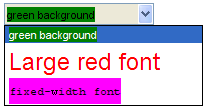
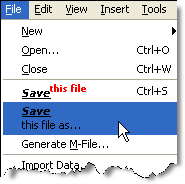
Menus and tooltips can also be customized in a similar fashion:
uicontrol('Style','popup', 'Position',[10,10,150,100], 'String', ...
{'<HTML><BODY bgcolor="green">green background</BODY></HTML>', ...
 '<HTML><FONT color="red" size="+2">Large red font</FONT></HTML>', ...
 '<HTML><BODY bgcolor="#FF00FF"><PRE>fixed-width font'});


Thanks for starting this blog Yair. It’s fun, and often necessary, to mess with Java directly when doing GUI programming in Matlab and this blog should help a lot with that.
About displaying HTML in uicontrols, is there a way to do that with static text? Simply changing the style parameter to text in your examples does not work.
Regards,
Ashish.
This is a good point, Ashish – text uicontrols use a class (com.mathworks.hg.peer.LabelPeer$1 which extends com.mathworks.hg.peer.utils.MultilineLabel) that de-HTMLs the content string for some reason that I do not understanding.
Instead of using uicontrol(‘style’,’text’,…) you could use javacomponent(‘javax.swing.JLabel’), which uses a standard HTML-compliant label (the string is controlled via its ‘Text’ property).
Yair
Perfect! That works, but I ended up using a JButton instead because I could define an ActionPerformedCallback for it, the only way I could figure out to respond to user clicks on a JLabel was to add a mouse listener and I had no idea how to do that on the Matlab side. This is the code I’m using:
Now, the next question is, is there a way to make it behave like a HyperLink on hovering i.e. change the cursor to the hand icon, like it does in a web browser?
Ah, Ashish – this one’s easy: to change the cursor to a hand icon, simply do this:
Note that in order to prevent memory leaks, it is advisable to use the
jObject.setProperty()orset(handle(jObject),'Property',...)formats, instead ofset(jObject,'Property',...).Yair
Thanks for the tip about using the SET function, I was digging around a little bit more about that and came up with this link:
http://mathforum.org/kb/message.jspa?messageID=5950839&tstart=0
Is what he says about explicitly setting java handles to [] true? I’m not doing that at the moment, but I could stuff all the java handles into GUIDATA and set them to empty in the DeleteFcn callback for the figure containing the Java components.
Thanks again for answering all my questions, pretty soon you’ll be able to create a new blog post from just these questions 🙂
Oh and I have some feedback about the website, it’s minor and nothing that a text editor can’t fix in a few seconds, but the code that you post cannot be copy-pasted into the Matlab command line directly because of the ‘, “, … etc. characters which instead of the ASCII versions are some HTML versions. The … for instance is a single character instead of 3 .s
I need exactly what Ashish needed almost 6 years ago and it’s working (HTML doesn’t work for uicontrol(‘style’, ‘text’)). My question is how do I change the size of the text? I was trying to access the method setFont method under handle.Font but it’s not accessible. How do I change the font size? Thanks.
@Alex – assuming you are talking about the Java component and not the Matlab uicontrol, you can do this:
Yair, thank you for your demon reply. At times it gives the impression you are an 24hr AI software working. 🙂 I used methods(jLabel) yesterday but didn’t show setFont, neither I could tab-complete it. Not sure why. Next time I will assume is there whether I see it or not. Thanks a million.
Sorry. It should have read ….. demon speed* reply….
Next time, use my uiinspect and/or checkClass utilities.
Forgot to ask one more question I had. I create the JButton using javacomponent and then call the handle function before setting the ActionPerformedCallback
hText = javacomponent( ‘javax.swing.JButton’, pos, hPanel );
hText.setText( ‘MyButton’ );
hText = handle( hText, ‘CallbackProperties’ );
set( hText, ‘ActionPerformedCallback’, @VarSelectCallback );
It seems I can move the line containing the call to the HANDLE function right after creating the JButton and then call all the methods the same way as using the handle returned by javacomponent. Is this true? Are the 2 handles equivalent (other than the fact that you should use the one returned by the HANDLE call to set the callback)?
Deleting the java handles (or explicitly setting to []) is really important only for very heavy components (JTable/JTree with lots of data etc.) or for components that keep getting replaced with new instances for programmatic reasons. Otherwise it’s just not worth your programming time…
Thanks for the feedback about the code snippets font – I fixed it and you can now copy-paste directly into Matlab.
Your observation about handle() is correct. handle() is a large undocumented topic in Matlab which is on my TODO list. Basically, the handle() object is a Matlab wrapper for the Java reference, and whatever you can do with the Java ref you can do with the handle, with some differences that I’ll detail separately (probably over several posts since the topic is large).
Can this be used to right align text (or center) in uicontrols? On windows the HorizontalAlignment property only works for text and edit boxes. However, I could not find a html instruction that would do it (p align=right…)
@Dani – the “normal” way to do this is to use HorizontalAlignment. In theory, you could use the style=”text-align:right;” CSS directive. However, it appears that the Java engine does not honor this CSS directive (although it does honor font size/color etc.). it doesn’t hurt to try, just don’t be surprised if it is ignored.
[…] the Command-Window (like Swing’s standard JTextArea of which CW is an instance) does not automatically support HTML formatting as most other uicontrols. In fact, CW’s default Document object, which holds all the text-area’s text and font style information […]
[…] how to use tooltips in Matlab GUI. In one of this blog’s very first posts, I described how HTML can easily be used with Matlab uicontrols. Let’s now combine these ideas to show how HTML support can easily be used to spice-up the […]
Yair, I was messing around with the JLabel HTML, and I have a few different links within it. Is there a way to allow for following these links?
@Jason – you can indeed follow hyperlinks. For a few examples, take a look at my UIINSPECT utility on the File Exchange. Specifically, see the link at the very bottom of the figure window, and also the links within the methods pane on the top-left.
Yair, Thanks for the suggestion. Because I have multiple links, I ended up using a browser instance and inserting the html like this:
Just to show another usage of this topic, I’m using it as a font name chooser:
[…] axes text labels that support Tex/Latex, and unlike other uicontrols like buttons or listboxes that support HTML, text labels (uicontrol(’Style’,’text’,…)) do not support text formatting […]
An example for Jbutton usage in MATLAB
Hi,
Is it possible to assign the color of one plot to what is written inside the listbox?I explain my application: I have an axes and a listbox, when I plot different lines, in the listbox it is shown Plot1,Plot2… and I would like those strings to have the color of its corresponding plotted line…is it possible? I just cant get it…
Thanks in advance
@cintix – yes it is possible. You just need to remember how HTML colors are specified. Here is a very simple example that you can modify for your own needs:
Yair
[…] remember that HTML is accepted just as in any other Swing-based label […]
Dear all,
Was just wondering if using this technique I would be able to make some options in a popupmenu change colour and more importantly unselectable?
Thanks for your invaluable help with this website.
Fil.
@Fil – You can use HTML to define separate item colors (see the example in the main article above), but you can’t define unselectable items.
Thanks Yair,
So there is no way to create a popupmenu with unselectable options using Matlab or Java?
Thanks for your help,
Fil
You can use HTML to set popup menu items to gray-italic, but you can’t prevent the user from clicking these items. In your callback, simply ignore any clicks made on your “uselectable” items.
[…] names share the same HTML support feature as all Java Swing labels. Therefore, we can specify font size/face/color, bold, italic, underline, […]
Hi Yair,
Just a note about using HTML within uicontrols:
I use a lot of HTML code for my uicontrols . The only drawback I have found is when you decide to set enable off one of them. For example :
As the ForegroundColor of “New Figure” label is still in red it is not clear that the label is disabled. I would expect to see the label in grey.
Currently I remove HTML tags as follows:
Note: The regular expression does not display correctly on your site, I am using this one from this tech-note:
How can I read an HTML file into MATLAB and discard the HTML tags?
Except this drawback , using HTML in uicontrols is easy and makes GUIs to be more pretty.
Aurélien
It’s a bit late to answer, but for the record this is a known bug in the JVM (i.e., not a Matlab bug). This bug’s webpage contains several workarounds; the full fix is in JVM 1.7, whose Matlab integration date is currently unknown.
Sorry for the belated answer – it’s in my book (p. 109) so apparently I knew about this for over a year. I’m not sure why I didn’t answer here immediately…
Hi,
How to pass a variable in the element?
var
for example: I have
var = 10;
@LL – your question is not understood. Be more specific
[…] have used HTML to format the header labels into two rows, to enable compact columns. I have already described using HTML formatting in Matlab controls in several articles on this website. […]
Is it only uicontrols that are derived from Java Swing components? If not, how can I detect if a given object is so-derived? E.g., are uipanel’s so-derived? (I’d like to use html tags in a uipanel title; is using a uicontrol(‘Type’, ‘text’) the only way to achieve this? Can I make such an object the value of the uipanel’s Title property, or do I have to basically make the control a separate child of the panel and place it manually in a title-like position?) Thanks!
@David – in fact, the uipanel title is actually a simple text uicontrol that is a child of the panel and placed in an appropriate position. You can get its handle (and modify it accordingly) using the hidden uipanel property TitleHandle. You can read more about this and see some ideas of customizing the panel title in an article I posted in 2010: http://undocumentedmatlab.com/blog/panel-level-uicontrols/
Text uicontrols do not understand HTML, but you can replace the label with a Java-based label that does. See http://undocumentedmatlab.com/blog/customizing-matlab-labels/
Finally, you can always elect to use a JPanel directly, rather than a uipanel – JPanels inherently support HTML in their titles, and also enable rounded corners, which is a nice feature that is lacking in uipanels.
To find out if there is an underlying Java component to a GUI control, use the findjobj utility. You’ll find that there is no such Java control that underlies uipanels.
Great, thanks!
Amazing! However, after trying this on a little experiment (a GUI-based Scientific Calculator), I came across a little problem – how do you implement a delete function on special characters in HTML (such as pi which is π)?
I have a pushbutton which deletes regular characters (numbers and letters) on an MJLabel one-by-one using this code
The thing is, I can now use special characters (thanks to your tutorials) on static textboxes. But everytime I use my delete command above, the underlying html code is revealed.
Before delete:
π
After single-instance delete:
`
does anyone know how to make accepted a code like :
(angle brackets instead of [ ])
The interesting thing for me would be including some images in my text.
Thanks !
@Eric – you got the HTML img URL syntax wrong, that’s why you don’t see the image. I explained this issue here. Many people seem to have this difficulty so I think I’ll write a dedicated article about it shortly – keep following this blog.
Note that HTML images only work for “real” uicontrols, but not for text labels that are created via the uicontrol function. I explained a workaround for using HTML in text labels here.
thank you Yair !
[…] A couple of weeks ago, a reader here asked how to integrate images in Matlab labels. I see quite a few queries about this […]
[…] The illusion is achieved using Matlab’s HTML formatting, where the part of the label string consisting of the class name is underlined. […]
Hello Sir,
I want to display dicom file path using uitree by dicom file series wise
Take a look at my series on using Matlab uitree
You may also be interested in using propertiesGUI to present the DICOM meta-data information using
[…] have often noted in past articles that most Matlab uicontrols support HTML formatting. We can use a listbox control for our log panel, and use HTML formatting for the various log […]
Hello,
first thank you for your great blog. It helps a lot!
Right now I struggle a little with the listbox. I try to generate items that contain multirow text using the “br” tag. Right now the listbox ist not extending the item height so the items are not completely visible. Is there a way to tell the listbox to autosize the items or do I have to somehow manually do that?
Thanks in advance and best regards
Eike
You need to do it manually
hi,
i’m searching for a method to change the background color of the whole popupmenu window.
i learned hear how to change the colors of the text and the direct background of the text,
but i want to change the color of a whole popup-window when i click on the the button right.
the matlab control offers only the color changings in the untouched menu window, but not in the whole opened one. this is is always white. eve if i change the colors of the text and its background with this html-method, what really works fine, all the rest background in the menu stays white.
is there a way to change it ?
I do not know how to do it directly from Matlab. I think you will need to do it using a customized Java control. See here.
For your info I have added a FEX submission for converting str2html. for use in uicontrols and uimenus etc….
I hope you find it useful!
Hello,
Is it possible to highlight different entries of a listbox separately?
I am looking for a way to be able to (1) highlight the entry my mouse is currently hovering at and (2) at the same time always keep the currently SELECTED entry highlighted (in a different color) aswell?
And I am not looking for chaning the color of the string via HTML. I’d like to have the whole “line” highlighted.
Thank you in advance!
Hannes
I figured out a workaround. I have some space on the right of the listbox. I placed a simple static text there, without any string but a certain backgroundcolor. And every time my MouseHoverCallback from the listbox executes I update the y-position of the static text in to the corresponding currently hovered index in a discrete manner.
This is what it looks like: http://hpewd.dorado.uberspace.de/listbox_example.png. The blue-highlighted entry is the currently selected one.
That provides a simple indicator. However, this is just a workaround. Maybe someone knows a more proper take on this.
[…] found how to do it using HTML code, as an undocumented feature, here. Basically the code, copied/pasted from Yair’s website, looks as […]
I am trying to write Latin characters in a uimenu, such as: á or ñ. However, the ‘&’ symbol is reserved for uimenus to allow mnemonic access to items and so doesn’t display the characters correctly. Do you know a way around this? Is Java required for this?
Thanks in advance.
I was able to fix this by putting an ‘&’ before the string as well as using it as an html character.
Is it possible to integrate CSS to Matlab Guide ?
I am trying to create one of the buttons here : https://codepen.io/bartekd/pen/qFsDf in my Matlab Guide figure. Is it feasible ?
Thank you in advance.
@Momo – yes, you can include CSS in your controls, even those created using GUIDE. Simply update the control’s String property to include the relevant HTML info. For example:
Note that not all CSS directives are supported by Java Swing (which is the underlying mechanism that parses the HTML/CSS directives).
@Yair Thank you for your reply.
I have been trying to include a css file for a while but I always get the html code as a string on the button. Can you help me with this issue ? Please refer to the example below (HTML code and it’s corresponding CSS code).
HTML CODE: <a href="#" rel="nofollow">green</a> CSS CODE: .myButton { background-color:#44c767; -moz-border-radius:28px; -webkit-border-radius:28px; border-radius:28px; border:1px solid #18ab29; display:inline-block; cursor:pointer; color:#ffffff; font-family:Arial; font-size:17px; padding:16px 31px; text-decoration:none; text-shadow:0px 1px 0px #2f6627; } .myButton:hover { background-color:#5cbf2a; } .myButton:active { position:relative; top:1px; }Please refer to this : http://www.bestcssbuttongenerator.com/
@Momo – you cannot include external CSS files. You need to specify the CSS directives directly in the HTML string as I have shown above.
Is it possible to change the horizontal & vertical alignment of the pushbutton string with CSS tags?
I see that most directives work, but I don’t see any effect from:
Much thanks for all you do!
@Meade – You can use an HTML string such as this:
A better solution is to use the findjobj utility as explained here. This would be independent of the button’s pixel-size and would work even when the button is resized.
@Yair
This is a great work-around!
I’m guessing by your suggestion that Matlab doesn’t interpret any of the ‘align’ commands for text in naked Matlab uibuttons?
As for suggestion two, I’m very familiar with your great |findjobj| utility. I use it all the time. I was hoping to avoid jButtons if possible, but they might be best choice afterall.
Many thanks!
meade
@Meade – it’s not Matlab that ignores the align directive but rather the underlying Java Swing behavior, which snugly fits the text in the center of the button, and of course aligning text within a tight-fitting box has no effect. The workaround I suggested simply forces Swing to use a non-tightly-fitting boundary box, within which you can indeed align the text. It’s a pretty standard HTML/CSS behavior workaround, and any decent web developer could probably find several similar alternatives.
while using html in Matlab uitable cell to change color , can I at the same time also specify alignment to centre or left? I don’t know html and am trying to work out if this is possible or not
data(1,1)='<html><font bgcolor=#FF8800>1</font></html>’
@darsh – yes it is possible using
<div>or<tr>/<td>, but this has some drawbacks:Instead, I suggest using the text alignment methods/properties of the underlying Java control: http://undocumentedmatlab.com/blog/button-customization
Hey Yair,
Thanks for such an awesome blog… I never knew such great capabilities existed, most of which i really needed…
Thanks again..
Trouble is, when there are “<" in the string, they are not shown in Matlab! Any ideas to fix it?
For html strings you have to replace the special characters with the entity names (e.g. replace
).
For a description to entity names and a list of the important ones see https://www.w3schools.com/html/html_entities.asp
A full list character entity names can be seen in https://dev.w3.org/html5/html-author/charref.
Hey Yair,
I really appreciate your fantastic blog! I had no idea these amazing features were out there, and many of them are exactly what I’ve been looking for.
Thanks again!
Hi,
Is the html formatting in ui components still supported? Since I updated to 2025a, all my html tags are made visible in the tooltip strings and popupmenus.
Cheers
In the new Javascript-based UI controls, only those components that have a settable Interpreter property can display HTML (by setting the Interpretter property value to ‘html’). This is indeed cumbersome and only partial support, and it should have been made the default behavior. but MW decided for unknown reasons that this is the way it should be and there’s nothing that can be done about it.
You could always dig within the UI’s DOM hierarchy to modify the controls at the true Javascript level (including full HTML and JS support), but this is definitely not documented or easy. See for example: https://undocumentedmatlab.com/articles/customizing-web-gui-uipanel