
A client recently asked me to develop an application that will help discover technical indicators for trading on the stock market. The application was very data-intensive and the analysis naturally required visual presentations of number-crunching results in a readable manner. One of the requirements was to present numeric results in a data table, so we naturally use uitable for this.
Today I will show how using some not-so-complex Java we can transform the standard Matlab uitable into something much more useful.
First pass – basic data table
We start by displaying the data in a simple uitable. The essence of the relevant code snippet was something like this:
headers = {'Periods', ... '<html><center>Any period<br />returns</center></html>', ... '<html><center>Avg return<br />signal</center></html>', ... '<html><center>Avg<br />gain</center></html>', ... '<html><center>Avg<br />draw</center></html>', ... '<html><center>Gain/draw<br />ratio</center></html>', ... '<html><center>Max<br />gain</center></html>', ... '<html><center>Max<br />draw</center></html>', ... '<html><center>Random<br />% pos</center></html>', ... '<html><center>Signal<br />% pos</center></html>', ... 'Payout', '% p-value'}; hTable = uitable('Data',data, 'ColumnEditable',false, ... 'ColumnName',headers, 'RowName',[], ... 'ColumnFormat',['numeric',repmat({'bank'},1,11)], ... 'ColumnWidth','auto', ... 'Units','norm', 'Position',[0,.75,1,.25]); |
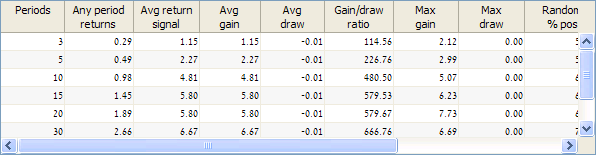
We can see from this simple example how I have used HTML to format the header labels into two rows, to enable compact columns. I have already described using HTML formatting in Matlab controls in several articles on this website. I have not done this here, but you can easily use HTML formatting for other effect such as superscript (<sup>), subscript (<sub>), bold (<b>), italic (<i>), font sizes and colors (<font>) and other standard HTML effects.
Even with the multi-line headers, the default column width appears to be too wide. This is apparently an internal Matlab bug, not taking HTML into consideration. This causes only part of the information to be displayed on screen, and requires the user to either scroll right and left, or to manually resize the columns.
Second pass – auto-resizing that actually works…
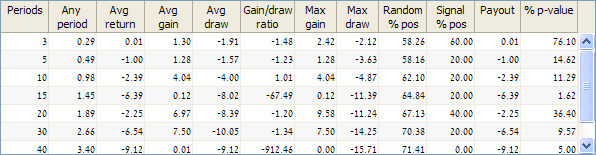
To solve the auto-resizing issue, we resort to a bit of Java magic powder. We start by using the findjobj utility to get the table’s underlying Java reference handle. This is the containing scrollpane, and we are interested in the actual data table inside. We then use the setAutoResizeMode, as described in the official Java documentation.
jScroll = findjobj(hTable); jTable = jScroll.getViewport.getView; jTable.setAutoResizeMode(jTable.AUTO_RESIZE_SUBSEQUENT_COLUMNS); |
Third pass – adding colors
There are still quite a few other customizations needed here: enable sorting; remove the border outline; set a white background; set row (rather than cell) selection and several other fixes that may seem trivial by themselves but together giver a much more stylish look to the table’s look and feel. I’ll skip these for now (interested readers can read all about them, and more, in my detailed uitable customization report).
One of the more important customizations is to add colors depending on the data. In my client’s case, there were three requirements:
- data that could be positive or negative should be colored in green or red foreground color respectively
- large payouts (abs > 2) should be colored in blue
- data rows that have statistical significance (%p-value < 5) should have a yellow background highlight
While we could easily use HTML or CSS formatting to do this, this would be bad for performance in a large data table, may cause some issues when editing table cells or sorting columns. I chose to use the alternative method of cell renderers.
ColoredFieldCellRenderer is a simple table cell renderer that enables setting cell-specific foreground/background colors and tooltip messages (it also has a few other goodies like smart text alignment etc.). This requires some Java knowledge to program, but in this case you can simply download the ColoredFieldCellRenderer.zip file and use it, even if you don’t know Java. The source code is included in the zip file, for anyone who is interested.
After using javaaddpath to add the zip file to the dynamic Java classpath (you can add it to the static classpath.txt file instead), the contained Java class file is available for use in Matlab. We configure it according to our data and then assign it to all our table’s columns.
Java savvy readers might complain that the data-processing should perhaps be done in the renderer class rather than in Matlab. I have kept it in Matlab because this would enable very easy modification of the highlighting algorithm, without any need to modify the generic Java renderer class.
Unfortunately, in the new uitable design (the version available since R2008a), JIDE and Matlab have apparently broken the standard MVC approach by using a table model that not only controls the data but also sets the table’s appearance (row-striping background colors, for example), and disregards column cell-renderers. In order for our custom cell renderer to have any effect, we must therefore replace Matlab’s standard DefaultUIStyleTableModel with a simple DefaultTableModel. This in itself is not enough – we also need to ensure that the uitable has an empty ColumnFormat property, because if it is non-empty then it overrides our cell-renderer.
In the following code, note that Java row and column indices start at 0, not at 1 like in Matlab. We need to be careful about indices when programming java in Matlab.
The rest of the code should be pretty much self explanatory (again – more details can be found in the above-mentioned report):
% Initialize our custom cell renderer class object javaaddpath('ColoredFieldCellRenderer.zip'); cr = ColoredFieldCellRenderer(java.awt.Color.white); cr.setDisabled(true); % to bg-color the entire column % Set specific cell colors (background and/or foreground) for rowIdx = 1 : size(data,1) % Red/greed foreground color for the numeric data for colIdx = 2 : 8 if data(rowIdx,colIdx) < 0 cr.setCellFgColor(rowIdx-1,colIdx-1,java.awt.Color(1,0,0)); % red elseif data(rowIdx,colIdx) > 0 cr.setCellFgColor(rowIdx-1,colIdx-1,java.awt.Color(0,0.5,0)); % green end end % Yellow background for significant rows based on p-value if data(rowIdx,12) < = 5 && data(rowIdx,11)~=0 for colIdx = 1 : length(headers) cr.setCellBgColor(rowIdx-1,colIdx-1,java.awt.Color(1,1,0)); % yellow end end % Bold blue foreground for significant payouts if abs(data(rowIdx,11)) >= 2 cr.setCellFgColor(rowIdx-1,10,java.awt.Color(0,0,1)); % blue % Note: the following could easily be done in the renderer, just like the colors boldPayoutStr = ['<html><b>' num2str(data(rowIdx,11),'%.2f') '</b></html>']; %jTable.setValueAt(boldPayoutStr,rowIdx-1,10); % this is no good: overridden when table model is replaced below... dataCells{rowIdx,11} = boldPayoutStr; end end % Replace Matlab's table model with something more renderer-friendly... jTable.setModel(javax.swing.table.DefaultTableModel(dataCells,headers)); set(hTable,'ColumnFormat',[]); % Finally assign the renderer object to all the table columns for colIdx = 1 : length(headers) jTable.getColumnModel.getColumn(colIdx-1).setCellRenderer(cr); end |
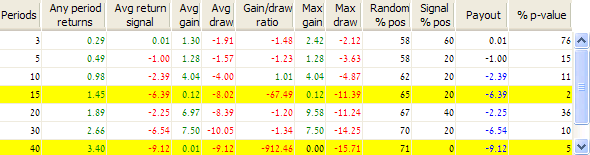
This may not take a beauty contest prize, but you must admit that it now looks more useful than the original table at the top of this article.

Hello,
Thank you for the contribution. I succeeded to replicate the example above but I have a problem. Only the data in blue appears because variable dataCells is not empty there but the other data doesn’t appear. I initialized dataCells = num2cell(data), then, the data appear as desired. But the problem is that I have no more access to the callback funtions to edit the table for example or select a cell.
Do you have an explanation (and a solution 🙂 ) to that. I use Matlab7.11.0(R2010b).
Best regards,
Younes
@Younes, this is because we replaced the table model, to which the callbacks were connected. If you would like my help in attaching callbacks to the new table model, then please email me (you can use the link at the top right of every webpage on this website).
Hi Yair,
First of all thank you for running that blog and helping to discover new ways of MATLAB 😉
My problem is as follows. I’d like to disable one of the rows of the uitable from being able to be edited. I can do it with columns with a build in MATLAB method ColumnEditable, but apparently nobody thought of the case when someone would like to do that with rows. I created my own DefaultTableModel and attached it to the table. The disabling works, but in the process I lose all my callbacks. Is there any way to attach the standard CellEditCallback to the new table model?
All the best,
Lech
@Lech – Swing’s JTable, on which uitable is ultimately based, uses a data model that is column-based, not row-based. Lots of different inconsistencies arise out of this, row-editability is just one of them.
You cannot use Matlab’s standard callbacks after you modified the table model, but you can use callbacks at the Java level. If you want my help in this, please email me (you can use the link at the top right of every webpage on this website).
hello
doesn’t the use of javaaddpath make this unusable for matlab compiled standalone applications?
is there a way around it?
@Jayveer, of course it can be done in compiled apps. Please contact me via the email link at the top of this page.
Hello,
I love your blog and find it very helpful! I used this code in R2011b and it worked beautifully. However, now that I upgraded to R2012a when I use the same code the font turns gray and when I change the background color I get a kind of 3-D effect with the font. Any idea what is causing this? Thank you!
Carly
@Carly – What you describe sounds like the way non-editable text is displayed. Maybe these cells are non-editable? try making the columns editable and recheck.
R2012a made changes in the way that uitables (even the old uitable) display data, this may well be one of these changes. Most of these changes can be solved or bypassed, but it could take some time to figure out exactly what to do. If this is important to you and you would like my consulting help, please contact me by mail.
Hi Yair,
Thanks for your contribution. I have managed to use it successfully, but once I changed the background colour, it would not let update the table data anymore. Have you got any idea for that? Thanks very much.
Berloou
@Berlouu – you will need to update your table data at the Java level
Thanks very much.
[…] Using some fancy cell background colors I can make this row stand out, and I can easily control other aspects as well. […]
Hi, Yair, and thanks! What if I have the opposite problem, namely, the original figure width is too small for the default column witdths–how can I auto-widen the figure so that even the widest of my columns are not cut off? (My guess is that I have to grab the underlying java Figure and Panel objects into which I’ve placed my table and then use autoresize properties they have, yes? Help me out: what are they called?) Thanks again!
@David – there’s no magic wand here that I know. You could sum the table column widths, and then resize your containing panel and figure accordingly.
Thanks, Yair, but how do I get the table colum table widths?
(get(myTable, ‘Columnwidth’) simply returns ‘auto’)?
You could use
jTable.getWidthdirectly, or access each of the columns separately as follows:Thanks again, Yair; I assume you mean
jTable.getColumnCount?@David – indeed, corrected
Yair,
I bought your book, Undocumented Matlab, and really like it. I’ve looked at some of the formatting options you discuss. However, I haven’t seen anything on alignment of the text/data within each cell. I would like to center the data in some cells but don’t see a method for doing so. Do you know if this is possible? Thanks.
Jeff
@Jeff – you need to use the cell renderer for this. If you need specific alignments in specific cells, then you would need to write a dedicated renderer class
Hi.Yair
I am using MATLAB to make uitable. I have a proble on the uitable background color setting , in matlab there is a setting for row background color, but no setting for uitbale background color. Some times i need a big uitable frame but less rows , then the empty part of uitable under rows is gray , it is not good color for me , i want to change it .
Could you give some tips on it?
Best regards,
Jeff
@Jeff – use findjobj to get the underlying uitable‘s JTable reference, then set the JTable’s background to some other
java.awt.Color.Hi Yair,
I have built a uitable using GUIDE in Matlab, but I want to customise color into it, is it possible to implement your code into GUIDE? If so, how can I do that? Thanks.
Regards,
Edmund
@Edmund – yes, you can indeed use colors in GUIDE-generated uitables, using the findjobj utility. You cannot do it directly in GUIDE, but you can do it in the GUIDE-generated m-file. My uitable report explains exactly how this can be done.
Hello Yair and thanks, how could I resize the table when I resize the panel that contain it?
Example:
@Jose – simply set the uitable’s Units property to ‘normalized’
Thanks Yair. I tried using the cellrenderer that you posted. Works great within MATLAB. However, I am getting an error when I try to compile it into an application. Copied below.
——
'Undefined function 'ColoredFieldCellRenderer' for input arguments of type 'java.awt.Color'——
@JavaIlliterate – you need to include the ColoredFieldCellRenderer.zip as an external file to your deployment project, and then call javaaddpath to make your Matlab program aware of it.
Alternatively, you can include the filepath of the zip file in a claspath.txt file that you can include as another external file in your deployment, but I would suggest against this because it ties your installation to a specific (absolute) folder path.
Hi Yair,
Thanks a lot for putting this together – appears to be a really nice utility. I have got most of what I want working for a table generated via GUIDE, but a few problems remain:
– when coloring cell foreground, coloring appears only to take effect when font is also modified via HTML strings (note that this code is in separate functions, so fairly sure of this) [The bulk of the cells are currently without HTML strings – using only where text effects required]
– HTML formatted cells are shown by default left-aligned, with standard cells right-aligned. Is there any way to set alignments consistently right or centre without adding this to the HTML?
Wondered if you had any thoughts
@JKen – these are explained in my uitable customization report and in my Matlab-Java programming book.
Hi Yair,
apologies to bug you again, but I have the book with me and can’t seem to find the section of interest. Specifically, I feel that I have followed the code examples correctly, yet still see that foreground color only takes effect if cell text also modified to include HTML tags.
I also notice a Java null pointer exception when pressing arrow up whilst on cell 1,1 (but no other cell). I expect this to be a zero versus one index that has been missed somewhere, but find it odd that it would only affect first cell and wondered if you had seen it before. Without these fixes, not too happy to call my code complete
Thanks
Looks likely to me that these are both functions of the Matlab version (R2012b). I may of course be wrong, but feel that I have replicated code above in simple test function that still displays both effects. I could put up with the need to set foreground colors via HTML (background color is the more difficult) but producing errors when moving to cell 1,1 is not pretty. Note also that I see same effect as described by Carly (text appears non-editable) but yet the cell contents can be edited [as per example, ‘ColumnEditable’ set to false, although I seem to remember your comment that this was perhaps disregarded]
@JKen –
1) for the bgcolor, look at page 162. In short this is due to what is in my eyes a serious design flaw in the new uitable that needs a new table model to work-around.
2) for the Java exception, look at page 160. All Java indexes (inc. row and column numbers) are 0-based, not 1-based as in Matlab. You need to convert accordingly in your callback functions.
Hi Yair,
Thanks for the info. I did notice the change to default datamodel in your example and used same code in mine. Background color is settable, but foreground color not.
For the Java exceptions, I agree that the most likely reason at first sight would be incorrect indexing. I do have a couple of issues with this:
* My test function is now effecitvely a copy of your code above (including index handling)
* Background & foreground colors are set at expected indexes
* Selected cell highlighting is at expected index
* It is only when selecting cell 1,1 that this problem presents
I really do think that this problem presents in R2012b and not earlier versions (not sure about R2009) and that the code outlined above will trigger these in R2012b
@JKen – It is possible that you’ve discovered a bug in R2012b, but it could also possibly be due to something in your code. Without detailed debugging, it is hard to say for sure. Public blog comments are not an appropriate or suitable mechanism for in-depth program debugging, so I’m afraid that you’ll need to continue by yourself from this point. If you’d like my assistance (as a paid consultant), please email me using the link at the top-right of this page.
Fair enough. Thanks for the help so far – does look to be a nice utility
Hi dear Yair
In the javatable there are some properities like:
SelectionBackground
SelectionForeground
I tried to change these like
But it does not change at all…
What should I do to fix this problem?
@Reza – you need to use Java colors (not Matlab colors) with Java objects. Read here or read my book.
Hi Jair,
thanks for this post. I am trying to combine this with the uitable sorting (http://undocumentedmatlab.com/blog/uitable-sorting/) but I find that when I sort the table the cells colours stay in the same place so that they don’t have any relation to the cell values anymore. Is there sone jtable property I can set so that the formats “move” with the value when I sort?
@Dermot – you could implement a smarter cell-color CellRenderer that looks not at the current row, but at the actual data row, using
jtable.getModel.getActualModel. The same is true if you implement filtering that removes some rows from the current view.[…] For this I needed to display warnings and errors-on-the-fly (the dynamic cell tooltips used a custom table cell-renderer) […]
Hey Yair,
I think I found a small bug in ColoredFieldCellRenderer.
If you don’t set the (default) foreground color via setFgColor, and you forget setting a foreground color on a cell (setCellFgColor). Then you get the nullpointer exception (JKen?) when clicking or editing the cell, because the foreground property is empty.
Gr. Steve
Hey Yair,
First of all I would like to thank you for the code you put on your blog! It is very useful when functions does not exist in Matlab!
I tried to use this application but there is something I do not understand : The background color of the cells change but only when I selected these cells! (I mean when I select it with the mouse ) Is it normal ? Because I thought the cells colors would automatically change even if it is not selected.
Thanks for your answer.
Regards,
Ségolène
@Ségolène – no this is not normal. Either you are doing something wrong or you forgot to refresh (repaint) the table after updating the colors
Here is what I wrote :
What did I forgot ?
jTable.repaint;I added this line after updating the colors in the for loop. But it did not change anything… Is it the wrong place ?
@Ségolène – I’m not sure exactly what’s wrong. If you’d like me to help you further with this then please contact me offline, via the email link on the top-right of this page.
hi guys, i am very new to matlab, i tried to use the code published but i keep getting this error:
it seems like this statement javaaddpath(‘ColoredFieldCellRenderer.zip’) is not working properly.
Is there any settings i need to do before i can use the published code?
Many Thanks in advance.
Marcus
@Marcus – the file ColoredFieldCellRenderer.zip should be in the current folder when you run the javaaddpath command. If it is not, then you should use the full path-name of the file.
Thanks Yair Altman. It works like a charm 🙂
Hi Yair,
Sorry for bothering you again. This time I will explain my problem in detail. I have a GUI application built entirely on MATLAB.
The main component is a uitable (new type) which refreshes couples of it columns based on selection from pop-up menu and has a cell-edit function. I was refreshing the whole table to satisy the requirement. The GUI was working perfectly. To create the visual effect ,I want to color few rows. I tried the cell-renderer (both yours and java default) to create the effect. I am happy with the outcome. But now, the refreshing functionality and the cell-edit function is not working at all. I tried both new and old type of uitable. But its not working. Can you please give me some guidance on the same. Basically the GUI fails on repeated/refereshing execution throwing the following error.
Matthew – it looks like your table’s scroll-pane handle is not seen. Most probably cause is that it’s not physically visible at the time that you’re asking for it, or you’ve updated the table and now the scroll-pane handle is no longer active. If you’d like specific assistance with your project I suggest that you use my consulting services – please email me to continue this discussion offline.
Hello Sir,
I’ ve implement Ur code to change the Backgroundcolor in my uitable, but I get these error
“Undefined function ‘findjobj’ for input arguments of type ‘double'”.
Can U pls help me.
Thx in advance.
@Raj – you did not read the article carefully, and also not the error message that you got: findjobj is not a built-in Matlab function but an external utility that you can download and only then you can use it in Matlab.
Hello Yair,
I am having the following error when trying to adjust the table columns. I am aware that the Graphic System in MATLAB 2014b changed dramatically. So you know what method should I call now (if this still works).
Thanks.
Hello Sir,
thank u very much.
Now I don’t get any error, but the backg. Color don’t change.
I have also used
jTable.repaint;but nothing happend.
Do U know what the problem is now?
Thanks in advance.
Raj
@Raj – as I explain in both my book and my uitable report, this happens in the new uitable because of a bad design decision made by MathWorks (it’s ok in the old uitable). To make it work in the new uitable you need to replace the table’s data model. Specific details are available in my report and book.
Hello Sir,
thank U very much for Ur advice.
Now everything is working.
Raj
Hi Yair,
We have a requirement to show colored cells in one column and check box cells in other column. I created uitable and it displayed check box column properly but colored cells in the other column were not not shown. So I followed your post and used the code as you mentioned for highlighting cells in yellow color. I am able to achieve the colored cells but facing one problem . When the following line is executed the check boxes converts to text fields.
jTable.setModel(javax.swing.table.DefaultTableModel(data,headers));
Please help me in how to get check box cells in place of text cells.
Thanks,
Nitin
@Nitin – indeed: this is due to the fact that the uitable’s model affects the table’s UI (which it shouldn’t, but that’s the way that MathWorks implemented uitable). To fix it you need to redefine the relevant column’s cell editor & renderer to use checkboxes. If you need help setting this up, email me for a short consultancy.
Hello Yair,
first of all: great work.
I use your CellRenderer in many of my uitables and it works great so far. I have seen, that there is a method called ‘setIcon’ in your class. But unfortunately, i guess, it is not possible to set individual icons row by row in a given column like it is possible, for example, to set the Background Color for a certain cell calling the ‘setCellBgColor’ method.
As i am not so familiar with java, is it possible to give a small code snippet for the implementation of a method called ‘setCellIcon(row,col,img)’ like it is done for the fore- and background cell colors?
Thank you very much
Jens
Hi Yair,
Thank you for this useful post. I’ve been trying to extend this functionality by adding cell spans (i.e.) I’d like to combine say, 2 columns in row 1, and to that combined cell apply a foreground or background color through ColoredFieldCellRenderer if possible. So far I’ve been able to do one or the other by using different JIDE grids (SpanTable or CellStyle), but not both. Have you ever tried something like this, and if so do you have an example or recommendations?
Thanks,
Mischka.
@Mischka – I have not tried the combination, but it should be possible, after all it’s a simple cell-renderer background, and all JIDE grids use a simple renderer model (unlike Matlab’s convoluted design in uitable). Anyway, if you’d like me to spend some time on it, contact me offline for a short consultancy.
Hello Mr. Altman,
i tried your code and everything works fine except for when i’m clicking on a cell a huge java exception comes up.
It doesn’t seem like it destroys my progam. Everything is working, but this message is coming up on every click on any cell.
What seems weird, when i click on the very first cell(up/left) there is no Selectionhighlight…but on every else cell there is SelectionHighlight.
What can you suggest?
Greetings
You probably figured it out by now, but for future readers:
I got this error when trying to display different uitables at the same position.
hi
what’s wrong with it when i click the first col?
@Frankie – there’s probably a bug in the renderer (around line #101), which does not take into consideration the type of data that you clicked on. You’re welcome to take a look and fix the code to fit your needs.
In case this is still unsolved, I’ve encountered this issue several times and in my experience it occurs when the ColoredFieldCellRenderer fails to get the RGB components for the foreground.
Simple fix: make sure you always assign the foreground color to the ColoredFieldCellRenderer with setCellFgColor.
Exception in thread “AWT-EventQueue-0” java.lang.NullPointerException
at ColoredFieldCellRenderer.getTableCellRendererComponent(ColoredFieldCellRenderer.java:101)
Got the same Problem.
Yair,
Thanks for this cell renderer, I’ve been using it for a couple years now with no problems.
Recently though I ran into a issue where it (or any other java class I’ve tried) hangs up, but only in an MCR standalone application, and only after a call to a matlab ui.
Its strange behavior, no?
@Matt – http://undocumentedmatlab.com/blog/solving-a-matlab-hang-problem
Hello Yair,
Really appreciate all the work you do for the site. I bought the book a while ago, and it’s really helped me to enrich my GUI applications. I was wondering, you describe using custom cell renderers to alter the appearance of table columns and headers, but I’m wondering whether this is possible for the numbered row “headers” when using the old uitable. The issue seems to be that Matlab uses a special table class (com.mathworks.widgets.spreadsheet.SpreadsheetScrollPane$NamedRowHeaderTable). If you try and set a custom cell-renderer for this single-column table, it is automatically reset to the default com.mathworks.widgets.spreadsheet.HeaderRenderer whenever the primary table is clicked via some listener. Any thoughts or suggestions?
Thanks,
Jeff
@Jeff – a technique that I often found beneficial and easy is to remove the standard row headers and simply use the first table’s column as the row headers. This first column can be rendered using the standard cell-renderer to have a specific bgcolor, fgcolor, font etc. and it remains in effect as long as the main table.
You can something similar also for the column headers – simply remove the standard ones and set the table’s first row to have some specific formatting (this will require either HTML formatting or a custom cell-renderer, since cell renderers are column-based, not row-based).
[…] Listbox cell-renderers need to extend javax.swing.ListCellRenderer, similarly to uitable cell-renderers. This is basically a simple Java class […]
Hello Yair,
This line:
doesn’t work for MATLAB 2014b (error below). Any solution?
@Alex – the table is probably hidden, deleted or something similar, which causes your
jScrollobject to be empty or invalid.Hi Yair,
I’m using the ColoredFieldCellRenderer, but I was hoping to use both this and your jTable FEX entry. That entry includes a TableSorter.jar class which is set via
However in order to get the colored cell renderer going, we need also to use the jtable.setModel() call, this time passing it a different model.
Is there any way of getting these two to play nicely together?
I’m thinking at the moment that we’d need to make a java model class containing both functionalities, but at least for the sorter that’s in your own .jar file.
Thanks,
Sven.
@Sven – feel free to contact me by email for a short consultancy.
Hi Yair,
Thank you for posting this.
Is there a way to replace Matlab’s table model with something more renderer-friendly without headers?
My headers are included in the data and thus I do not have any headers variable to pass to
Regards,
Stephanie
You can use
DefaultTableModelwith dummy column headers (identifiers), and then remove the table header:Hi Yair,
Thank you, it’s working perfectly.
Hi Yair,
Assigning the renderer object to all the table columns as follows:
is making my data become grey instead of black. I am not using the cell renderer to set any foreground color so I don’t know what could be the cause. Is it possible to revert this?
I keep getting an error in the following lines
How do i get rid of this error!?
the cells and the font color don’t change and remains the same as the matlab uitable
@Nathan – you need to download the findjobj utility from the File Exchange and then add it to your Matlab path – this function is not a built-in Matlab function.
Thanks, I got that but now my entire table turns yellow and the text turns grey!
Yair,
First I want to thank you very much for posting this blog. Even though it didn’t work for me, it opened my eyes as far as the use of html and Java in matlab.
I am using Matlab 2014b release. I copied your code integrally and I created data with 1.5*randn(10,12). I ran it by passing the data array and all I see is few values in the last column no data in the rest of the table and all the rows’ background is turned yellow.
Also, the way this is written, if no value is found above 2, the dataCells array assignment will never be executed and an error Unknown variable is generated when it gets to replacing the table model. [ jTable.setModel(javax.swing.table.DefaultTableModel(dataCells,headers)) ]
By the way, the way I wanted to use this code is:
I am collecting data one row at a time and append a table that I display to the user. Every time I update the table, I call this function passing the new table to your code for rendering… It is just not working for me.
When I change the color, this does not appear immediately. It seems like it will only appear when the model is changed. At this point, the table looses the majority of its data and only those values above two appear.
Yair,
Apologies for the multiple inquiries. The other question I had is: How can I open the view area to display more rows. The way the code is now, it only displays three rows. I tried “jTable.setAutoResizeMode(jTable.AUTO_RESIZE_SUBSEQUENT_ROWS);” and I am getting an error that this is nor appropriate method.
The dataCells array is empty except in a single cell position where the value is greater than 2.
The question is: Is dataCells supposed to have html cells the size of the original data table?
Thanks for your help.
Regards,
Youcef Yahiaoui
@Youcef – You seem to have a lot of questions about advanced uitable customizations. Unfortunately, without knowing what you are doing in your code exactly I cannot help you. I believe you will find the answers in my uitable customization report and/or my Matlab-Java programming book. Specifically regarding setAutoResizeMode, this method applies to columns, not rows.
If you’d like me to help with your specific code, feel free to email me for a short consultancy.
Thanks, Yair, for your time.
Everything works well until I try to switch the table models:
Is there a particular location in matlab paths where I am supposed to put ColoredFieldCellRenderer.zip? This is my problem, this is not doing its job. am I supposed to unzip it? Where can read about how to properly use this package?
Thanks, Yair and I really appreciate reading my concern.
Regards,
Youcef Yahiaoui
@Youcef – you can place the Zip anywhere on Matlab’s path. As I said above, I think you will find all the related information in my book and/or report, and I could also help you with a short consultancy.
Yair,
Your ColorFieldCellRenderer has been extremely helpful. I have customised it to include control on decimal places, date format etc. But I am facing a issue where when I sort by table, the cell renderers does not get updated. I know I have to use convertRowIndexToModel and convertColumnIndexToModel for this, but how can I implement these methods when we am working widely with column addresses in ColoredFieldCellRenderer? I am a bit lost on this, any pointer on this will be appreciated.
I would like to maintain the flexibility of setting cellFg and cellBg colours as with your renderer model even when sorting or filtering.
@Manu – you would probably need to modify the ColorFieldCellRenderer’s code to use
table.getRowSorter().convertRowIndexToModel(row)and/ortable.getModel.getActualRowAt(row). If you cannot do this yourself, contact me for a consulting offer.I am modifying ColorFieldRenderer but table.getRowSorter().convertRowIndexToModel(row) returns NullPointerException and getActualRowAt(row) method does not exist in table.getModel(). Any pointers?
Will overriding PrepareRenderer and updating the Jtable will achieve the same goal without making big changes to your ColorFieldRenderer? I guess that will an easier route.
@ Manu – I faced a similar issue and I got around by transferring all logic to renderer class rather than defining from within matlab. You will lose the setFg and setBg methods but it will sort and filter properly as the renderer is using the logic internally, so no need to convert rows/columns to ModelRows/ModelColumns.
I am trying your PrepareRenderer method, I like the idea of transferring bulk row rendering logic out of cell renderers. It will be faster too as in my case as I have 1000s of rows. You might be interested in this: https://tips4java.wordpress.com/2010/01/24/table-row-rendering/
@ Yair – I hope you agree with my comments above.
Thanks Amit. Yair’s ColorRenderer is saving cell Bg information in Hashtables and reads that when rendering is recalled, that’s why it is static. I guess that a huge downside and pretty difficult to get around unless Yair has a smart workaround like he always does.
Hi yair
thanks to your createTable.m very much ,but I have three question .first , the Fieldcellrenderer speed is slow when wo have a big data.how to create a row ColoredFieldCellRenderer. and how to create a uicontextmenu in the old uitable ,the program can’t work .three,how to modify the Rowname in old style uitable
thanks.
I also have a trouble with the old table,how to make a efficentive callback function to uitable to the modified value using handles .I try the Global mtale ,it can solvethe probrem.while we I use the ColorFieldRenderer.the global value ihave been removed .how to create a callback when we use the old uitable in R2016 GUI
Hi Yair,
I’m having difficulty getting the ColoredFieldCellRenderer to create: “No class ColouredFieldCellRenderer can be located on the Java class path”
However, the correct javaclasspath entry is definitely present, and I have tried both adding the zip and the class itself to the path.
So I think it’s some other issue that is preventing the class instantiating.
I’m running Matlab 2016b. version -java reports 1.7.0_60-b19 (64 bit)
Other jar files on the classpath (dynamic) are substantiating fine.
I wondered if you have any thoughts? Something obvious I’m missing I’m sure. A dependency of the class?
Thanks,
Will
@William – read the error message carefully: “No class ColouredFieldCellRenderer can be located…” – of course it can’t be located if you misspell the class name!
As i commented here (https://uk.mathworks.com/matlabcentral/answers/25038-how-to-change-each-cell-color-in-a-uitable#answer_261164) since at least 2013b there has been a “BackgroundColor” property of uiTable that is an n by 3 RGB color array.
If this is shorter than the table, it appears to repeat the colors (this is how the alternating row colors are achieved). This completely highlights the background of the row.
@Phil – this only applies to uitables on recent Matlab releases and not to older versions that are very much still in wide use, certainly when my post here was originally posted (2011). Also note that to this day there is no documented way to customize specific cells. The methods that I described in the post above overcome all these limitations, for all Matlab releases since 2004 (years before uitable was even a documented function). Despite the fact that 5.5 years have passed since my original post, everything still works today just as it did back then. With due humility, I would consider any hack/trick that works as-is and provides useful functionality for 13+ years as notable. I’m not sure you can find many corresponding examples in other software.
hi yair,
what is the problem here please? im working it for hours and i dont get the colors 🙁
TNX
@dadi – your code makes no sense in the
ifsection:if data(rowIdx,colIdx) 0– fix the condition.Also, why are you using findjobj() 3 separate times to get jScroll and jTable?! – once is enough, these objects don’t change
hi
the for was good, but the copy here changed it.
here is the complete code, with the correct if(s) and only one findjobj.
the color still does’nt apear 🙁
the inspiration for the color code (the second part of this code) is from this article.
oh i see that when i post the code some chars does’nt apear 🙁
Hi,
I am just trying to change the foreground color to turn green and I keep getting the following error message “Warning: Objects of ColoredFieldCellRenderer class exist – not clearing java
> In javaclasspath>local_javapath (line 190)
In javaclasspath (line 119)
In javaaddpath (line 71)”
My code is below. Any help would be appreciated. Thanks! I am using 2015b.
Any hints on why the color won’t change? Thank you so much!
Hey Yair,
So I am trying to use this example to create an analysis tool at work. After fooling around with it for an hour or two to no avail, I created a new .m file and just directly copy-pasted your code example into it. I re-created the data shown, initialized a cell array of that data using num2cell as was suggested in the comments above, and added a jTable.repaint to the end of it. The result opens a new figure window with a UITable on it that just displays black column headers and grey text for all of the data. None of the foreground or background formatting seems to be getting applied, which is the same thing I observed in the work program I am working on. I get no error messages or warnings in the console.
I am using Matlab 2016a, any help would be appreciated.
Thanks,
Bryan
@Bryan – without looking at your code, Matlab setup and platform information, it is impossible to say what exactly is wrong. I’m certain the problem is solvable and I’d be happy to help you fix it, but I would like to be compensated for my time and expertise. You can contact me by email (altmany at gmail.com) or my consulting page.
Hi Bryan, Hi Yair,
I’ve the same problem and would also be very glad to get it running! So please post the solution online and not direct via email to Bryan.
Thanks, regards
@Martin – as stated in my response to Bryan, I do not work for free: goodwill does not go very far when I need to pay for the groceries and utilities, so I would like to be compensated for my time and expertise. And surely you cannot expect that if Bryan (or anyone else) paid me for a private consulting, that I will just post it here for anyone to see – private consulting remains private.
If this problem affects your professional work, then surely your employer can see the value in paying for a professional solution. You can contact me by email (altmany at gmail.com) or my consulting page.
While I certainly respect Yair’s need to be compensated for his time, I thought it would be worth mentioning what I came up with. I actually linked over to undocumentedmatlab from a post on Mathworks where Yair suggested this page as a solution to a question:
https://www.mathworks.com/matlabcentral/answers/25038-how-to-change-each-cell-color-in-a-uitable
Staff member Friedrich’s solution is what I ended up working from. Essentially Matlab UITables natively support html code in each cell, so you can do literally anything you could imagine with that if you do a bit of googling on html tables and formatting. Works like a charm, but it can be very slow in rendering if you have a large table. My table has 13 columns and scrolling down to the bottom of 5000 entries took Matlab nearly 3 whole minutes to catch up rendering. Yair’s solution using a Java renderer is absolutely faster, but it has quite a few issues in more recent versions of Matlab. I experienced random table shading, java console errors on mouse-over, cell text all becoming grey, and so on when I tried to implement the code listed above in R2016a.
Hope this helps,
Bryan
is there a matlab gui way to set the row color? i am trying to get the row green if checkbox is checked and red if not, and can’t find a way right now. Tanks for help
in the name of god
DEAR Yair
I’m having a project with a graphical user interface environment with a MacAccess user and I’ve encountered a problem. I want to be in the graphical user interface table with MATLAB software user,Multi-row cells are combined, subtracted, divided and minus and placed in another cell in the same table. This question is very important to me. Please email us.
thank you.
Yair,
You may have addressed this already in the past, if so, please kindly point me to the appropriate article(s). My issue is with creating a table which has (not column but) cell specific renderers, editors, and editability. Therefore cells within the same column use different renderers, editors, and may or may not be editable. What adds further complexity is that I have a table who’s rows may or may not span multiple columns. I can upload / email my code if this helps.
Philip
@Philip – in the Java-based uitable you can use JIDE’s CellStyle to customize specific cells. Refer to JIDE’s documentation for details.
In the web-based (uifigure/AppDesigner) uitable, you can use the uistyle function starting in R2019b.
Yair,
I am a bit of a novice at programming with Java. Would you please expound a bit more or provide an example on how to use JIDE’s CellStyle in MATLAB? I have successfully created a CellStyle object and set its properties in MATLAB. I used your uiinspect tool to verify that the object was created and props were set appropriately but have been unable to assign the object to specific cells. Methods like setCellStyle(int, int, com.jidesoft.grid.CellStyle) do not appear to be valid. I have read through the JIDE Grids Developer Guide but have not found it to be very helpful for my purpose. I have also read through your Uitable Customization Report but it does not provide any detail on the use of CellStyle.
Philip
Philip – perhaps you forgot to update the table’s model to a DefaultStyleTableModel. In any case, this topic is way outside the scope of this blog, which is Matlab-centric – It relates to a pure Java component that is covered in the JIDE documentation and forums, so I will not discuss it in any detail here.
If you’d like my additional assistance in your specific case, please contact me by email for a private consulting proposal.
Hi Yair,
i’m trying to use your code example to change the colors of a table cell, but I have a doubt: in the following part of your code:
what is "headers"? It is not defined, so I don’t know what to do when I call
Is it a cell array containing the columns name? Can you explain?
I don’t know java language, so I have some problem to understand the code, I built a java table using your "createTable.m" code, but there isn’t any example to how to change cell color or font.
Thank you
headers is a simple cell array of strings (column header names). I thought that was pretty obvious from the context…
Additional types of uitable customizations are described in other articles on this website, and in my book (“Undocumented Secrets of Matlab-Java Programming“), and in my Uitable Customization Report. If you’d like personal assistance with your specific project, I’d be happy to help you as a professional consultant.
Thank you Yair, I’ve supposed it, but I was not sure.
Maurizio
Hi Yair,
how can I define a callback for a cell/row/column selection? In createTable you can define a data changed callback, but if you simply select a cell, how can you define a callback?
Thanks
Hi Yair,
what about if I would like to set a specific background and font color to the table row header?