
In the past year, readers of this blog have used its search box thousands of times. Can you guess what the top search terms are?
It turns out that 7 of the top 15 search terms relate to tables, trees and tab-panes.
These items are related in being standard GUI elements that unfortunately have very lacking support in Matlab. They all have corresponding functions in the %matlabroot%/toolbox/matlab/uitools folder, which was already introduced here as containing many unsupported GUI functions. Specifically, uitable for tables (this became supported in R2008a, but even the supported version has many important undocumented aspects); uitree and uitreenode for trees; and uitab and uitabgroup for tab-panes, which are today’s subject. Future articles will describe tables, trees and tab-panes in more detail.
uitab & uitabgroup
Like most other uitools, the uitab and uitabgroup functions are semi-documented, meaning that they have no support or doc-page, but do have readable help sections within their m-files. In our case, edit the uitab.m and uitabgroup.m files to see their help section.
Available since 2004 (R14 SP2, aka 7.0.4), Matlab’s uitabgroup uses the Matlab Java widget com.mathworks.hg.peer.UITabGroupPeer, which extends the standard javax.swing.JTabbedPane. Unlike uitable and uitree, which use actual Java objects to both store and present the data, uitabgroup only sets up the Java object to display the tabs, whereas the tab contents themselves are placed in entirely unrelated Matlab uicontainers. Matlab uses very clever double-booking to keep the Java and Matlab objects synchronized. The ability to “switch” tabs is actually a deception: in reality, a listener placed on the SelectedIndex property of the tab group causes the relevant Matlab container to display and all the rest to become hidden. Other listeners control containers’ position and size based on the tab group’s. Adding and removing tabs uses similar methods to add/remove empty tabs to the JTabbedPane. Read uitabgroup‘s schema.m for details.
A drawback of this complex mechanism is the absence of a single customizable Java object. The benefit is that it allows us to place any Matlab content within the tabs, including plot axes which cannot be added to Java containers. Had uitabgroup been a Java container, we could not add axes plots or images to its tabs. In my humble opinion, Matlab’s tab implementation is an ingenious piece of engineering.
Here’s a simple tab-group adapted from uitabgroup‘s help section:
hTabGroup = uitabgroup; drawnow; tab1 = uitab(hTabGroup, 'title','Panel 1'); a = axes('parent', tab1); surf(peaks); tab2 = uitab(hTabGroup, 'title','Panel 2'); uicontrol(tab2, 'String','Close', 'Callback','close(gcbf)'); |
(recent Matlab releases throw a warning when using this code: either add the ‘v0’ input arg to uitabgroup and uitab calls, or suppress the MATLAB:uitabgroup:MigratingFunction warning)
Here, the returned uitabgroup object hTabGroup is actually a Matlab container (deriving from uiflowcontainer) that always displays two elements: the Java tab-group, and the active Matlab uicontainer (the active tab’s contents). Understanding this, hTabGroup’s FlowDirection property becomes clear. However, it is better to use hTabGroup’s TabLocation property, which accepts ‘top’, ‘bottom’, ‘left’ and ‘right’:
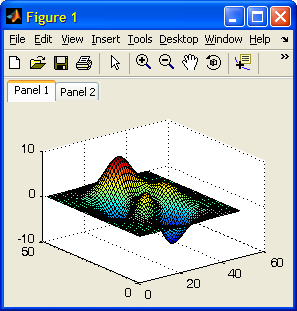
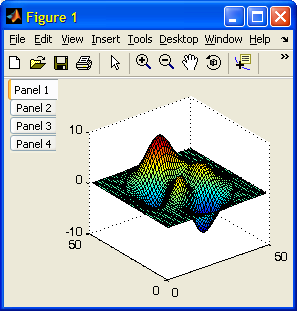
Another hTabGroup property of interest is Margin, which sets the margin in pixels before each of the displayed elements – not just between them as might be expected: Increasing Margin (default=2 pixels) increases the gap between the tab group and the active tab’s contents, but also the gap between the tab group and figure edge:
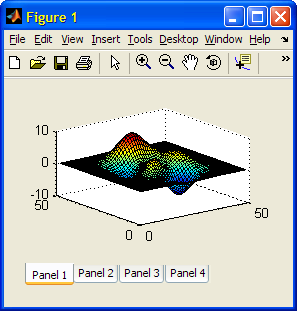
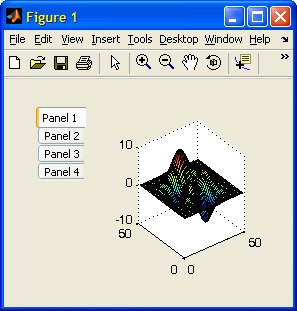
Tabs can be selected programmatically, by setting hTabGroup’s SelectedIndex property. Reading this property is useful when setting tab-selection callbacks using the SelectionChangeFcn property:
set(hTabGroup,'SelectionChangeFcn',@myCallbackFcn); set(hTabGroup,'SelectedIndex',2); % activate second tab |
Edit Oct 27 2010: R2010b made a few changes to the hTabGroup properties: SelectedTab has been added (holds the handle of the selected tab, rather than its index as SelectedIndex; note that SelectedTab was added as a hidden property for some unknown reason, probably a programming mistake); the tab BackgroundColor cannot be modified (I’ll show how to bypass this limitation in a near-future article); SelectionChangeFcn callback and the SelectionChanged event have changed their names to SelectionChangeCallback and SelectionChange respectively. Note that this is one of the very rare occasions in which MathWorks have taken the trouble to notify users about changes to one of their undocumented/unsupported functions. They should be commended for this since it helps us Matlab users make better use of the product.
Additional control over the tab group’s behavior can be achieved by customizing the underlying Java object. This object is not directly exposed by uitabgroup, but can be found using the FindJObj utility, or via the hidden ApplicationData (this alternative only works on R2014a or earlier!). Remember that Java objects use 0-based indexing so tab #1 is actually the second tab. Also remember that HTML is accepted just as in any other Swing-based label:
% Get the underlying Java reference using FindJObj jTabGroup = findjobj('class','JTabbedPane'); % A direct alternative for getting jTabGroup (only works up to R2014a!) jTabGroup = getappdata(handle(hTabGroup),'JTabbedPane'); % Now use the Java reference to set the title, tooltip etc. jTabGroup.setTitleAt(1,'Tab #2'); jTabGroup.setTitleAt(1,'<html><b><i><font size=+2>Tab #2'); jTabGroup.setToolTipTextAt(1,'Tab #2'); % Disabling tabs can only be done using the Java handle: jTabGroup.setEnabledAt(1,0); % disable only tab #1 (=2nd tab) jTabGroup.setEnabled(false); % disable all tabs |
A future post will describe tab customization, including fonts, colors, icons and even addition of close buttons as in modern web browsers.
tabdlg
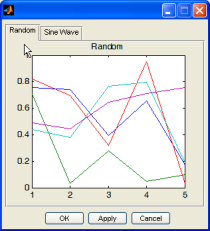
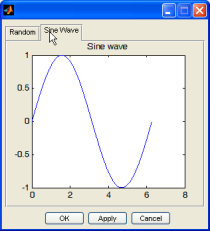
tabdlg is a related semi-documented and unsupported uitool that, like uitabgroup, creates a tabbed user interface. However, unlike uitabgroup, tabdlg uses plain-vanilla Matlab, without reliance on Java (well, actually all Matlab GUI controls ultimately rely on Java, but tabdlg does not use any Java beyond that). The end result looks less professional than uitabgroup, but it works even when Java does not.
tabdlg has an extensive help section, so it will not be detailed here. In brief, the input parameters specify the tab labels, dimensions, offsets, callbacks, font, default tab, sheet dimensions and parent figure. Here is a sample usage, taken from tabdlg‘s help section. This code is executed whenever tabdlg is invoked without any input arguments:
File Exchange alternatives
There are many implementations of tab panels in the Matlab File Exchange. Matlab’s official Desktop Blog had an article about one specific example, which was that week’s Peek of the Week, and relied on adjacent buttons that are easy to implement, but in my personal opinion are a far cry from our expectations of a tab panel.
Better FEX utilities are: Multiple Tab GUI, Highlight Tab Objects easily, and best of all: uitabpanel or TabPanel Constructor.
Another very recent submission was this week’s POTW. This utility gives a professional (although somewhat non-standard) look, and is very easy to program – an excellent utility indeed.
All of the numerous tab-panel FEX utilities, as well as the fact that tab-panels are one of the most searched-for terms in this website, indicate the Matlab community’s desire to have supported native-looking tab-panel GUI in Matlab. Perhaps after 6 years it is time to bring uitab and uitabgroup into the light?
Addendum Oct 3 2014: the uitab and uitabgroup functions have finally become fully supported and documented in Matlab version 8.4 (R2014b). They remain practically unchanged from what I’ve described in this article, more than four years earlier.

Hi Yair,
Have you noticed that MATLAB gives an error when setting the uitabgroup BackgroundColor to ‘none’? It does work if I provide a “real” color string, such as ‘red’. Any thoughts?
Jason
??? No constructor ‘java.awt.Color’ with matching signature found.
Error in ==> uitools.uitabgroup.schema>backgroundColorCallback at 192
javapeer.setControlBackgroundColor(java.awt.Color(col(1), col(2), col(3)));
Warning: Error occurred while evaluating listener callback.
@Jason – this is indeed a bug in uitabgroup‘s implementation. You can get around this bug as follows:
A related problem is that the tabs themselves have a background color property, but it has no effect. I will cover this limitation and its solution in my planned follow-up article on tab panels (that I mentioned above).
Yair,
Thanks, but actually I wanted a transparent set of tabs to allow “things underneath” to show themselves. I have other solutions that I will pursue to work around this.
Jason
@Jason – you cannot use uitabgroup for transparent tabs, because the uicontainer panel that it creates is opaque.
However, you can indeed place a regular javax.swing.JTabbedPane component (using javacomponent) with no attached container panel. This will create the transparent tabs effect that you want.
[…] within a JTabbedPane or JSplitPane. Instead, we need to rely on Matlab-based workarounds (uitab and uisplitpane) which are cumbersome compared to their Java […]
Hello.
tabs seem really interesting, but I cannot get them work for matlab.
You said that the tutorials for tabdlg and uitab are available in some other page.. but I could not find them.
can you give me the links please ?
uitab, uitabgroup and tabdlg are semi-documented built-in Matlab functions. This means that the functions are explained in a comment within the function, which can be seen using the edit(‘uitab’) command, and similarly for the other functions. They are nonetheless not part of the official help and have no doc pages.
Hi Year,
this Site is nice work, it gives me a lot of inspiration for my little GUI´s.
But i have an Problem with the Code below. After i run that Code i can only see the statusbar. The uitabgroup is hiden and can´t be made visible.
You got any idea to solve that Problem?
Perhaps i made an big mistake.
I´am using Matlab 2010a.
Thanks
eimer
@eimer – uitabgroup‘s default position vector is [0,0,1,1] normalized. This means that when you add the uitabs, they are placed on top of this container (beneath the figure’s toolbar/menubar) and you only see a fraction of the actual tabs.
To fix this, simply set the uitabgroup‘s position to [0,0,1,0.95] when you create it. The extra 5% of figure height should be enough to display the tabs (of course this changes when you resize the figure, but you get my point).
On a separate note, in R2010b you should remove the ‘v0’ input arguments.
-Yair
Thanks Yair, it´s works fine but i get anohter problem whith this uitabgroup.
I can see the tabs at the top of my GUI, now i try to place an uipanel all over the visible parts of my uitabs. So that I could later on destroy all the stuff on it. But the uipanel did act up, I get an area beneath the tabs and over the panel, which display nothing.
I tried to edit the position property of the uitabs but I can’t change anything.
I noticed your note, but in Matlab 2010a i get an error Message and for that i decided to add the ‘v0’, so that the users wouldn´t be scared.
Hi, I am using the tabdlg function and it works great when I use a figure as the parent, but when i try to use a panel it returns an error, apparently it is looking for some properties that only figures have, is there anyway to get around this beside using another function? Thanks
@John – tabdlg only accepts figure handles as a parent – it does not accept panel handles, as you have indeed discovered. If you look at tabdlg‘s help section you will see that this is indeed what it says. However, since tabdlg is a straight-forward m-file, you can easily modify it to accept panel handles or any other customization that you need. Simply type edit(‘tabdlg.m’) at the Matlab Command Prompt.
– Yair
is there a way to make the text of the selected tab in uitabgroup bold, thanks!
[…] A few months ago I published a post about Matlab’s semi-documented tab-panel functionality, where I promised a follow-up article on tab customizations […]
Very helpful post but I have a question, is it possible to change the title font size using uitab ? I tried using HTML in 2007b and I got some java errors ;
Sorry to post again but finally it only works for one tab but when adding a second one, I have a Java error.
java.lang.ArrayIndexOutOfBoundsException: 1 >= 1
@Oro – in order to use HTML you need to add the <HTML> tag, as follows:
Regarding the OutOfBoundsException – it appears that you are trying to access the second tab (#1) before it was actually created.
Thank you very much for your quick reply.
I missed my copy and paste but I was able to correct my error thanks to you.
I was using the html tag at the same time I was creating the tab so it made an error. Here is the correct code.
I tried to make the font bigger but the text is not fully displayed, kind of cutted. Is there a way to enlarge the tab ?
@oro – the tab width is adjusted automatically but unfortunately the height is automatically kept constant and as far as I can tell it cannot be changed.
Ok thank you for your help ! I just wanted to know the limitation of the customization.
Hi, great info here. Thanks,
In persuing my tabbed GUI further I want to place a uitable into one of my tabs, but I can’t seem to find a way to get the uitable to attach to a tab handle. Any ideas on how I could do this?
Thanks
@Chris – when you create your uitable, you need to specify that its Parent is the requested tab. See the example within the article above.
Tried that, and matlab kind of blows up on me with a huge amount of red ink.
If I try this:
I get the following when I run it:
UIDefaults.getUI() failed: no ComponentUI class for: com.mathworks.hg.peer.ui.table.UIStyledTableCellRenderer[,0,0,0×0,invalid,alignmentX=0.0,alignmentY=0.0,border=,flags=0,maximumSize=,minimumSize=,preferredSize=,defaultIcon=,disabledIcon=,horizontalAlignment=LEADING,horizontalTextPosition=TRAILING,iconTextGap=4,labelFor=,text=,verticalAlignment=CENTER,verticalTextPosition=CENTER]
java.lang.Error
at javax.swing.UIDefaults.getUIError(Unknown Source)
at javax.swing.MultiUIDefaults.getUIError(Unknown Source)
at javax.swing.UIDefaults.getUI(Unknown Source)
at javax.swing.UIManager.getUI(Unknown Source)
at com.jidesoft.swing.StyledLabel.updateUI(Unknown Source)
at com.jidesoft.grid.StyledTableCellRenderer.updateUI(Unknown Source)
at javax.swing.JLabel.(Unknown Source)
at javax.swing.JLabel.(Unknown Source)
at com.jidesoft.swing.StyledLabel.(Unknown Source)
at com.jidesoft.grid.StyledTableCellRenderer.(Unknown Source)
at com.mathworks.hg.peer.ui.table.UIStyledTableCellRenderer.(UIStyledTableCellRenderer.java:25)
at com.mathworks.hg.peer.ui.UITablePeer.initCellRendererMap(UITablePeer.java:144)
at com.mathworks.hg.peer.ui.UITablePeer.(UITablePeer.java:123)
and more!!
@Chris – it works on my system (WinXP R2011a)… perhaps you’re using an older Matlab release?
Try adding a pause(0.1) and/or drawnow before your call to uitable.
Apologies for the previous post for not using the tags, saw that just after i’d clicked submit and couldn’t go back and edit.
yes I am using WinXP and R2008a
I’ve tried both puase and drawnow, but neither work!
I have discovered that if I use the ‘v0’ switch as in
this stops the java error messages, and gives me a table. Unfortunately it won’t attach to the tab and is always visible.
@Chris – uitable(‘V0’,…) creates a simple Java table and places this onscreen. Unfortunately, Matlab’s implementation of uitab does not handle Java and ActiveX objects correctly (details here).
Going back to the original uitable code you posted, it works ok for me on my WinXP R2008a system. So perhaps your pause is not long enough for the uitab to completely render, or perhaps you are not running the exact code that you have posted.
Thanks for all you have done to document what MatLab has not.
I successfully use uitabs based on your postings. However, I run into an interesting twist. If I create a figure with tabs, then save the figure as a MatLab fig, when it opens I get the tabs but no text labels on the tabs.
When opening the fig file, I get an error:
??? Error using ==> uitools.uitabgroup.schema>childAddedCallback at 157
A uitabgroup cannot be the parent of a hgjavacomponent.
Hence, the hgjavacomponent has been reparented to the gcf
Here is an example that only makes the tab group and tabs, not populated with plots. Creates a figure with tabs (straight from MatLab example). Then save as a fig file, then try to load:
@Chuck – thanks for the tip. This is similar to an effect that was reported for toolbar customizations, and my advise is similar to that case: Place your tab-creation code in the figure’s CreateFcn property, and it will automatically get executed whenever the figure is reloaded from disk.
Thanks for the tip, I’ll give it a try!
-Chuck
Yair:
Sorry to bother you on this again. I am having a bit of a time figuring this out.
The figure that I want to save is not as simple as the above. I actually have two tabs, each has a 1600 x 1200 image (drawn with imagesc), overlaid with a quiver plot (one arrow every 10 pixels). All of this is drawn before I save the file. So, I understand how to programmatically, in the CreateFcn, create the tab group and tabs. But, how do I get the original data into these tabs as plots? Do I need to carry the data along and replot it? This potentially doubles the size of the fig file?
I am guessing what you are telling me to do is far simpler than I am making it.
Bottom line, once I make a figure with two tabs, complete with plots, I want to save that, then email it to a colleague, who can then open it and explore the figure in MatLab, using zoom etc.
I can email you a sample if needed.
Thanks again
Chuck
@Chuck – I’m afraid I don’t know any silver bullet in this case… You can store the data in the fig, but as you said this will increase its size.
Is there a way I could paste in names for the tabs after the fact? After I load the figure, perhaps in the createFcn, I could simply apply some labels to the tabs? The tabs always have the same names in my application. But, have no idea how this would be done.
The data is present in the images, and the images are associated with the tabs. It is simply a matter (or not so simply) of getting labels onto the tabs.
Chuck
@Chuck – simply set the tab handle’s Title property:
How/where do I get the handles of the tab upon reload of the figure? Or are the handles the same as when originally created? If the same, I guess I could put them into userdata. However, I suspect when they are re-parented during the reload, the handles are created anew.
Chuck
@Chuck – just like any other figure handle:
Hi Yair!
FYI,
I found an interesting technical solution on the TMW website:
Why is it no longer possible to dock figures generated by a compiled application created with MATLAB Compiler 4.8 (R2008a)?
http://www.mathworks.com/support/solutions/en/data/1-A6XFET/?solution=1-A6XFET
You will find an attached Zip-file which contains a M-file and a executable for R2009a (Matlab 7.8 – MCR 7.10 – compiler 4.10 )
This code uses javax.swing.JTabbedPane component that you have already mentioned in your article. It will display 3 tab panels .
Aurélien
Thanks Aurélien – in next week’s article I will show how to dock figures in compiled applications without the need for MathWork’s so-called “workaround” of changing your application to use tabbed-panels.
Here it is: http://undocumentedmatlab.com/blog/docking-figures-in-compiled-applications/
cool . I’m looking forward to reading your next article .
Hello Yair,
I have allready created a tab group, looks fine and works fine, thank you for this.
Is it possible to create dynamic tooltips for the listboxes I created in the tabs, as you allready explained in http://undocumentedmatlab.com/blog/setting-listbox-mouse-actions/ ?
Thank you,
Christoph
@Christoph – of course you can – the components are entirely independent of each other. Try it – I promise that it does not explode…
Hello Yair
I have tried it and as you said, it works.
But there is a problem I can not solve.
I have created 5 tabs in the tabgroup:
and then I have created a listbox in each tab:
Works perfectly, I can work with the listboxes.
Now I start the search for the listboxes underlying Java control:
And your (very helpful tool, thank you for that) answers with:
To get the actual contained listbox control in the scrollpane, I have changed
to
And here starts my problem.
If I start using the four different listbox controls, I can create the dynamic tooltips for the second listbox with the first entry in jListbox, for the third listbox with the second entry and so on.
But I cannot get the tooltips for the first listbox.
Do you have an idea, what I have done wrong or where I think in the wrong way?
Thank you for your help,
Christoph
Hello
Is there no solution?
Christoph
@Christoph – this could take some time to debug. If this is important to you, please contact me using the email link at the top of this webpage, and I will send you a price proposal for my service.
Hello Yair,
I did not expect it is such a issue.
I thought there is just a little mistake in my code which can be detected easily.
Although I would like to have it working it is not worth too much effort.
So thank you very much for your help.
Christoph
I am making a software on gui (matlab) that will predict cardiac diseases. i want to create tabs. one tab includes risk factors while another includes ecg parameters. can u please help me that how can i create tabs?
@Xt2y – the page that you commented on (and the following articles) explains how to use tab panels in Matlab. If you would like my help with your specific application, I will be happy to help you for a consulting fee. Please contact me offline, using the email link at the top-right of the webpage.
Hi Yair. Thanks so much for sharing your indepth knowledge. I would like to embed a uitree within a uitab in a uitabgroup. Creating the uitree inside is easy enough thanks to your examples, but the uitree does not get hidden when i switch tabs in the gui. Any ideas?
here is the code i am using:
Thanks Ryan.
@Ryan – as I explained in the follow-up article, Matlab tabs have an internal bug that causes Java and ActiveX controls to remain visible when the tabs are changed, unlike “regular” Matlab uicontrols that behave nicely. Several workarounds are mentioned here, and you can also easily fix this bug by modifying the m-files in the folders %matlabroot%/toolbox/matlab/@uitools/@uitabgroup and /@uitools/@uitab. At least some of these problems are fixed as of R2010a, but I can’t remember right now whether the Java bug is one of them.
Hi Yair,
I suspect I am having the same problem as Ryan as I try to created 2 layers of tabs, i.e. a parent tab group where each of its child-tabs have another tab group. Could you explain to me in a little more detail what you mean by “Hook onto the uitabgroup’s SelectionChangeFcn() callback and modify your uitable’s Visible property accordingly” in the provided link? I need to use the second option since I want to add axes etc. into the tab.
@Ryan: If you have fixed this could you explain to me how you did it?
Thanks a lot to both of you in advance.
@Ludwig – SelectionChangeFcn is a property of the uitabgroup. You can create your own callback function and set SelectionChangeFcn to it. Within your callback function you can update the visibility of sub-components etc.
Wow, didnt expect to hear back from you this fast or even at all. Thanks.
What you describe sounds simple enough but I must admit I am very new to working with Matlab GUIs and hence am still confused as to where I place my own callback function and how I set SelectionChangeFcn for the relevant uitabgroup to it. I have a rough idea of what I need to put into the function just not how to integrate it with the rest of my code. Do you maybe have a link or somewhere where I can read up on these basics as I dont really expect anyone to spoon feed me the answer.
@Ludwig – I don’t believe that there is any specific place that explains this in detail for uitabgroup. If you can’t find the answer on this website, I’d be surprised if it exists elsewhere… Regarding Matlab GUI callbacks in general, there are plenty of places, including the official Matlab docs. If you want me to help with your specific application, you can contact me offline (altmany at gmail), for a short consultancy.
Ok. Thanks a lot. I will see how far I get on my own before resorting to contacting you.
Hello Yair,
I love this website. I’m having a bit of trouble creating a set of nested tabs within a specific GUI I am programming. The GUI is to contain four different tabs, the last three of which will each contain two of their own tabs. The problem occurs after I create the system of tabs and try to add GUI components to them. I can add GUI components to the first tab which has no chilren tabs just fine. I can also add GUI components to the two children tabs of the second main tab just fine as well. When I try to add GUI components to the children tabs of the third and fourth main tabs, none of the components become visible. My code looks like this:
Did you find a solution for this problem?
I am having a similar issue and haven’t been able to find a solution. I tried a couple scenarios and nothing worked:
1) If I create the UI elements for the second tab before I create the nested tabs in the first, they show until I create the nested tabs in the first, then they disappear.
2) If I create the nested tabs on the first tab, then create the UI elements on the second tab, none of the UI elements show (as expected) except if I add a nested tab to the second tab, then it shows up, but does not go away when switching tabs
3) After adding the first nested tab group, when I select the second main tab, its Visible property remains “off”. This is a read-only property for uitab, so I can’t change it.
Unless there is a way to modify how matlab changes visibility of the tabs on change, I don’t know how to make this happen.
Has anyone found a solution on this?
Thanks!
~Andrew
Not sure if you’re still following this thread, but I think I’ve identified a pair of bugs in Mathwork’s code for uitab and uitabgroup that are causing this problem.
In $matlab/toolbox/matlab/uitools/@uitools/@uitabgroup/schema.m, the function “updateVisibilityOfTabs” (around line 247 in my version):
Need to add
to that call.
Similarly in $matlab/toolbox/matlab/uitools/@uitools/@uitab/updateVisibility.m:
Add a similar Parent identifier:
Basically the bug is because the “findobj” function does a deep search on the input object and its children, so it returns not only the uitab objects which are children of the current uitabgroup, but also any other uitab objects which are in any way descended from the current uitabgroup. Adding the ‘Parent’ specification will limit the returns to only the children of the current uitabgroup.
@Greg – nice catch – thanks for taking the time to share it here.
How do i allow the user to add additional tabs to my matlab GUI if they please too? Like how a individual would add a tab in excel.
@Brent – you would need to use some sort of GUI control (e.g., a “+” button) that the user can click. In the button’s callback you would add the code to create the new tab.
@Yair Altman
Will it be too much to ask for an example, because i been trying to do that for like 10 hours now and i have failed.
Hi Yair!
How can I extract the index of ‘SelectedTab’ in matlab 2011a?
Because I meet some problems when using the property ‘SelectedIndex’ in matlab 2011a(it can work in matlab 2009b),I use the property ‘SelectedTab’ instead. But I also meet some mistakes when using ‘SelectedTab’ handle number.I need using the index of selected tab in my code.I want my code to work in both matlab 2009b,2011a.Thanks!
I believe that the SelectedIndex was not removed – it continues to exist side-by-side with SelectedTab. If you want an alternative, you can attach a numeric value to each tab’s UserData or ApplicationData (via setappdata) and then access it via
selectedTab.UserDataorgetappdata(selectedTab,'myValue').Hi Yair,
I tried the below example to create a tab group in 2011b based on the suggestion provided to @kesh [ http://undocumentedmatlab.com/blog/figure-toolbar-components/#comment-13890%5D. But unable to create the tabs. I am seeing only empty figure without any tabs. Would you please post a working example for 2011b?
Getting Below error:
@DSN – it works for me…
Try adding a pause(0.1) or pause(0.5) after the drawnow() in your script. Also, ensure that the figure is created visible – maybe that makes a difference.
Thanks a lot sir , but i wonder if i can modify the tabs to allow it to be closed individually.
All i need is a ‘x’ icon to appear.After pressing it ,the tab closes.
Thanks
@Ahmed – I showed how to do this here: http://undocumentedmatlab.com/blog/uitab-colors-icons-images/
Hello,
I created several tabs dynamically using uitabgroups and uitab. Is there any way to order my tabs,
for example :
i need tab(3) to be the 1st tab and tab(4) as second, tab(2) as 3rd and tab(1) as last tab.
please help me out in this.
thank you.
@ashwini – it is not easy to change the tab order after the tabs are created and displayed. The easiest way is to simply create the tabs in the order that they should be displayed.
Hallo Yair,
I like to update the data of the tables.
At the moment it only works with the hObj. Can you please tell me, how I can update the other two tables?
Greetings, Kai
@Kai – tab2 and tab3 are the handles to the tabs, not to the tables. You need to assign handles to the uitables and then use them:
Hey Yair,
thank you for the fast answer.
If i try your offer in the first part it works. but if i try to use it in the funktion it doesn
can it be that my handles is wrong?
thank you very much, Kai
Of course it is. You need to retrieve the handles value in your callback via:
or pass it in the callback definition or any other method. Otherwise how can you expect the function to know what handles is???
Okay, now it works! 🙂
Thanks, you made my day!
Hello,
is there any way for printing or exporting as PDF the content of a tab?
sort of:
Unfortunatelly I get this error:
Cheers,
Sebastian
@Sebastian – not directly. You could temporarily reparent the panel to a new figure and then export that figure – something like this (untested):
Yair,
thanks so much for your answer. I see your point and it makes sense. The problem is that when I change the hPanel parent
the axes within the hPanel do not move to the new figure, so even if I print the new figure I get an blank PDF.
I’m I doing something wrong?
Thanks again,
Sebastian
Perhaps you did not place your axes as a child of hPanel but rather as a child of the figure or some other container.
Yair,
my mistake, your solution does work. I’ve clicked on a different panel so the handle has changed, I’m sorry.
Thanks so much for your answer and for sharing with us your knowledge.
Sebastian
Greetings Mr. Altman,
maybe you can give me a advice. I have several tabs. I use a self-defined structure. If i delete a tab at the end of my group and then delete the specific data from my structure there is no problem. But if i delete a tab in the middle or beginning then every tab moves left and the first tab is empty. why is that so? how can i solve that problem?
regards
@Patrick – your tab deletion logic is probably buggy…
Like i’ve said i have a structure for example
It’s an array. For every file i make a new tab. My delete logic is pretty simple.
IDX is the index for the current tab. Nothing more. The problem comes with the DELETE function.
But i don’t know how to solve it. I could copy the whole structure and make whole new tabs perhaps but that
would be an awful solution i guess.
Any suggestions? 🙂
Hey,
i solved it by making the current uitab invisible and visible again. But i get the message
So there is perhaps a better way or in future will be a better way i guess.
Hello,
I have a weird problem. I have two uitabgroups. I want to move one tab from one group to another group. So i just
write onto the handle of the tab the PARENT of the new uitabgroup. It somehow works but not fine. I have an editbox for example in the tab and when i move the tab to another uitabgroup the editbox is empty! So my text is gone..why is that? I do not write something else anywhere. Just changing the parent from the tab. Is this a bug or something wrong with Matlab?
Greetings
I assume that it’s an internal Matlab bug.
Hello Mr Altman,
I hope you can give me a hint. I have two uitabgroups and in every group is one uitab. How can i determine in which tab/group i am currently? The function “SelectionChangeFcn” from uitabgroups works only if i have two or more uitabs in a uitabgroup. I need to know exactly in which uitabgroup/uitab i am active right now. Do you have any suggestions?
Regards
@Thomas –
Hello Mr. Altman,
yeah this is quite obvious. But i did not mean that. I need a callback. When i click on a tab i want to know which tab i have clicked. Unfortunatley there is only the “SelectionChangeFcn” Callback for uitabgroups and this works only with multiple uitabs. But if i have TWO uitabgroups and in every group only ONE uitab the callbackmethod is not triggered because i do not change the tab…Do you understand? :/
regards
This can be done via the underlying Java handle:
Thank you very very much! 🙂
Hello Mr. Altman,
I’m tying to use uitab and uitabgroup. In my program, I add and remove tabs like this.
And,
After that, when I delete the program(exit), it gave me an error
Is there any way to avoid this error? Any suggestions? 🙂
regards
I think, when I remove tab by using ‘removeTabAt’ function, children of uitabgroup are not decreased, still the same as before removing a tab. But, if I check java object, I can see the decreased tab count.
How can I synchronize uitabgroup handle and java object of itself ?
It looks as though you may not be calling removeTabAt on the EDT.
Try
before your existing code.
Thanks.
And when I delete the tab, I tried this code and works fine.
Now, they are synchronized and my application doesn’t give any error like “java.lang.IndexOutOfBoundsException”.
@Jun Lee – oh, the vagaries of EDT in Matlab – an endless source of fun and challenge in Matlab GUIs…
Hi everybody,
I have a question, I want to move the location of a uitab in a uitabgroup. How is it possible ?
Thanks for your help.
@Florian – there is no easy way to do this. Tabs are ordered based on the order that they were added to the tab-group, and there is no direct way to modify this order except by deleting the tabs and re-adding them to the tab-group in the new order.
It’s a bit easier at the Java level (only the specific tab needs to be deleted and then inserted at the relevant location), but using Java would cause other complications with regards to the Matlab-panels synchronization. So I suggest sticking to the pure-Matlab alternative.
I have found this function: uistack
Which help me to move tab the problem is the name of the tab, in fact, when I put a new tab between two other, the name hierarchy is not respected.
I found a way to re – set the name but it isn’t a proper code.
Hello Mr. Altman,
Currently, I am running Matlab R2014b prerelease for testing. But I cannot get the java reference. jTabGroup is an empty array :(.
(I need the underlying Java object for disabling the TabGroup and adding a KeyPress-Listener.)
Do you have a solution of hint?
Thanks,
MartinM
@MartinM – There are at least two ways to do this:
Thanks for your reply Mr. Altman! The first methods works.
Works fine for me. 🙂
Doesn’t work for me (R2014b prerelease) 🙁
Is it possible that Visibility property for uitab and uitabgroup is disabled since at least 2012 matlab version?
sorry Visible, not Visibility… 🙁
Hi,
I create
when I do
the table Tab1 overlaps the panels t1 and t2.
Hi,
Put the table inside a uiflowcontainer already inside the tab. The createTable function doesn’t fit in the tab environment alone.
Mr. Altman,
I would like to create a seamless transition between the tabpanel generated with uitab and the box surrounding the tab panel contents. Take for example, the tab panels in your IDS example shown in Chapter 10 of your book. Another example would be the picture shown for tabdlg in this article.
Any hints would be greatly appreciate!
Kind regards
David M
@David – you can take the code from tabdlg.m, but if I were you I would not spend any time on this: I think it’s better to use the standard uitab functionality as-is.
[…] for years, and some of them eventually become documented. For example, uitab/uitabgroup, on which I posted over 4 years ago and also became official in R2014b after numerous years of running as-is in […]
Shalom Yair,
I am trying to use callback for tab press.
basically what i have done is: uncomenting function tabChangedCB(src, eventdata) from “Creating a User Interface with Tab Panels” example.
I am getting the following error:
“function keyword use is invalid here”
(Matlab) Explanation
A nested function cannot be defined inside a control statement (if, while, for, switch or try/catch).
Be aware that in addition to this message, other messages might appear in the file. Such as, might not be aligned with its matching END and Parse error at END: usage might be invalid MATLAB syntax. When you remove the nested function definition from the control statement, these other messages might disappear.
code added below:
results(before uncommenting):
TabbedUserInterfaceExample BeingDeleted: 'off' BusyAction: 'queue' ButtonDownFcn: '' Children: [3x1 Tab] CreateFcn: '' DeleteFcn: '' HandleVisibility: 'on' Interruptible: 'on' Parent: [1x1 Figure] Position: [0 0 1 1] SelectedTab: [1x1 Tab] SelectionChangedFcn: '@tabChangedCB' SizeChangedFcn: '' TabLocation: 'top' Tag: '' Type: 'uitabgroup' UIContextMenu: [] Units: 'normalized' UserData: [] Visible: 'on' BackgroundColor: [0.9400 0.9400 0.9400] BeingDeleted: 'off' BusyAction: 'queue' ButtonDownFcn: '' Children: [] CreateFcn: '' DeleteFcn: '' ForegroundColor: [0 0 0] HandleVisibility: 'on' Interruptible: 'on' Parent: [1x1 TabGroup] Position: [0 0 1 1] SizeChangedFcn: '' Tag: '' Title: 'Principal/Interest Plot' TooltipString: '' Type: 'uitab' UIContextMenu: [] Units: 'normalized' UserData: []Regards,
Gil Polsman
Hi Yair,
about my previews post, issue solved. Code added below:
Regards,
Gil Polsman
Hi Yair,
I had used jtables to populate data in uitable and some plots. when i try to export to pdf, plot is getting exported in very bad quality and empty uitable. is it because of using jtable that matlab doesnt now what is there in uitable?
any way to print to pdf the full uitab contents using java in a good resolution?
@ruthvik – try to use either the export_fig or ScreenCapture utilities
Hi,year
when I find the uitab callback(ButtonDownFcn),can’t effect in zoom/pan/data cursor mode.How can I resolve the question