
In my previous posts I have shown how Matlab’s semi-documented uitree and uitreenode functions can be used to display hierarchical (tree) control in Matlab GUI. Today I conclude this mini-series by answering a reader’s request to show how checkboxes, radio buttons and other similar controls can be attached to tree nodes.
There are actually several ways this can be done:
Matlab icon control
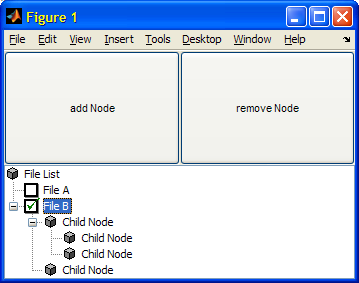
The simplest is to create two icons (checked/unchecked) and switch the node’s icon whenever it is selected (use mtree’s NodeSelectedCallback or jtree’s MouseClickedCallback callbacks) – a sample implementation was posted by Gwendolyn Fischer a couple of years ago, based on even earlier posts by John Anderson, Brad Phelan and me. Here it is, with minor fixes:
function uitree_demo % function based on treeExperiment6 by John Anderson % see https://www.mathworks.com/matlabcentral/newsreader/view_thread/104957#269485 % % The mousePressedCallback part is inspired by Yair Altman % % derived from Brad Phelan's tree demo % create a tree model based on UITreeNodes and insert into uitree. % add and remove nodes from the treeModel and update the display import javax.swing.* import javax.swing.tree.*; % figure window f = figure('Units', 'normalized'); b1 = uicontrol( 'string','add Node', ... 'units' , 'normalized', ... 'position', [0 0.5 0.5 0.5], ... 'callback', @b1_cb); b2 = uicontrol( 'string','remove Node', ... 'units' , 'normalized', ... 'position', [0.5 0.5 0.5 0.5], ... 'callback', @b2_cb); %[I,map] = imread([matlab_work_path, '/checkedIcon.gif']); [I,map] = checkedIcon; javaImage_checked = im2java(I,map); %[I,map] = imread([matlab_work_path, '/uncheckedIcon.gif']); [I,map] = uncheckedIcon; javaImage_unchecked = im2java(I,map); % javaImage_checked/unchecked are assumed to have the same width iconWidth = javaImage_unchecked.getWidth; % create top node rootNode = uitreenode('v0','root', 'File List', [], 0); % [matlab_work_path, '/fileListIcon.gif'],0); % create two children with checkboxes cNode = uitreenode('v0','unselected', 'File A', [], 0); % as icon is embedded here we set the icon via java, otherwise one could % use the uitreenode syntax uitreenode(value, string, icon, isLeaf) with % icon being a qualified pathname to an image to be used. cNode.setIcon(javaImage_unchecked); rootNode.add(cNode); cNode = uitreenode('v0','unselected', 'File B', [], 0); cNode.setIcon(javaImage_unchecked); rootNode.add(cNode); % set treeModel treeModel = DefaultTreeModel( rootNode ); % create the tree tree = uitree('v0'); tree.setModel( treeModel ); % we often rely on the underlying java tree jtree = handle(tree.getTree,'CallbackProperties'); % some layout drawnow; set(tree, 'Units', 'normalized', 'position', [0 0 1 0.5]); set(tree, 'NodeSelectedCallback', @selected_cb ); % make root the initially selected node tree.setSelectedNode( rootNode ); % MousePressedCallback is not supported by the uitree, but by jtree set(jtree, 'MousePressedCallback', @mousePressedCallback); % Set the mouse-press callback function mousePressedCallback(hTree, eventData) %,additionalVar) % if eventData.isMetaDown % right-click is like a Meta-button % if eventData.getClickCount==2 % how to detect double clicks % Get the clicked node clickX = eventData.getX; clickY = eventData.getY; treePath = jtree.getPathForLocation(clickX, clickY); % check if a node was clicked if ~isempty(treePath) % check if the checkbox was clicked if clickX <= (jtree.getPathBounds(treePath).x+iconWidth) node = treePath.getLastPathComponent; nodeValue = node.getValue; % as the value field is the selected/unselected flag, % we can also use it to only act on nodes with these values switch nodeValue case 'selected' node.setValue('unselected'); node.setIcon(javaImage_unchecked); jtree.treeDidChange(); case 'unselected' node.setValue('selected'); node.setIcon(javaImage_checked); jtree.treeDidChange(); end end end end % function mousePressedCallback function selected_cb( tree, ev ) nodes = tree.getSelectedNodes; node = nodes(1); path = node2path(node); end function path = node2path(node) path = node.getPath; for i=1:length(path); p{i} = char(path(i).getName); end if length(p) > 1 path = fullfile(p{:}); else path = p{1}; end end % add node function b1_cb( h, env ) nodes = tree.getSelectedNodes; node = nodes(1); parent = node; childNode = uitreenode('v0','dummy', 'Child Node', [], 0); treeModel.insertNodeInto(childNode,parent,parent.getChildCount()); % expand to show added child tree.setSelectedNode( childNode ); % insure additional nodes are added to parent tree.setSelectedNode( parent ); end % remove node function b2_cb( h, env ) nodes = tree.getSelectedNodes; node = nodes(1); if ~node.isRoot nP = node.getPreviousSibling; nN = node.getNextSibling; if ~isempty( nN ) tree.setSelectedNode( nN ); elseif ~isempty( nP ) tree.setSelectedNode( nP ); else tree.setSelectedNode( node.getParent ); end treeModel.removeNodeFromParent( node ); end end end % of main function treeExperiment6 function [I,map] = checkedIcon() I = uint8(... [1,1,1,1,1,1,1,1,1,1,1,1,1,1,0,0; 2,2,2,2,2,2,2,2,2,2,2,2,2,0,0,1; 2,2,2,2,2,2,2,2,2,2,2,2,0,2,3,1; 2,2,1,1,1,1,1,1,1,1,1,0,2,2,3,1; 2,2,1,1,1,1,1,1,1,1,0,1,2,2,3,1; 2,2,1,1,1,1,1,1,1,0,1,1,2,2,3,1; 2,2,1,1,1,1,1,1,0,0,1,1,2,2,3,1; 2,2,1,0,0,1,1,0,0,1,1,1,2,2,3,1; 2,2,1,1,0,0,0,0,1,1,1,1,2,2,3,1; 2,2,1,1,0,0,0,0,1,1,1,1,2,2,3,1; 2,2,1,1,1,0,0,1,1,1,1,1,2,2,3,1; 2,2,1,1,1,0,1,1,1,1,1,1,2,2,3,1; 2,2,1,1,1,1,1,1,1,1,1,1,2,2,3,1; 2,2,2,2,2,2,2,2,2,2,2,2,2,2,3,1; 2,2,2,2,2,2,2,2,2,2,2,2,2,2,3,1; 1,3,3,3,3,3,3,3,3,3,3,3,3,3,3,1]); map = [0.023529,0.4902,0; 1,1,1; 0,0,0; 0.50196,0.50196,0.50196; 0.50196,0.50196,0.50196; 0,0,0; 0,0,0; 0,0,0]; end function [I,map] = uncheckedIcon() I = uint8(... [1,1,1,1,1,1,1,1,1,1,1,1,1,1,1,1; 2,2,2,2,2,2,2,2,2,2,2,2,2,2,1,1; 2,2,2,2,2,2,2,2,2,2,2,2,2,2,3,1; 2,2,1,1,1,1,1,1,1,1,1,1,2,2,3,1; 2,2,1,1,1,1,1,1,1,1,1,1,2,2,3,1; 2,2,1,1,1,1,1,1,1,1,1,1,2,2,3,1; 2,2,1,1,1,1,1,1,1,1,1,1,2,2,3,1; 2,2,1,1,1,1,1,1,1,1,1,1,2,2,3,1; 2,2,1,1,1,1,1,1,1,1,1,1,2,2,3,1; 2,2,1,1,1,1,1,1,1,1,1,1,2,2,3,1; 2,2,1,1,1,1,1,1,1,1,1,1,2,2,3,1; 2,2,1,1,1,1,1,1,1,1,1,1,2,2,3,1; 2,2,1,1,1,1,1,1,1,1,1,1,2,2,3,1; 2,2,2,2,2,2,2,2,2,2,2,2,2,2,3,1; 2,2,2,2,2,2,2,2,2,2,2,2,2,2,3,1; 1,3,3,3,3,3,3,3,3,3,3,3,3,3,3,1]); map = ... [0.023529,0.4902,0; 1,1,1; 0,0,0; 0.50196,0.50196,0.50196; 0.50196,0.50196,0.50196; 0,0,0; 0,0,0; 0,0,0]; end |
Custom Java classes
An alternative is to create a custom tree Java class and/or a custom TreeCellRenderer/TreeCellEditor. Specifically, to change the icons of each node you have to implement your own java component which derives from DefaultMutableTreeNode.
Some online resources to get you started:
- Sun’s official JTree customization tutorial
- Santhosh Kumar’s custom tree icons, tree-node checkboxes, and selective tree-node checkboxes
- Java2s’s multiple JTree customization snippets
Built-in classes
Another option is to use Matlab’s built-in classes, either com.mathworks.mwswing.checkboxtree.CheckBoxTree or com.jidesoft.swing.CheckBoxTree:
import com.mathworks.mwswing.checkboxtree.* jRoot = DefaultCheckBoxNode('Root'); l1a = DefaultCheckBoxNode('Letters'); jRoot.add(l1a); l1b = DefaultCheckBoxNode('Numbers'); jRoot.add(l1b); l2a = DefaultCheckBoxNode('A'); l1a.add(l2a); l2b = DefaultCheckBoxNode('b'); l1a.add(l2b); l2c = DefaultCheckBoxNode('<html><b>α'); l1a.add(l2c); l2d = DefaultCheckBoxNode('<html><i>β'); l1a.add(l2d); l2e = DefaultCheckBoxNode('3.1415'); l1b.add(l2e); % Present the standard MJTree: jTree = com.mathworks.mwswing.MJTree(jRoot); jScrollPane = com.mathworks.mwswing.MJScrollPane(jTree); [jComp,hc] = javacomponent(jScrollPane,[10,10,120,110],gcf); % Now present the CheckBoxTree: jCheckBoxTree = CheckBoxTree(jTree.getModel); jScrollPane = com.mathworks.mwswing.MJScrollPane(jCheckBoxTree); [jComp,hc] = javacomponent(jScrollPane,[150,10,120,110],gcf); |
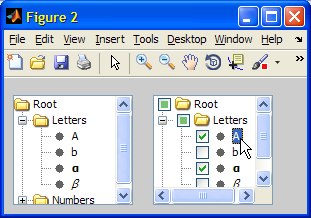
Note: Matlab’s CheckBoxTree does not have a separate data model. Instead, it relies on the base MJTree’s model, which is a DefaultTreeModel by default. JIDE’s CheckBoxTree does have its own model.
This concludes my uitree mini-series. If you have any special customizations, please post a comment below.

I prefer pure Java solution and then putting JPanel containing JTree into MATLAB figure using javacomponent(). I used code from http://www.javaspecialists.eu/archive/Issue145.html
This is great. Is there a way to apply a filter to display only certain file types when using the tree for a file system?
@Mikhail – the link you posted is to a TristateCheckBox class, not a CheckBox tree. I plan to write an article someday about Matlab’s internal tri-state checkbox classes. Being internal and available in Matlab out-of-the-box, they are more useful than 3rd-party classes.
@Amy – filters are not available by default in uitree, but you can trap the node expansion callback function to implement this relatively easily.
@Mikhail – as promised, I posted the tri-state checkbox article last week.
It took me over a year from your comment, but I guess that it is better late than never, right?
Thanks for your great entry. I really like jave based checkbox tree.
Do you know how to callback in java based checkbox tree?
Thanks again for the great post. I’ve been playing with jtrees a lot lately and could now really use some customization of the Drag and Drop behavior. So, here’s a vote for a post on DnD.
Thanks
Scott
How do I get the information which checkboxes are checked when I use com.mathworks.mwswing.checkboxtree.CheckBoxTree?
Found a solution:
l1a.getSelectionStatethis is amazing!
i have a question about how to hide the Root.
just like a file system directory, use this method i can just display the files in C:\, how to show the files in D:\ within the same tree?
@Rex – I’m not sure you can using a simple single command: “My Computer” is not really a valid system folder. However, you can setup two tree nodes, one for C:\ and the other for D:\, and display them in a uitree. It’s not as simple as a one-line command, but it’s not very difficult and it will do what you want.
hi,Yair
I am an antenna engineer. I want to design a GUI to manage my antenna pattern data.
I realized a tree i need with actxcontrol about 4 years ago. This tree inluced some icons, i integrate them with a ActvieX Dll design with visual basic to load the pictures. But according to your blog, i think using VBScript to load the image is more effective.
Now i want to design a tree with uitree, but i do not know how to make them within one tree:
Root1
|__Child11
| |_____Subchild111
| |_____Subchild112
|__Child12
|_____Subchild121
|_____Subchild122
Root2
|__Child21
| |_____Subchild211
| |_____Subchild212
|__Child22
|_____Subchild221
|_____Subchild222
@Rex – the previous article in this series described how to create a custom tree.
Hi Yair,
We have used ‘com.jidesoft.swing.CheckBoxTree’
We want to have callback for two different user actions, namely,
– Checkbox checking event and
– Mouse click on the string without checking the check box itself
For the first event, we managed to handle it using the following lines of code
However for the second event we did not manage to find a listener.
Please advise
Thanks in advance
Amjad
@Amjad – there are several callbacks that you can use – all of them directly on the
jCheckBoxTreeobject. Specifically, your best guess would probably be MouseClickedCallback. Also, take a look at the related ClickInCheckBoxOnly boolean property.Hi Yair and Amjad,
It cannot be stressed enough: thanks for this wonderful website! It truly is of great help in my daily struggle with MATLAB gui controls 🙂
I know this post was from some time ago, but perhaps you can help me with a minor callback issue I face now. I have created a CheckBoxTree using Yair’s second approach (using the built-in classes from com.mathworks.mwswing.checkboxtree.CheckBoxTree). I would like to take action after selection or deselection of an item in the tree.
Setting the ValueChangedCallback does not seem to work, since that callback only triggers when the item focus has changed (so checking and immediately unchecking the same item trigger the ValueChangedCallback only once; R2013a). The MouseClickedCallback works perfectly (albeit only with selection by mouse, not by the space bar of course). However, if I set the callback like this:
Matlab generates a warning:
Is there a way: (1) to set the callback function more elegantly, so that the warning is not shown anymore, or (2) suppress the warning (I don’t know the message identifier).
Thanks in advance!
With kind regards,
Mark
@Mark – use the handle() wrapper. See here
Thanks!
[…] I have already described a built-in Matlab tree control whose nodes have tri-state checkboxes […]
Hi Yair,
First, thank you so much for your entire website. This is a real bible for making interfaces in Matlab.
I am using uitree in one of my program and everything you posted about is working. I am trying to be able to draw a rectangle on the tree to select multiple nodes (like what you can do on the listbox). I was wondering if there was a simple Java property to change to allow this that you were aware of. I can’t find it.
Thanks!
@Jerome – you can use ctrl-click to select multiple nodes. I’m not sure about a bounding box (you can probably find a solution in one of the numerous java forums/websites)
Hello Yair,
great to follow all your postings, even if I have difficulties to understand the details of connections/interface between Java and Matlab.
Now I am trying to add ToolTips to an uitree node/leaf. As you proposed I true to use to manipulate the renderer with the Tooltip manager. But I am not able to continue. Do you have some tips for me? This is my code
I read somewhere that I need to reach the following:
Thanks a lot!
Best Regards,
Domenico
@Domenico – you need to create a dedicated Java cell renderer class, compile it using a Java compiler, and then set your tree to the new class. If you’re not comfortable with Java, you can use a workaround such as the one that I’ve shown for context-menus.
Hi Yair,
I’m trying to make a tree lazily expand based on a very complicated data model that I have already coded (a bunch of classes that are built in a tree). The expansion of every node depends on the data that the node contains, and I store this data in the UserData field of the uitreenode.
To invoke the right node expansion subfunction, I need access to this field *of the node I am expanding*. This works fine when I double click the node I want to expand:
However, if I just click the [+] icon, the expansion function gets called but the node isn’t selected. How can get the node that is being expanded in the callback? I couldn’t find any function in the Jtree or the UITreePeer that would do that for me.
Also, I don’t think I can make any use of ‘value’ because in my implementation it’s just a string (I can’t cast my classes into handles; or can I?).
@Yishai – place your code in a function and attach this function to the uitree’s NodeExpandedCallback. This callback function gets the node handle in the second input parameter.
Note that uitree‘s help section (in uitree.m) incorrectly calls the property ExpandedFcn, whereas the correct name is NodeExpandedCallback. If you make this change, you can use the example in the help section to see a sample node-expansion callback function.
OK, I think I got it. This morning I explored every single field in the tree and found that this works:
Hope someone finds this helpful.
Thanks Yair,
I didn’t see your reply when I posted. I guess both solutions work, but I already had everything written this way so I stuck to it, just changed the way I get to the UserData field.
Thanks again,
Yishai
Hello Yair,
I have created two matlab GUIs, GUI A has a tree view by using uitree and GUI B has a button which be able to modify the tree view in the GUI A. But the problem is that the GUI B can not get uitree handle by using general passing data method among GUIs.
The following code in GUI A
The following code in GUI B
Looking forward to your reply!
Thanks!
Kind regards,
Keming
@Keming – you can store all the handles using setappdata and then retrieve those handles using getappdata
Yair, Thank you for your help, you are always right!
I was hoping you could help with an issue i’ve been having. I created the tree perfectly fine, but how can you determine (either during or after the fact) that a checkbox was selected? I have played around with the callbacks but the only one i could get to work (‘ValueChangedCallback’) fires only when the name is clicked on, not the checkbox. How can i tell if the checkbox is clicked? Is there an event for it? I’ve been using the ‘methodsview’ function in matlab to try and figure it out with little helpful return…
One other other comments mentioned a ‘l1a.getSelectionState’ which gives me an error of ‘???No appropriate method or public field getSelectionState for class com.mathworks.mwswing.checkboxtree.CheckBoxTree’
Also, i am creating the tree inside a for loop, since it must be dynamic based on different data. There wasn’t any way i could see of moving through the tree in matlab (such as starting at the root, moving to the housed nodes, etc.) which i thought i could possibly use and determine each checked state individually…but cannot.
help?
Thank you in advance.
@Natalie – I don’t have an immediate answer, but I’m pretty sure that it can be done using a combination of properties/callbacks. If you’d like me to spend some time to investigate and solve this for you (for a small consulting fee), please contact me by email.
I have a super basic question here. I’m very new to Java but have been working with MATLAB and its vanilla flavor GUIs for 10+ years.
My goal is to create an interactive plotting tool to display waveforms depending on if its node is checked or not.
In the uitree_demo under the function mousePressedCallback, we find the following line of code:
For my kludged together tree, this is what is returned:
I see that this contains all of the information I am after (it tells me which node has been clicked) but I am at a loss as to how to get at it. I would love it if I could get a MATLAB structure or even a string of the above treePath. So, how do you suggest to do this and where can I go to read up on how to do this right?
Thanks.
Found a kludge for my problem
Now, I can parse the string with regular expressions. Please point me to a better way.
@Richard –
Quick question I hope. I have a that built off a folder structure, and anytime the user inputs a new file I’m deleting the uitree and creating it again using the uitree(‘v0′,’Root’,'[directorypath],handle.panel) method. However this causes me to have to expand through the tree and set some custom icons and also have to do alot of leg work to put the tree in the same state collapse wise. Is there any easy way to update the tree so that if new files/folder exists they are just there and I dont have to create it new everytime?
Thanks in advance, and thanks for this site and the Book.
You can add/remove specific nodes in run-time. See the previous article of this series, or in my book (section 4.2) for details.
Hi Yair,
Do you know of a way to save the checkbox tree? I have created a very large tree in my application and I would like to load it from a file each time rather than having to re-create. It appears that the nodes cannot be serialized during save.
Example:
node = com.mathworks.mwswing.checkboxtree.DefaultCheckBoxNode(‘test’);
save(‘test’, ‘node’);
you’ll need to programmatically save the tree’s data model
Can you tell me what code should be written to find file location. I have created a CheckBoxTree using Yair’s second approach (using the built-in classes from com.mathworks.mwswing.checkboxtree.CheckBoxTree). Also suggest me where it should be added inside that code.
I am using example of http://undocumentedmatlab.com/blog/customizing-uitree-nodes-2 ‘built in classes’ example. I am using it because I want tick as per how it is mentioned in the output of that code. Now if I want to get file location using the same format I am unable to do so. I did try with slight editing in the words (instead of tree I wrote JTree as the example code uses ‘JTree’ and not just ‘tree’)..
But it gives me error as
No appropriate method, property, or field getSelectedNodes for class com.mathworks.mwswing.MJTree.
Error in
selectedNodes = jTree.getSelectedNodes;
Can you tell me where I am going wrong?
kpmandi – I already suggested that you contact me by email for paid consulting. Please stop posting questions here again and again. This is my website, it is NOT a general Q&A forum.
[…] Several years ago I blogged about using a checkbox-tree in Matlab. A few days ago there was a question on the Matlab Answers forum asking whether something similar […]
Hello, first off all thanks for the great Work.
I am using the CheckBoxTree as explained above. But iam not sure how the tree is actually working and couldnt find any helpful informations on other sites.
myCode:
How can i update the tree after initializing? Is the jTree or jCheckBoxTree my main object? jCheckBoxTree.expandPath(..) works for me.
Since i am using CheckBoxTree, your information about the uitree doesnt seem to help.
Thanks a lot
Seems like i found the solution. For everybody with the same problem, this solves the problem:
jCheckBoxTree.updateUI;But i am still not able to delete the root node. Neither
jCheckBoxTree.removeAllnorjCheckBoxTree.removeSelectionPath(nodeRoot)works for me.hi master
I would define a number of pushbutton or table ,… For each node on the figuer
When i change node ,chenge the information on the figuer like table or chekbox
I have been looking into the Matlab implementation of the CheckBoxTree (
com.mathworks.mwswing.checkboxtree.CheckBoxTree). The problem I’m facing is that whenever I click the Label (e.g. like in the last figure of the article, where “A” is clicked), the state of according checkbox also changes.I would expect the following behaviour:
1) Click label -> MouseClickedCallback is fired
2) Click CheckBox -> Change State of CheckBox -> MouseClickedCallback is fired
What steps do I need to take to prevent the CheckBox from getting changed when clicking the label?
@Sebastian – I assume that you can get the click location from the callback’s eventData parameter, and thereby decide whether or not to rever the checkbox state. Or maybe there’s an option in one of the object’s properties to modify this behavior.
Hi
If I using DefaultCheckBoxNode to create CheckBoxTree and I want to change the icon of the leaf and still having the checkbox on it. How do I do it ?
@Michael – this requires modifying the tree’s cell-renderer. I explain cell-renderers in my Matlab-Java book, but here is a short example:
Hi there!
I just created a tree using ui.extras.jTree and I need to count the number of nodes under each parent node. There seem to be no method corresponding to getChildCount() as in JTree. Any help or tips?
@Daniel – try to use the parent’s Children property, as in:
numel(hParent.Children)Hello Yair.
First of all, great article.
I need to create a CheckBoxTree using com.mathworks.mwswing.checkboxtree.CheckBoxTree. However, I need to customize the icons and when changing the CellRenderer in the original MJTree, changes don’t apply to the CheckBoxTree.
Could you please tell me how can I achieve this? I tried modifying the CheckBoxTree’s CellRenderer, but it says that there’s no ‘setLeafIcon’ for CheckBoxTreeCellRenderer.
Thank you in advance for your help.
@ACenTe – this would probably require creating a custom CellRenderer class in Java. Email me for private consulting on this if you are interested.
Hi Yair,
A big respect for you and your website. Really helpfull!
I have a question regarding the uitree/uitreenode and if it is possible to speed up the process. I have built my tree using uitreenode, and the user can have several filters. Because I have more then 1e4 elements, it takes quite a while filter everytime. For the time being, I do it using the following workflow:
this is taking too much time.
Is there a possibility to speed up things? Maybe by extracting a small tree from a larger tree?
Thanks in advance,
@KhRaIf – there are several ways in which you can speed up your Matlab code. In general, you need to run the Profiler and see where the performance hotspot is, and try to optimize that. One general idea that could help is to create the tree model first, and only then to attach it to the tree, rather than updating a visible tree one node at a time (which is much slower since the tree needs to refresh after each update). Also, updating an invisible tree is faster than a visible one – you can make it visible when it is ready.
If you still need additional assistance, email me for private consulting.
Dear Yair,
this is an incredibly cool resource as all your stuff.
I’m using the
com.mathworks.mwswing.checkboxtree.DefaultCheckBoxNodeand would like to set the state of the check boxes programmatically.I know the getSelectionState property that works fine for me.
However, setSelectionState method does not:
Any ideas?
Thanks so much!
… found a solution:
However, this unfortunately does not update the parent selection boxes. Is there any method to re-validate the whole selection state of the jtree?
Thanks so much!
Excellent tutorial,
I am using the Matlab built in class (com.mathworks.mwswing.checkboxtree.CheckBoxTree), how do I get a list of which nodes have the check box marked?
If I use:
…from the built-in class example I get a list of the highlighted nodes, not the checked ones.
-Thanks
@Paul – you can check each node’s SelectionState property value, and you can compare it to
com.mathworks.mwswing.checkboxtree.SelectionState.SELECTED,.NOT_SELECTEDor.MIXED. For example:Hello!! Please help me deal with the matlab. You have a very useful article, but is it possible to implement setting the flag in the tree for uifigure using javacomponent or uitree ???
Yuriy – I do not understand your question